Document ingestion is the first mile of a Retrieval-Augmented Generation (RAG) system. Before retrieval, chunking, or embedding can work, raw content from PDFs, websites, databases, APIs, and scanned files has to be collected, parsed correctly, cleaned, and labeled with useful metadata.
This article explains how documents and knowledge bases enter a RAG pipeline. It covers common source types, preprocessing and cleanup, metadata, OCR for scanned content, and the difference between structured and unstructured data. The focus here is ingestion itself: getting clean, well-labeled documents into the system before downstream retrieval begins.
1. Why Ingestion Is the Foundation of RAG Quality
It is tempting to think of ingestion as plumbing, a boring step you rush past to get to the more interesting parts like embeddings and reranking. In practice, ingestion quality places a hard ceiling on everything downstream.
Consider what happens if ingestion goes wrong:
- A PDF parser silently drops a table, so the retriever can never find the number that only existed in that table.
- A scraped web page keeps its navigation menu and cookie banner, so the embedding for that “document” is partly about cookie consent rather than the actual article.
- A scanned contract is never run through OCR, so its clauses are invisible to search even though the file is sitting in the index.
- A support ticket is ingested without an
updated_atfield, so a stale answer from a year ago outranks the fixed answer from last week.
None of these are retrieval bugs in the usual sense (bad embeddings, wrong top-$k$, weak reranker). They are ingestion bugs, and no amount of retrieval tuning can fix a document that was never read correctly or never labeled with the right metadata. This is the same principle behind the old engineering saying “garbage in, garbage out”, just applied to knowledge bases instead of databases.
Good ingestion design pays off in three concrete ways:
- Recall ceiling: If the fact never entered the index in usable form, the retriever cannot find it no matter how good the embedding model is.
- Trust and citations: Metadata captured at ingestion time (source, author, timestamp, permissions) is what makes citations meaningful later.
- Freshness correctness: Knowing when a fact was true, not just when it was ingested, is essential for time-sensitive corpora. This connects directly to point-in-time correctness, a concept borrowed from feature engineering that applies just as strongly to RAG corpora.
2. The Document Object: A Common Contract for Heterogeneous Sources
The intuitive challenge of ingestion is that every source speaks a different language. A PDF is a stream of positioned glyphs. An HTML page is a tree of tags mixed with advertisements. A database row is a set of typed columns. An API response is JSON.
Ingestion’s real job is translation: convert every one of these formats into one common shape that the rest of the RAG pipeline can rely on, regardless of where the content originally came from. That common shape is usually called a document, and it is best thought of as a simple contract rather than a specific file format.
Formally, an ingestion function $I$ maps a raw source object $r$ from a source system into a normalized document:
$$
I(r) = (\text{id}, \; \text{text}, \; \text{metadata}, \; \text{provenance})
$$
The full knowledge base is then the union of documents produced by every connector:
$$
\mathcal{D} = \bigcup_{s \in \mathcal{S}} { I(r) : r \in s }
$$
where $\mathcal{S}$ is the set of all source systems (PDF store, wiki, database, APIs, and so on). Everything that happens later (chunking, embedding, indexing, retrieval) operates only on $\mathcal{D}$, never on the original heterogeneous formats. This is what makes RAG systems extensible: adding a new source system means writing one more function that produces the same document shape, not rewriting the retriever.
In code, that contract is often as simple as a small data class:
from dataclasses import dataclass, field
from datetime import datetime
from typing import Optional


@dataclass
class Document:
    """The common contract every connector must produce."""
    id: str
    text: str
    source_type: str          # "pdf", "docx", "web", "db", "api"
    source_path: str          # file path, URL, or table name
    title: Optional[str] = None
    author: Optional[str] = None
    created_at: Optional[datetime] = None
    updated_at: Optional[datetime] = None
    language: Optional[str] = None
    permissions: list = field(default_factory=list)  # e.g. ["team:finance"]
extra: dict = field(default_factory=dict) # source-specific fieldsEvery loader described in the next section has one job: read from its native format and return a list of Document objects that satisfy this contract.

3. Data Sources: Where Knowledge Lives
Most real knowledge bases blend several of the following source types. Each one has its own quirks, and a connector that ignores those quirks will quietly corrupt the corpus.
3.1 PDFs
PDF is a page-layout format, not a text format. It stores positioned glyphs, not paragraphs, which means multi-column layouts, headers, footers, and tables can easily get scrambled into the wrong reading order if the parser is naive.
A practical PDF loader should extract text per page, keep page numbers as metadata (essential for citations), and detect when a page has little or no extractable text, which usually signals a scanned image that needs OCR (covered in Section 7).
In plain terms, the loader opens the PDF one page at a time, extracts whatever text is available, labels each page with its page number, and marks pages with almost no text as likely OCR candidates. The result is a set of page-level documents that preserve citation-friendly metadata even when some pages need a later fallback step.
pdfplumber tends to preserve table structure better than a bare PyPDF2 extraction, which matters a great deal for financial and legal documents where the table is often the answer.
3.2 Word Documents
Word documents (.docx) are XML under the hood, which is a gift: unlike PDF, the document still knows which text is a heading, which is a bullet, and which is body text. A good loader preserves that structure instead of flattening everything into one paragraph, because heading text is valuable both for chunk boundaries later and for building a table of contents style metadata field.
Here, the loader walks through the Word document paragraph by paragraph, treats headings as natural section boundaries, groups the body text that belongs under each heading, and groups the text per section. That preserves the author’s structure instead of flattening the whole file into a single block of text.
Using python-docx this way effectively pre-chunks the document by heading, which is often a better starting point for the chunking stage than a single wall of text.
3.3 Websites
Web pages carry a lot of content that is not content: navigation bars, cookie banners, related-article widgets, footers, and advertisements. Feeding all of that into an embedding model dilutes the semantic signal of the page.
A reasonable web loader
fetches the page with a real user agent and a timeout, removes obvious boilerplate such as navigation, footer, script, and sidebar content, then keeps the main article area as the document text. It also records the page title and URL so the extracted content stays traceable.
A few practical, security-relevant notes for web ingestion:
- Always check and honor
robots.txtbefore crawling, and rate-limit requests so ingestion does not look like a denial-of-service attack against the source site. - Set a real
timeouton every request; a hung connection to one page should never stall the whole ingestion job. - Treat scraped HTML as untrusted input. Do not evaluate embedded scripts, and strip
<script>tags before any further processing.
3.4 Databases
Database rows are structured by nature, so ingesting them for RAG usually means deciding how much of that structure to flatten into text versus keep as filterable metadata. A support ticket table, for example, can be serialized into a short natural-language paragraph while still keeping the original columns (status, priority, assignee) as metadata for filtering.
Here, the loader reads each database row, turns the most important human-readable fields into a short text document, and keeps operational fields such as status or last update time as metadata. This gives the retriever searchable text without discarding the structured fields that are better used for filtering.
In practice, any interpolation in a database query should be limited to trusted, hardcoded identifiers such as a known table name, never user-supplied values. Any value coming from a user or an external system must go through parameterized queries (cursor.execute(query, params)) to avoid SQL injection.
3.5 APIs
APIs are the most dynamic source: ticketing systems, CRMs, and internal wikis often expose REST endpoints that return the freshest version of the truth. The two practical challenges are pagination (most APIs will not return everything in one call) and incremental sync (re-ingesting the entire corpus on every run is wasteful and slow).
Here, the loader authenticates with the API using an environment-provided token, requests records page by page until no more results remain, and converts each returned item into a document with content and update metadata. If the source supports incremental sync, it can also ask only for records changed since the last ingestion run.
Reading the token from an environment variable, rather than hardcoding it, is not a style preference; committing API credentials to source control is one of the most common real-world security incidents in data pipelines.
3.6 Tools and Frameworks: Which One Fits Each Source?
There is no single best RAG ingestion tool. The right choice depends first on the source of truth and the failure mode you can least tolerate: lost PDF layout, stale records, missing access-control metadata, or poor OCR. It also helps to separate four jobs that are often bundled under the word “ingestion”:
- A connector or sync tool reads from a system such as Slack, Google Drive, a database, or a SaaS API and keeps track of changes.
- A parser converts a file or web page into text, layout elements, tables, and metadata.
- An OCR or document-AI tool turns pixels in a scan, form, or receipt into text and fields.
- A RAG framework adapts the result to its
Documentrepresentation, applies transformations, and sends it to the index.
For example, an engineering wiki might use Airbyte to incrementally copy records from the source system, a parser to process attached PDFs, and LlamaIndex to turn both into nodes for a vector store. Choosing only one of these layers because it is called a “RAG framework” usually leaves gaps in change detection, file parsing, or permission propagation.
| Source type and primary concern | Best first choice | Why it fits | Use another option when |
|---|---|---|---|
| Complex, layout-heavy PDFs, research papers, financial reports, or manuals | Docling | Its document model preserves reading order, page layout, tables, formulas, code, and OCR output, and it can run locally. This makes it a strong default when citations, tables, and headings must survive extraction. | Use a managed document service when you need prebuilt form fields, hosted scaling, or a cloud compliance boundary. |
| Mixed local files, including PDF, DOCX, PPTX, HTML, images, and email attachments | Unstructured | Its partitioning API produces typed document elements and metadata, then provides cleaning and structure-aware chunking utilities. It is a practical general-purpose parser for a heterogeneous file repository. | For production workloads, verify the open-source limits first: scheduling, incremental loading, and production observability are not included in the local library. |
| A Python RAG application that needs many readers, a canonical document model, transformations, and ingestion caching | LlamaIndex | Its readers, LlamaHub registry, node parsers, and ingestion pipeline provide an application-level bridge from data sources to a retrieval index. It is a good integration layer, not a replacement for a high-fidelity parser. | Use a dedicated connector or parser when a source requires robust incremental sync or detailed layout extraction. |
| A RAG application already built around chains, tools, and retrievers | LangChain document loaders | LangChain loaders and splitters make it convenient to adapt a source into LangChain documents within the same application architecture. | Do not select it solely for parsing quality. Choose the underlying loader or parser based on the source format, then use LangChain as the integration layer. |
| Enterprise RAG pipelines that need explicit routing, validation, parallel branches, and reusable ingestion stages | Haystack | Haystack composes converters, cleaners, splitters, embedders, document stores, retrievers, and generators as validated directed pipelines. Its branching and asynchronous execution are useful when different file types or indexes need different ingestion paths. | Haystack is an orchestration framework, not a high-fidelity parser or SaaS sync system. Pair it with a source-specific connector and parser, and use the appropriate managed platform or your own deployment controls for enterprise observability, governance, and access control. |
| Very broad or legacy enterprise file collections, especially Office, email, archives, and unusual MIME types | Apache Tika | Tika detects and extracts text and metadata through one interface across more than a thousand file types. It is especially useful when format coverage matters more than sophisticated layout reconstruction. | Prefer Docling or Unstructured for a small set of difficult PDFs where tables and reading order determine retrieval quality. |
| Public documentation sites, JavaScript-rendered pages, and frequently refreshed web content | Firecrawl | It renders and converts web pages into clean Markdown, and handles crawling, caching, rate limits, and dynamic content. Its response keeps useful source metadata such as the final URL and page title. | Use a bespoke crawler when the site has a specialized authentication flow, strict crawl policy, or extraction rules that must be fully under your control. |
| SaaS applications and operational systems such as Google Drive, Notion, Slack, Jira, Zendesk, Salesforce, S3, Postgres, or MySQL | Airbyte | Airbyte provides source connectors for these systems and can replicate records to a staging destination. It is the better fit when the hard problem is recurring synchronization rather than parsing one file. | Pair it with a parser and a document-normalization step before embedding files or rich text. A replicated table is not automatically RAG-ready text. |
| Clean scanned pages, offline processing, and a low-cost open-source OCR path | Tesseract | It is a local OCR engine with broad language and image-format support. It is suitable when the scans are reasonably clean and data cannot leave the environment. | Escalate to a document-AI service for handwritten text, dense forms, difficult tables, or business-critical extraction. |
| Invoices, receipts, tax forms, IDs, contracts, handwritten forms, or high-volume scanned records | Google Document AI, Azure Document Intelligence, or Amazon Textract | These managed services provide OCR plus layout, tables, key-value pairs, and domain-oriented or custom extraction. Choose the provider that matches your cloud, data-residency requirements, and the prebuilt document types you need. | Avoid sending restricted documents to a hosted service unless the security, retention, residency, and contractual requirements have been approved. |
This table suggests a first choice, not a benchmark result. Run candidate tools against a representative, labeled sample of your own corpus. A parser that is excellent for a clean academic PDF can still fail on your supplier invoices, multilingual scans, or two-column legal contracts.
A practical selection recipe
Choose the source-specific component first, then add only the layers that solve a demonstrated requirement. A practical process is:
- Define the non-negotiables before choosing a tool. Decide whether the source needs page-level citations, reliable tables, incremental updates, permission filtering, offline processing, or a particular data-residency boundary. These requirements determine the pipeline more reliably than a framework’s popularity.
- Test on a small, labeled source sample. Include the difficult cases you actually expect: multi-column pages, tables, low-quality scans, deleted SaaS records, JavaScript-rendered pages, and documents with restricted access. For each candidate, check text completeness, heading and table fidelity, reading order, source links, metadata, and processing cost. A parser that looks good on a plain PDF may fail on the document that matters most.
- Select the source layer. For files with important layout, begin with Docling or Unstructured and retain page and element metadata. For public or documentation websites, use Firecrawl when rendered extraction is needed, subject to the site’s terms and
robots.txt. For SaaS applications and databases, start with Airbyte or the source system’s official change feed. Preserve the native record ID,updated_at, deletion state, and access-control fields before turning a record into text. - Add specialized extraction only when needed. For scans and fixed-layout forms, test Tesseract first when local execution and cost are the priority. Use Document AI, Document Intelligence, or Textract when table, form, or handwriting accuracy justifies a managed service and the data-handling constraints permit it. Keep OCR confidence and the original page reference with the extracted text.
- Add the application integration last. Use LlamaIndex or LangChain after choosing the connector and parser that preserve the required source details. For pipelines with several routes, explicit component validation, or concurrent branches, use Haystack. These frameworks make stages composable, but they should not flatten away the source-specific metadata that makes retrieval safe and auditable.
Before a full rollout, run the selected pipeline twice against the same sample. Confirm that the document count, stable IDs, hashes, permissions, and citations are reproducible, and verify that changed and deleted source records are handled correctly. In production, retain the raw source or a governed pointer to it, along with the parser name and version, extraction timestamp, and content hash. This makes re-ingestion deterministic when a parser improves or a source document changes, and prevents a subtle mistake: treating parsed Markdown as the source of truth instead of as a versioned derivative of the original file or record.
4. Document Preprocessing
Once text has been extracted from any of the sources above, it is rarely clean enough to embed directly. Preprocessing normalizes it into a predictable, consistent shape.
Typical preprocessing steps include:
- Encoding and Unicode normalization: Different sources mix UTF-8, Latin-1, and smart quotes. Normalizing to a single Unicode form (
NFKC) prevents the same word from being represented by two different byte sequences. - Whitespace normalization: Collapsing repeated blank lines and trailing spaces left over from PDF extraction or HTML rendering.
- Structure preservation: Keeping headings, bullet markers, and table boundaries as lightweight markers (for example, Markdown-style
#for headings) so the chunker inherits document structure instead of one undifferentiated blob of text. - Language detection: Tagging each document with its detected language, which later supports language-specific chunking, embedding model selection, and filtering.
import re
import unicodedata


def normalize_text(raw_text: str) -> str:
    text = unicodedata.normalize("NFKC", raw_text)
    text = text.replace("\r\n", "\n").replace("\r", "\n")
    text = re.sub(r"[ \t]+", " ", text)
    text = re.sub(r"\n{3,}", "\n\n", text)
return text.strip()This function should run as the last step of every connector in Section 3, so that no matter where a document came from, the text handed to the next stage looks the same.
5. Cleaning
Cleaning goes one step further than normalization: it removes content that survived extraction but should not be there at all, and it prevents the same underlying content from entering the index more than once.
5.1 Boilerplate and Noise Removal
Common noise patterns include repeated page headers and footers in PDFs (for example, “Confidential – Internal Use Only” on every page), navigation and legal disclaimers scraped from websites, and auto-generated signatures in emails or tickets. A simple, effective technique is frequency-based: if the exact same short line of text appears on a large fraction of pages or documents from the same source, it is very likely boilerplate rather than content, and can be dropped.
5.2 Deduplication
Knowledge bases accumulate duplicates over time: the same policy PDF gets uploaded twice, a wiki page gets copy-pasted into three different spaces, or a ticket gets synced from two integrations. Exact duplicates can be caught with a simple content hash. Near-duplicates (same content with minor formatting differences) need a similarity measure.
A common lightweight approach is SimHash or n-gram-based Jaccard similarity: represent each document as a set of overlapping word n-gram $S(d)$, and treat two documents as near-duplicates when their similarity crosses a threshold $\tau$ (commonly around 0.85 to 0.9):
$$
J(d_1, d_2) = \frac{|S(d_1) \cap S(d_2)|}{|S(d_1) \cup S(d_2)|} \ge \tau
$$
import hashlib


def n_gram(text: str, k: int = 5) -> set[str]:
    words = text.split()
    return {" ".join(words[i:i + k]) for i in range(len(words) - k + 1)}


def jaccard_similarity(a: set[str], b: set[str]) -> float:
    if not a or not b:
        return 0.0
    return len(a & b) / len(a | b)


def content_hash(text: str) -> str:
return hashlib.sha256(text.encode("utf-8")).hexdigest()In production, exact-hash deduplication runs cheaply on every document, while n-gram-based near-duplicate detection is usually only run within documents from the same source or the same time window, since comparing every pair across a million-document corpus is $O(n^2)$ and quickly becomes impractical without a blocking or indexing strategy.

Cleaning improves document quality, while deduplication decides which copy of the same content is allowed into the knowledge base.
5.3 Sensitive Content
Cleaning is also the natural checkpoint to flag or redact sensitive content, such as personally identifiable information (PII), before it is embedded and indexed. What counts as sensitive is domain-specific, but the discipline of checking at ingestion time, rather than hoping the generator will not repeat it later, is a good default.
6. Metadata
If text is what the retriever searches over, metadata is what makes retrieval precise, filterable, and trustworthy. Metadata is best thought of as the index card attached to every document: it does not change what the document says, but it changes what you can do with it before and after retrieval.
A practical metadata schema for most knowledge bases includes:
| Field | Purpose |
|---|---|
source_type / source_path | Where the document came from, for citations and re-ingestion |
title | Human-readable identifier shown in citations |
author | Provenance and trust weighting |
created_at / updated_at | Freshness filtering and point-in-time correctness |
version | Distinguishing revisions of the same underlying document |
permissions | Access control so retrieval never surfaces content a user should not see |
language | Routing to the correct embedding model or chunker |
section / page_number | Precise citations that point to the exact passage |
Two of these deserve extra emphasis because they are the ones teams most often skip until a production incident forces the issue:
- Permissions: If your knowledge base mixes public documentation with internal-only content, the retriever must filter by the requesting user’s access rights, not just relevance. Attaching permission metadata at ingestion time is far easier than trying to reconstruct it later.
- Freshness: A retriever that treats a 2021 policy document and a 2024 update as equally relevant will sometimes surface the wrong one. This is the same point-in-time correctness problem seen in feature engineering, applied to text: know not just when a document was ingested, but when the information in it was actually true.
7. OCR Basics
Some documents are not text at all when they arrive; they are photographs of text. Scanned contracts, faxed forms, and photographed whiteboards all fall into this category, and without Optical Character Recognition (OCR), that content is invisible to the rest of the pipeline even though the file technically exists in the index.
A practical OCR step in an ingestion pipeline looks like this:
- Detect the need for OCR: As shown in the PDF loader in Section 3.1, a page with almost no extractable text layer is a strong signal that OCR is needed.
- Preprocess the image: Deskewing, binarization (converting to black and white), and upscaling low-resolution scans meaningfully improve OCR accuracy.
- Run the OCR engine: Tesseract is a common open-source choice; cloud OCR services can offer higher accuracy on messy scans at a per-page cost.
- Check confidence, do not just accept text blindly: Every OCR engine returns some notion of per-word or per-line confidence. Low-confidence output should be flagged for human review rather than silently trusted.
Store the OCR confidence assessment as metadata on the resulting document. Downstream, a system might down-weight or visibly mark answers that cite an OCR passage with low confidence, the same way a careful analyst would flag a smudged page rather than presenting it as certain fact.

OCR output should never be trusted blindly; confidence scores decide whether text flows straight into the knowledge base or gets routed for review first.
8. Structured vs. Unstructured Data
Not every source belongs in a vector index in the same way, and this is one of the most consequential decisions in ingestion design.
Unstructured data (PDF prose, wiki articles, scraped web pages, transcripts) is naturally suited to semantic search: the meaning is embedded in free-flowing sentences, so a dense retriever comparing embeddings works well.
Structured data (database tables, spreadsheets, JSON records) is different. A table of “employee, department, start date” rows does not benefit much from semantic similarity search; it benefits from exact filtering, aggregation, and joins, the kind of queries SQL was built for. Force-flattening every row into a sentence and embedding it can technically work for simple lookups, but it throws away the precision that structured queries offer for anything involving counts, ranges, or comparisons (“how many employees joined last quarter” is a COUNT query, not a similarity search).
A practical rule of thumb for ingestion design:
- If a question about the data is naturally phrased as “find records where X” (filters, ranges, aggregations), keep the structured form and query it directly, or expose it through a text-to-SQL layer alongside RAG rather than through embeddings alone.
- If a question is naturally phrased as “what does this say about X” (explanation, summary, precedent), unstructured text and semantic retrieval are the right tool.
- Many production systems do both: structured metadata (from Section 6) narrows the candidate set with hard filters, and semantic search ranks within that narrowed set. Lexical methods such as TF-IDF and BM25 can also provide a useful exact-term signal alongside embeddings. This hybrid pattern, filter first, embed second, is usually more reliable than relying on embeddings to encode everything, including facts that are really just table lookups in disguise.
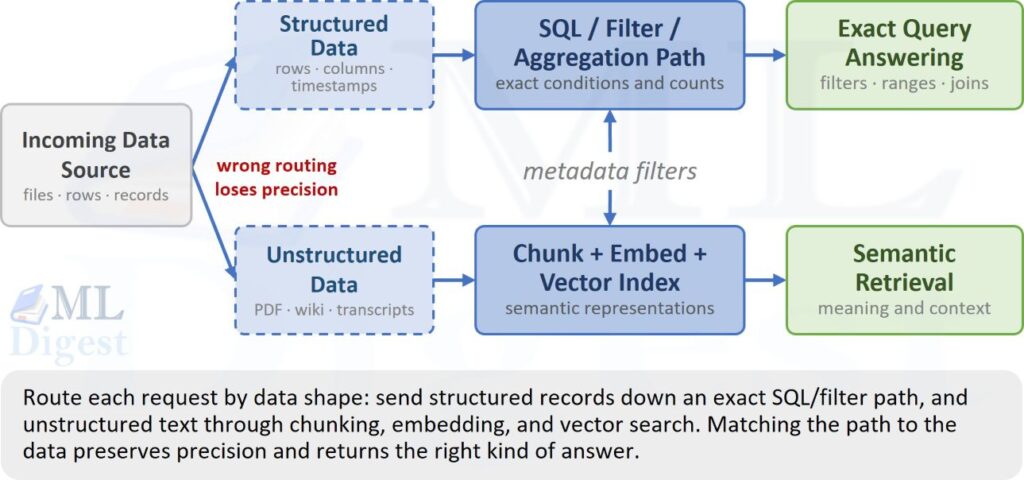
Good ingestion design routes structured data toward exact querying and unstructured data toward semantic retrieval, with metadata often bridging both.
How metadata bridges structured and unstructured data
Metadata is short, structured information about a document. It is not the main document itself. A useful analogy is a library book: the pages contain the full story, while the label on the spine and the catalogue record say its title, author, subject, language, and publication date. The story is unstructured text. The catalogue fields are structured metadata.
Consider a company policy document. Its text might say, “Enterprise customers may request a refund within 30 days when a service outage prevents normal use.” That sentence is the part a RAG system needs when someone asks, “When can a customer receive a refund?” Alongside the text, the system can store simple labels such as:
| Metadata field | Example value | What it helps with |
|---|---|---|
product | cloud-storage | Limits the search to the right product |
customer_tier | enterprise | Excludes policies for other customer types |
region | EU | Finds the policy that applies in a specific location |
updated_at | 2026-06-15 | Prefers the current policy over an old one |
permissions | support-team | Prevents people without access from seeing it |
When a support agent asks, “What is the refund policy for an enterprise cloud-storage customer in Europe?”, the system can use metadata and text together in two simple steps:
- Use the labels to narrow the pile. Keep only documents for
cloud-storage,enterprise, andEUthat the support agent is allowed to read. This is an exact check, similar to filtering a spreadsheet column. - Read the remaining documents by meaning. Search their text for the passage that best answers the question. This is semantic search: it can match “refund after an outage” even if the question uses different wording from the document.
In other words, metadata answers “Which documents are allowed and relevant to this situation?” The document text answers “What do those documents actually say?” Metadata does not replace the text, and the text should not be expected to perform exact checks such as access control, dates, or regions.
This distinction also prevents a common mistake. If the question is “How many enterprise customers were refunded in Europe last month?”, the answer should come from the billing database, which can count rows exactly. If the question is “Why can an enterprise customer receive a refund?”, the answer belongs in policy text, which semantic search can find and summarize. Metadata helps the RAG system select the right policy, while the database remains responsible for precise calculations.
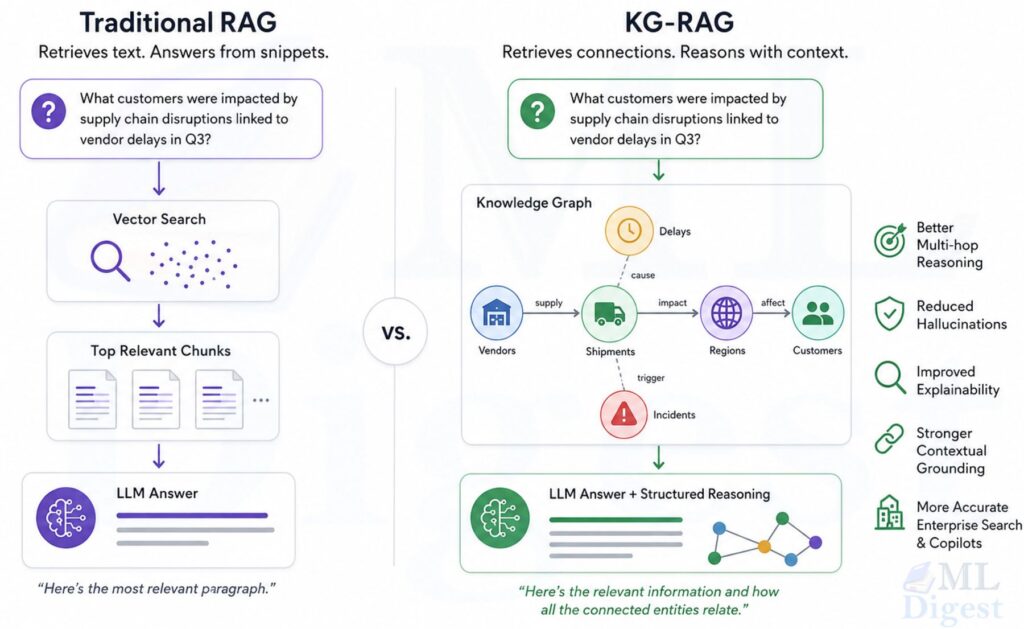
For this reason, each chunk created from a document should retain the metadata needed to filter it, especially its source, date, product, and permissions. When relationships between entities matter as much as the wording of a passage, a knowledge-graph-based RAG design can complement this metadata-and-text approach. The safe order is always: first exclude documents the user must not see, then search the permitted documents for the best explanation. This is the practical bridge between structured labels and unstructured writing.
9. Practical Tips and Best Practices
With loaders, normalization, cleaning, metadata, and OCR fallback each defined, the pipeline that ties them together is intentionally simple: run every source through its loader, normalize and clean the result, deduplicate across the whole batch, and hand off a list of Document objects ready for chunking.
The output of this function is the input to chunking: a clean, deduplicated, metadata-rich set of Document objects, each one traceable back to exactly where it came from.
A short checklist that tends to save the most debugging time later:
- Treat every connector as a place where silent data loss can happen; log how many documents and how much text each loader produced, and alert on sudden drops.
- Always keep a pointer back to the original source (file path, URL, database row id) in metadata, even after cleaning discards the raw text; you will need it for citations and re-ingestion.
- Prefer incremental ingestion (using
updated_ator a change feed) over full re-ingestion once a knowledge base grows past a small size; it is faster and reduces the chance of accidentally overwriting metadata like permissions. - Version your ingestion pipeline itself. A change to a PDF parser or an OCR confidence threshold can silently change what the retriever finds, so treat ingestion code changes with the same care as a model change.
- Do not skip encoding normalization; a document indexed with the wrong encoding can look correct visually while being unsearchable by exact keyword.
- Build a small “golden” ingestion test set (one PDF with tables, one scanned page, one multi-language document, one API record) and re-run it whenever a loader changes, the same way you would run an evaluation set after changing a retriever. For end-to-end checks, compare the results with the practices in evaluating RAG systems and use a practical RAG workflow debugging process when a regression appears.
Summary
Ingestion is the quiet first mile of every RAG system: pulling documents from PDFs, Word files, websites, databases, and APIs, normalizing and cleaning the text, attaching metadata that makes retrieval precise and auditable, running OCR where needed, and deciding thoughtfully whether a given piece of data belongs in a vector index or a structured store. None of this is glamorous work, but a retriever can never be better than the documents it was given, and a generator can never cite a source that was never labeled correctly in the first place.
Once documents are ingested into the common contract described in Section 2, the natural next step is chunking, splitting these clean documents into retrievable passages while preserving the structure and metadata captured here. If you are building a RAG system end to end, it is also worth revisiting when to use RAG and when prompting or fine-tuning is better before investing heavily in an ingestion pipeline, since the effort only pays off when retrieval is actually the right tool for the problem.

Silpa brings 5 years of experience in working on diverse ML projects, specializing in designing end-to-end ML systems tailored for real-time applications. Her background in statistics (Bachelor of Technology) provides a strong foundation for her work in the field. Silpa is also the driving force behind the development of the content you find on this site.

Happy is a seasoned ML professional with over 15 years of experience. His expertise spans various domains, including Computer Vision, Natural Language Processing (NLP), and Time Series analysis. He holds a PhD in Machine Learning from IIT Kharagpur and has furthered his research with postdoctoral experience at INRIA-Sophia Antipolis, France. Happy has a proven track record of delivering impactful ML solutions to clients. Check more about him here: https://sites.google.com/site/slhappyin/
Subscribe to our newsletter!