Ollaya is an open-source runtime for local decision models. It runs models locally and turns text or JSON into choices, scores, and probabilities, helping applications act on structured answers instead of parsing generated prose. For example, given “I was charged twice and need a refund,” it can help route the ticket to billing and estimate whether the customer is asking for a refund. This guide shows how to run a model and use its answers in an application.
1. What Is Ollaya, and Why Use It?
When an application already knows the possible answers, a decision model can rank them without generating prose. A generative model remains useful for open-ended writing and explanations. For a fuller comparison and an introduction to Choice, Noul, and Score, see our guide to Jev’s typed decisions. This guide focuses on running a compatible open model locally with Ollaya.
Ollaya is the runtime, not the model. It downloads and runs open model families, including Laya, NLI, GLiClass, and decider, behind a local HTTP API and a command-line interface. The open-source repository calls it “Ollama for decision models,” but Ollaya is independent of Ollama: it does not implement Ollama’s text-generation endpoints. Ollaya’s TypeSafe-compatible API accepts Jev-style requests and returns compatible answer shapes, but its open models can produce different predictions.
Local inference can serve ticket triage, intent classification, routing, and screening proposed agent actions. Once the model files are downloaded, inference does not need a hosted model call. This can reduce network round trips and keep request data on the host, fitting well into a broader ML model deployment framework that balances edge execution against cloud APIs. It does not eliminate the need to evaluate accuracy, protect the host, or review each model’s license.
2. How a Typed Decision Works
Ollaya accepts a state, such as a message or JSON object, and a dictionary of questions. Each question has a type:
| Type | What you ask | What comes back |
|---|---|---|
choice | “Which team should handle this?” with at least two labeled options | Selected label, probabilities for the options, and confidence |
score | “How urgent is this?” with ordered level descriptions | Probability-weighted level index, level probabilities, legend, and confidence |
noul | “Is the customer asking for a refund?” | Probability between 0 and 1 assigned to the statement being true |
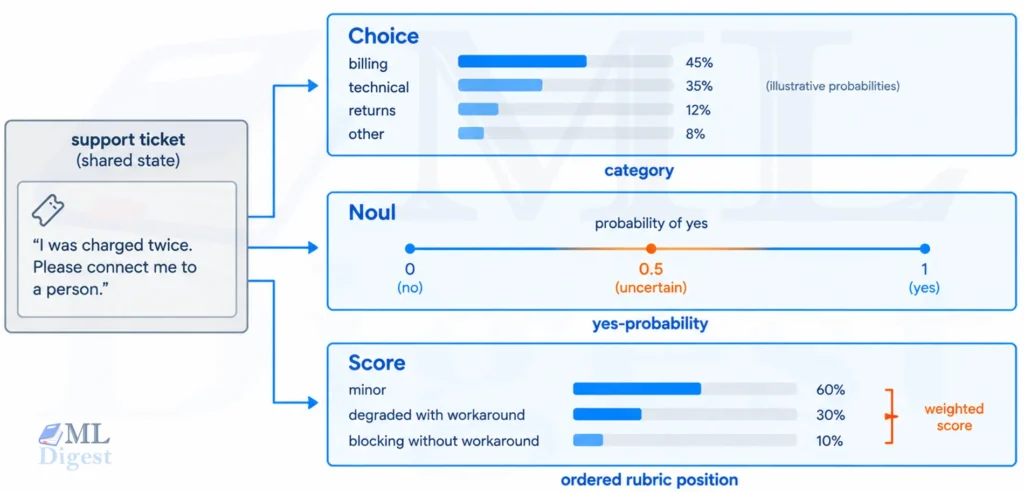
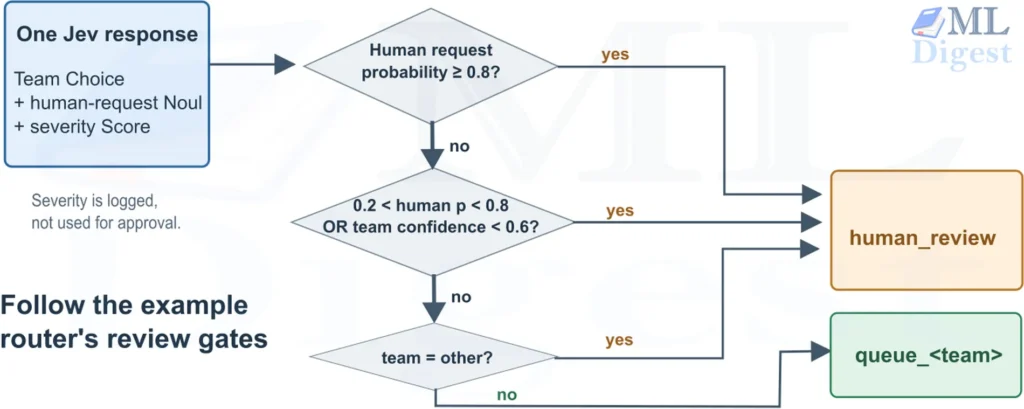
A request can ask several questions about the same state; inference cost still depends on the model, input length, and question set. The Ollaya API contract defines the exact question and response formats. The Jev guide covers how to interpret the selected Choice label, the expected Score level, and the Noul probability. In Ollaya’s TypeSafe-compatible response, confidence for Choice and Score is a normalized top probability, not measured accuracy; Noul has no separate confidence field. Principles of model calibration (such as evaluating Expected Calibration Error) are critical here: calibrate any routing threshold against labeled validation data rather than treating raw score or confidence as automatic approval.
3. Host a Typed Decision Model Locally using Ollaya: Step by Step
The commands below follow Ollaya’s quickstart and CLI reference. Start with laya:en for English support messages. Pulling the laya language router also pulls both its English and multilingual targets; pinning laya:en avoids the extra download for an English-only first test. Check the model catalog linked above before choosing another family or hardware profile.
3.1 Install the runtime
On Windows x64, open PowerShell and run the project’s installer:
irm https://ollaya.dev/install.ps1 | iex
ollaya -vIf the command is not recognized immediately, restart PowerShell or restart your session to refresh your session’s PATH environment variable.
On Linux (x86-64 or arm64 with glibc 2.38 or newer) or macOS on Apple silicon, use:
curl -fsSL https://ollaya.dev/install.sh | sh
ollaya -vThese commands execute downloaded installer scripts. For a managed environment, inspect the script or download an appropriate binary from the project’s releases and verify its checksum first. The project also offers a desktop app. CPU inference is available; NVIDIA acceleration depends on a compatible build, GPU, and driver (the project documents R580 or newer for its current CUDA installer). Check RAM and disk space before pulling large models.
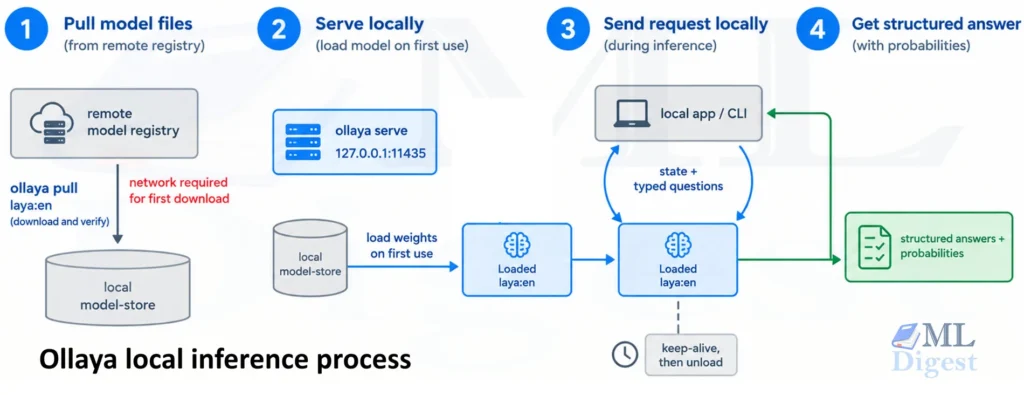
3.2 Start the local server and download a model
Run the daemon in one terminal:
ollaya serveIt listens on 127.0.0.1:11435 by default. Keep this terminal running, and open another terminal for the next commands:
ollaya pull laya:en    // Download the English decision model
ollaya ps              // Show the loaded model and its status
ollaya list            // Show all downloaded models
ollaya run laya:en --preset triage "I was charged twice. Please refund the second charge."
ollaya ps // Show the model is still loaded and ready for more requestsThe triage preset supplies example questions, so the first run does not need a custom schema. The exact labels and probabilities vary with input, model, hardware precision, and version. Running ollaya run without a prestarted server also starts a local server automatically and pulls a missing model; starting serve explicitly simply makes the hosting step visible. On Linux, an installer-managed systemd service may already be running, in which case you do not need a second foreground server.
3.3 Confirm that your application can reach it
With the server still running, a PowerShell check is:
Invoke-RestMethod http://127.0.0.1:11435/api/version
Invoke-RestMethod http://127.0.0.1:11435/api/tagsFor a containerized CPU-only deployment, the repository’s Docker image is an alternative. Bind the published port to loopback so that the unauthenticated default server is not exposed to your network:
docker run -d --name ollaya -p 127.0.0.1:11435:11435 -v ollaya-models:/home/ollaya/.ollaya ghcr.io/ollaya-dev/ollayaThen run docker exec ollaya ollaya pull laya:en, or send a pull request to its API. The image stores models at /home/ollaya/.ollaya/models as a non-root user, and the named volume preserves downloads across container recreation. Confirm the mount against the current container documentation before relying on persistence.
4. Use the Local Model in a Python Workflow
Here is a runnable Python example using only the standard library. It sends one support message with two questions to the native /api/decide endpoint, then uses the returned billing probability to decide whether to auto-route or ask for human review. Start the server and pull laya:en first, as shown above.
import json
from urllib.error import HTTPError, URLError
from urllib.request import Request, urlopen

payload = {
    "model": "laya:en",
    "state": "I was charged twice. Please refund the second charge.",
    "questions": {
        "team": {
            "type": "choice",
            "instructions": "Which team should handle this ticket?",
            "criteria": {
                "billing": "Payments, invoices and refunds",
                "technical": "Bugs, errors and outages",
                "account": "Login and account settings",
            },
        },
        "refund_requested": {
            "type": "noul",
            "instructions": "The customer asks for a refund.",
        },
    },
    "keep_alive": "10m",
}

request = Request(
    "http://127.0.0.1:11435/api/decide",
    data=json.dumps(payload).encode("utf-8"),
    headers={"Content-Type": "application/json"},
    method="POST",
)

try:
    with urlopen(request, timeout=60) as response:
        result = json.load(response)
except HTTPError as error:
    print(f"Ollaya rejected the request ({error.code}): {error.read().decode()}")
    raise
except URLError as error:
    print(f"Cannot connect to Ollaya: {error.reason}")
    raise

team = result["answers"]["team"]
refund_probability = result["answers"]["refund_requested"]["noul"]
billing_probability = team["probabilities"]["billing"]

# Demonstration threshold, not a production-calibrated policy.
if team["choice"] == "billing" and billing_probability >= 0.90:
    action = "Route to billing"
else:
    action = "Send to human triage"

print(f"Answering model: {result['model']}")
print(f"Billing probability: {billing_probability:.2f}")
print(f"Refund-request probability: {refund_probability:.2f}")
print(action)This example deliberately fails closed on HTTP errors rather than silently treating a failed model call as approval. In a production service, record the model name and version, monitor error codes, set a deadline appropriate for cold starts, and evaluate the routing threshold on labeled tickets before automating it. Native responses also include routing, state_truncated, and timing fields; check state_truncated before trusting a decision if requests may be long. As with any AI system evaluation, test difficult and ambiguous cases, not only the easy examples.
5. Connect Existing Clients and Agents
If your application already uses the TypeSafe integration, its Python SDK can point to Ollaya’s /v1/systemone API. In PowerShell, set the relevant variables for the current session:
$env:TYPESAFE_BASE_URL = "http://127.0.0.1:11435"
$env:TYPESAFE_API_KEY = "local"
$env:TYPESAFE_DEFAULT_MODEL = "laya:en"
$env:NO_PROXY = "localhost,127.0.0.1"The SDK requires a nonempty API key even though Ollaya does not require authentication on loopback by default. If you configure the server’s OLLAYA_API_KEY, set the SDK key to the same secret. The default SDK model may otherwise be jev-latest, which is not a locally installed Ollaya model. /v1/decisions is an alias for /v1/systemone, and /v1/models lists locally installed models, not the entire catalog. Model behavior, context lengths, and quality still differ from a hosted Jev model, so API compatibility is not a substitute for migration tests.
For agent workflows, Ollaya integrates natively with the Model Context Protocol (MCP) and provides pre-packaged agent skills (detailed in Ollaya’s agent documentation). Clients can launch ollaya mcp over stdio or run streamable HTTP via ollaya mcp --http, calling its decide tool to screen proposed actions or classify requests. For example, a coding agent can use the built-in agent preset to inspect a proposed shell command alongside the user request, determine whether it is destructive or off-task, and route high-risk or uncertain actions to human approval. This mirrors the reflection and self-critique pattern common in robust agent workflows. The decision model should inform a policy, not become the sole security boundary; a classifier can be mistaken. For more on safely governing agent behavior, see when not to use an AI agent and LLM guardrails.
6. Practical Limits and Best Practices
- Choose a model for the job. Start with
laya:enfor English decisions, thelayarouter for mixed languages, or compare alternatives such asnliandgliclasson your own labeled data. Model families may have different trade-offs in speed, context, and option count. - Check model-specific limits. The API allows
choice,score, andnoul, but a model’s context and option budget may be much smaller than the API’s maximum. For example, the documentedlaya:encontext is 512 tokens, including the questions. The TypeSafe-compatible endpoint returnsSTATE_TRUNCATEDrather than quietly deciding from incomplete input; the native endpoint reportsstate_truncated. - Evaluate locally before automating. Track precision, recall, and classification metrics alongside calibration for each use case and model before choosing an automated cutoff threshold. The Jev evaluation checklist covers the general workflow; apply it again when switching to an Ollaya-served model.
- Budget for cold starts.
ollaya psreveals loaded models. The default keep-alive is five minutes, so the first request after unloading may wait for weights to load. Preload frequently used models or setkeep_alivethoughtfully when latency matters. - Secure the API. The server binds to loopback and has no authentication by default. Do not expose port 11435 publicly. For remote clients, set
OLLAYA_API_KEY, restrict network access, and use a TLS-terminating reverse proxy. Keep model downloads and licenses in your deployment review. - Measure before replacing a hosted service. Local latency claims depend on device, precision, question count, and input length. A hosted-versus-local comparison also includes network time. Check your own task accuracy, throughput, and total cost instead of assuming every decision model is faster or better than an LLM.
Summary
Ollaya makes it straightforward to download, host, and call open decision models locally. Define typed questions, inspect the returned probabilities, and let explicit application rules determine whether to route, escalate, or ask a person. Start by running laya:en with the triage preset, then adapt the Python example to a small labeled sample from your own workflow before automating any consequential decision.

Silpa brings 5 years of experience in working on diverse ML projects, specializing in designing end-to-end ML systems tailored for real-time applications. Her background in statistics (Bachelor of Technology) provides a strong foundation for her work in the field. Silpa is also the driving force behind the development of the content you find on this site.

Happy is a seasoned ML professional with over 15 years of experience. His expertise spans various domains, including Computer Vision, Natural Language Processing (NLP), and Time Series analysis. He holds a PhD in Machine Learning from IIT Kharagpur and has furthered his research with postdoctoral experience at INRIA-Sophia Antipolis, France. Happy has a proven track record of delivering impactful ML solutions to clients. Check more about him here: https://sites.google.com/site/slhappyin/
Subscribe to our newsletter!