AI browser automation is attractive because much business work still happens behind web interfaces: reading dashboards, researching vendors, testing a product, or moving information between systems. Yet the question is rarely, “Can an agent click this button?” The important question is, “How much judgement should the model control, and how much should ordinary application code control?” Browser Use and Stagehand answer that question from opposite ends of the control spectrum.
Browser Use begins with an agent that can plan and iterate toward a goal. Stagehand begins with developer-owned browser code and adds AI only where interpretation is useful.
Neither tool is universally better. The right choice depends on whether the workflow is exploratory or predetermined, read-only or state-changing, Python- or TypeScript-centered, and tolerant or intolerant of model-driven decisions. This article compares their design, implementation approach, cost and reliability trade-offs, then recommends a practical choice for common requirements.
1. The Short Answer
Choose Browser Use when the browser task is naturally expressed as a bounded goal and benefits from an agent repeatedly observing the page, choosing the next action, and adapting to what it finds. It is especially effective for exploratory research, multi-page data collection, and short-lived workflows where writing every step up front would be more work than the task itself.
Choose Stagehand when the application already owns the workflow and needs AI as a selective capability, not as the overall decision-maker. It is especially effective for durable product flows, browser testing, and actions that must pass deterministic validation before execution. Its combination of ordinary page APIs with observe(), act(), and extract() lets a team reserve model inference for ambiguous parts of a page.
For either tool, prefer a documented API over browser automation whenever the API reliably exposes the operation. A browser agent is often the best fallback for a human-only interface, not the first choice for a stable machine interface. See when not to use an AI agent for the broader decision framework.
2. Two Different Starting Points
The simplest way to compare the tools is to imagine two colleagues asked to “find the current enterprise plan price, compare it with a competitor, and draft a recommendation.”
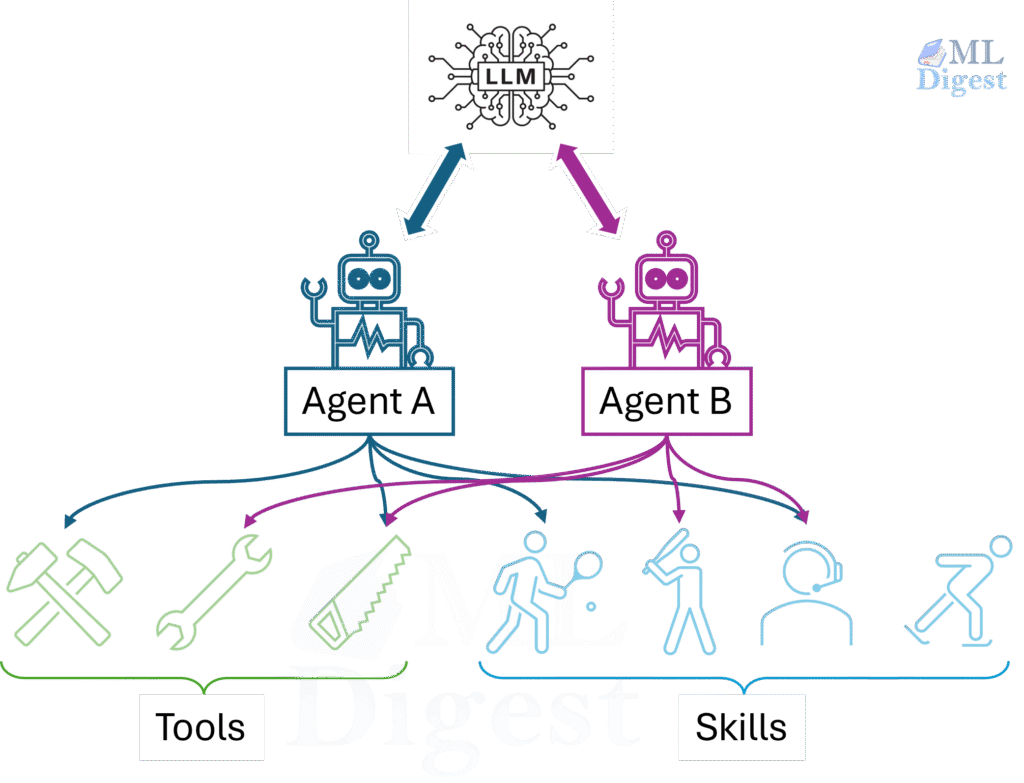
The Browser Use colleague receives the goal and a browser. They can decide which tabs to open, which page sections matter, when to search again, and when they have enough evidence to answer. The process is an agent loop.
The Stagehand colleague receives a checklist written by an application. The checklist navigates to known pages with regular browser code. At one ambiguous step, it asks the colleague, “Which control opens the enterprise pricing section?” The application examines the proposed action before it permits a click. The process is application-controlled automation with AI-assisted steps.
This distinction is more useful than a feature-count comparison because it determines where uncertainty lives in the system.
| Design question | Browser Use | Stagehand |
|---|---|---|
| Primary abstraction | An LLM-driven Agent that pursues a natural-language task | A browser SDK with deterministic APIs and optional AI primitives |
| Who selects the next step? | The agent, based on the current observation and task history | Application code, except for a bounded AI request |
| Typical unit of work | A complete, bounded browser task | A navigation, extraction, or interaction within a larger workflow |
| Best language fit | Python | TypeScript, Python, or Go |
| Best way to add control | Limit browser privileges, tools, steps, output schema, and policy | Use locators first, then observe() and application-side validation |
| Natural strength | Exploration and multi-step adaptation | Predictable product workflows and selective AI assistance |
The tools can also coexist. An orchestration service might use Browser Use for an analyst-style research subtask, then feed validated results into a deterministic Stagehand workflow that updates a low-privilege internal interface. This is only sensible when the handoff has a strict schema and explicit policy boundary. Do not combine two agentic layers merely because both are available.
For a longer-running workflow, make that handoff a checkpointed agent workflow with explicit state and retries, rather than an implicit chain of model calls that is difficult to resume or audit.
3. The Core Technical Difference: Who Owns the Feedback Loop?
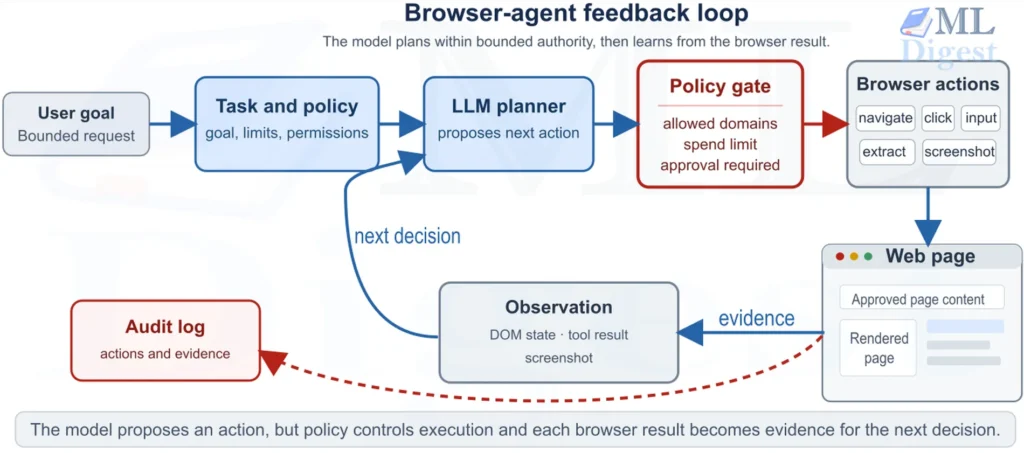
Both tools work with the same browser feedback loop: observe the current page, perform an action, inspect the resulting page, and continue or stop. They differ in which part of the system normally chooses the next action.
With Browser Use, the Agent owns the loop for a bounded task. The application supplies the goal, model, browser, tools, and limits, then the agent decides which permitted browser action to attempt next. With Stagehand, application code owns the loop. It can use deterministic navigation and locators, invoke observe(), act(), or extract() only for an uncertain step, and make the next workflow decision itself.
The practical trade-off is autonomy versus explicit orchestration. Browser Use reduces the code needed to explore a variable route. Stagehand reduces the surface area on which the model can make decisions in an otherwise known workflow.
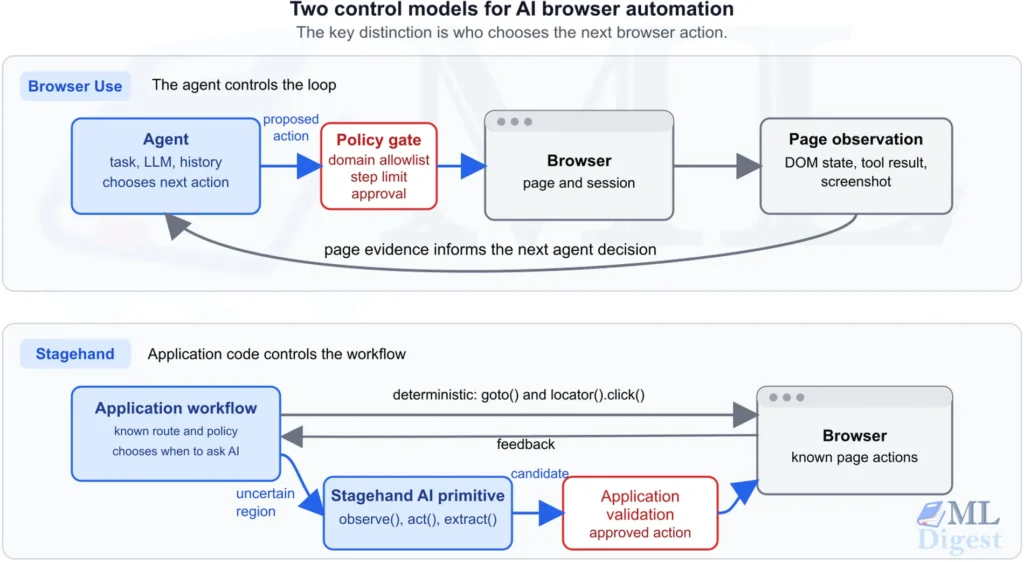
This does not make Browser Use unsafe or Stagehand automatically safe. Both need external policy and verification for consequential operations. The difference is the default engineering posture: Browser Use optimizes for assigning a goal, whereas Stagehand optimizes for selectively delegating interpretation.
4. How Their APIs Shape an Implementation
4.1 Browser Use: Describe the Goal, Then Bound the Agent
Browser Use centers its Python API on an Agent configured with a task, LLM, browser session, optional tools, output schema, and limits. Calling Agent.run() asks that agent to navigate the task autonomously within those bounds. This is concise when the route is unknown, but the task, permitted tools, and stopping criteria become an important part of the implementation.
Choose this interface when the application primarily wants to assign a goal and consume a result. The Browser Use guide covers its configuration, output models, sessions, custom tools, and security controls.
4.2 Stagehand: Use Code for Certainty, AI for Ambiguity
Stagehand is an SDK with deterministic page operations plus AI primitives such as observe(), act(), and extract(). Its APIs support TypeScript, Python, and Go, and fit naturally beside Playwright-style browser code. A developer can keep navigation and stable locators in code, then use an AI primitive to interpret a changed label or extract a semantically defined region.
Choose this interface when the application already owns the process and needs to add a small amount of adaptive browser behavior. The Stagehand guide covers setup, typed extraction, observed actions, sensitive variables, caching, and reliability testing.
4.3 The Decisive Stagehand Pattern: Observe, Validate, Then Act
Stagehand’s distinctive control pattern is observe(), application validation, then act() with the approved action. It avoids asking the model to rediscover a target and lets the application decide whether the candidate is acceptable before execution.
Browser Use can enforce equivalent constraints with its tools and external policy layer, but that boundary is not its primary interaction pattern. When a workflow needs explicit code review of an individual UI action before it happens, Stagehand presents the more direct abstraction.
5. A Capability Comparison That Matters in Practice
| Requirement | Browser Use | Stagehand | Practical implication |
|---|---|---|---|
| Multi-page research with an unclear route | Strong default, the agent can plan and adapt | Possible, but the application must sequence the calls | Start with Browser Use for bounded research tasks |
| Browser test for a known product flow | Possible, but often more autonomy than needed | Strong default, use ordinary locators with AI fallback | Start with Stagehand |
| Data extraction from a changing page | Strong with an agent and Pydantic output model | Strong with extract() and Zod, Pydantic, or Go schemas | Choose by workflow ownership and language |
| Deterministic clicks and form filling | Supported, but not its primary advantage | Strong default through page APIs | Prefer Stagehand for predominantly known UI |
| One uncertain element in an otherwise stable flow | Can solve it, but requires an agent turn | Strong default with observe() or act() | Stagehand has the narrower, cheaper abstraction |
| Autonomous task completion | Core design strength | Requires an external agent or orchestrator | Prefer Browser Use if a task-level agent is desired |
| TypeScript-first application | Cloud SDK available, but the open-source library is Python-first | First-class option | Prefer Stagehand for a direct multi-language browser SDK |
| Python-first agent application | First-class option | Supported, but less central to its public examples | Prefer Browser Use unless selective control dominates |
| Managed remote browser execution | Hosted Browser Use services or a CDP-connected browser | Browserbase-managed browser, or a local browser launched or connected by the SDK | Compare deployment, data-residency, and pricing requirements separately |
| High-impact external action | Requires strong external policy gates around the agent | Easier to place an explicit approval gate before act() | Neither should act without deterministic authorization |
Feature parity is not the goal. A reliable system often uses the simplest abstraction that still handles its uncertainty. If an exact locator is stable, neither tool should spend a model call finding it. If no stable locator exists and semantics matter, ask an AI primitive or an agent to interpret the page. If a direct API exists, bypass the browser entirely.
6. Recommendations by Task and Requirement
6.1 Use Browser Use for Exploratory, Read-Only Research
Pick Browser Use when the goal is clear but the route is not. It is a strong fit for bounded research, collecting cited facts from several public sites, exploring a changing dashboard, or finding an answer across a support portal. In each case, the useful next page or query depends on what the agent encounters.
It is a poor default for a long, irreversible business process. As the number of model-directed decisions grows, the need for checkpoints, verification, and a recovery path grows with it. For implementation guidance, see the Browser Use guide.
6.2 Use Stagehand for Product Workflows and AI-Resilient Tests
Pick Stagehand when the workflow is mainly known and application code must remain the primary source of control. It is well suited to resilient regression tests, an internal portal with an occasionally renamed control, extraction from a known region, or a browser feature in a TypeScript service that already uses Playwright-like patterns.
The value is selective adaptation: deterministic code handles the stable path, and an AI primitive handles a semantic target that may drift. See the Stagehand guide for the implementation patterns.
6.3 Use Either Tool for Structured Extraction, but Choose the Boundary Carefully
Both tools can convert a web page into typed data. Browser Use validates a final agent result with Pydantic. Stagehand validates extract() data against Zod in TypeScript, Pydantic in Python, or JSON Schema derived from a Go type parameter. The key distinction is the scope of reasoning:
- Use Browser Use when the agent must find the relevant page or reconcile evidence across several pages before it can extract data.
- Use Stagehand when code already knows the page and can narrow the model’s view to a specific table, card, or content region.
The Stagehand option often uses less model context and fewer model calls, which can lower cost and reduce ambiguity. That advantage disappears if the application has to recreate an exploratory route manually.
6.4 Do Not Delegate High-Impact Actions to Either Tool Without a Policy Layer
For payments, purchases, publishing, deletion, legal commitments, security changes, or sensitive-data transfer, neither tool is an authorization layer. Because Browser Use is designed to choose more of the trajectory, external constraints normally need to cover a broader range of possible browser actions. Stagehand makes an explicit action-approval boundary easier to express, but still needs one. Apply deterministic authorization, verification, and approval around either choice. See prompt injection and guardrails for LLMs for the underlying threat model.
7. Reliability, Cost, and Observability
The right test cases differ because the tools fail in different places. Browser Use can take an unhelpful route or expend its step budget before it reaches the target. Stagehand is more likely to expose an application-level branching, locator, or approval-boundary mistake. Test both against realistic page variation and compare verified outcomes rather than demo completion.
| Scenario | Browser Use expectation | Stagehand expectation |
|---|---|---|
| Target label changes | Re-plan within the allowed task and step budget, or stop clearly | observe() or self-healing finds an approved semantic target, or stops clearly |
| Required data is missing | Return a schema or validation failure, never invent a value | Return a schema or business-validation failure |
| Session expires | Stop and request a controlled reauthentication path | Surface the login state to the application, never improvise credentials |
| Page contains malicious instruction text | Ignore it as untrusted page data and remain within policy | Do not let it bypass application validation or the action allowlist |
| Submit timeout occurs | Check the resulting state before retrying | Verify receipt or state before any retry |
7.1 Cost Follows the Control Model
Browser Use usually has higher and less predictable model usage because it plans across the entire task and may revisit pages or change route. That expense is justified when it replaces extensive custom branching for a genuinely variable journey. It is wasteful when the route is already known.
Stagehand lets an application avoid inference for known interactions, so its model cost is more directly tied to the few ambiguous steps. This can make cost and latency easier to budget, although selector scope, screenshots, caching, and the selected model still affect the result. Measure actual latency, model usage, cache behavior, and verified task success for either tool.
7.2 Observability Should Match the Control Model
Browser Use execution history is most useful for understanding the agent’s route, observations, and decisions. Stagehand’s call metadata and instance-level metrics() are most useful for identifying a slow or unsuccessful AI-assisted operation within a developer-owned workflow. In both cases, export the relevant browser and policy events to OpenTelemetry and retain artifacts with the privacy controls described in protecting privacy in AI systems.
8. A Practical Selection Checklist
Answer these questions in order:
- Can a stable API perform the work? If yes, use the API.
- Is the browser route fixed and mostly known? If yes, start with deterministic automation. Add Stagehand for the few places where semantic interpretation is necessary.
- Is the goal clear but the route variable? If yes, a bounded Browser Use agent is likely the fastest useful abstraction.
- Does the workflow modify external state? If yes, implement policy enforcement, idempotency, verification, and approval outside the model before selecting either tool.
- Does the application need TypeScript or Go? If yes, Stagehand has a direct SDK advantage.
- Does the team already operate Python agent workflows? If yes, Browser Use will often integrate more naturally for task-level automation.
- Can the work be narrowed to a known page region? If yes, Stagehand extraction with a locator can reduce ambiguity and inference cost.
- Can a human accept occasional review? If not, reduce autonomy, use deterministic paths, and make the workflow stop on ambiguity.
Summary
Browser Use and Stagehand solve the same broad problem, but they make different parts of the system responsible for judgement. Browser Use is the better default for a bounded, goal-oriented browser task where the route must be discovered dynamically. Stagehand is the better default for an application-controlled workflow where deterministic browser code should handle known steps and AI should handle only ambiguity.
Choose by the uncertainty that remains after ordinary automation is considered: use Browser Use when the journey must be discovered, and Stagehand when the journey is known but a few page-level decisions require interpretation. Consult the dedicated Browser Use guide, Stagehand guide, and their official documentation for implementation details and API changes.

Silpa brings 5 years of experience in working on diverse ML projects, specializing in designing end-to-end ML systems tailored for real-time applications. Her background in statistics (Bachelor of Technology) provides a strong foundation for her work in the field. Silpa is also the driving force behind the development of the content you find on this site.
Subscribe to our newsletter!