Passing structured data to a Large Language Model (LLM) often feels like paying postage charge on bubble wrap. When you serialize a database query, an API response, or a transaction log into standard JSON, every single record repeats the exact same field names, quotation marks, curly braces, and colons. Across hundreds of rows, this structural scaffolding consumes thousands of context tokens, inflates inference costs, and adds visual noise that models must parse.
Token-Oriented Object Notation (TOON) addresses this overhead with a compact translation layer for the JSON data model. It combines YAML-style indentation for nested objects with CSV-style tabular layouts for uniform arrays, adding structural checks through declared lengths ([N]) and field headers ({fields}). Token savings depend on data shape, JSON formatting, and tokenizer; compact JSON can be smaller for irregular or deeply nested data. This guide covers the v4.1 rules implemented by the Rust-backed toons library on PyPI and demonstrates Python integration patterns. “Lossless” here means preserving JSON-model values within the implementation’s numeric domain, not the original JSON whitespace, numeric spelling, or arbitrary Python types.
1. The Intuition: Why JSON Taxes Your Context Window
Imagine you are reading a roster of 500 employees out loud to a colleague over the phone. If you read that roster as JSON, your conversation sounds like this: “Open brace, quote name quote colon quote Alice quote, comma, quote role quote colon quote admin quote, close brace. Next item: open brace, quote name quote colon quote Bob quote, comma, quote role quote colon quote user quote, close brace.” By the tenth employee, both you and your colleague are exhausted from repeating the column names.
A human naturally solves this by stating the schema once at the beginning: “I am going to read 500 employee records. Each record has two fields: name and role. First: Alice, admin. Second: Bob, user.”
When we build Retrieval-Augmented Generation (RAG) systems or AI agents that consume tool outputs via the Model Context Protocol (MCP), we routinely stuff JSON payloads into prompts. While JSON is an exceptional wire format for machine-to-machine communication, subword tokenizers such as Byte-Pair Encoding (BPE) and SentencePiece must allocate discrete tokens for repeated keys, quotes, and brackets. Every redundant token increases your KV cache footprint and your API bill.
TOON: Declare Structure Once, Stream Data Compactly
TOON is not a replacement for JSON in your database or REST APIs. Instead, I like to think of it as a specialized lens at the boundary between your application code and the LLM. You keep JSON or native Python dictionaries inside your application, encode them into TOON right before constructing the prompt, and decode any TOON output back into native Python structures.
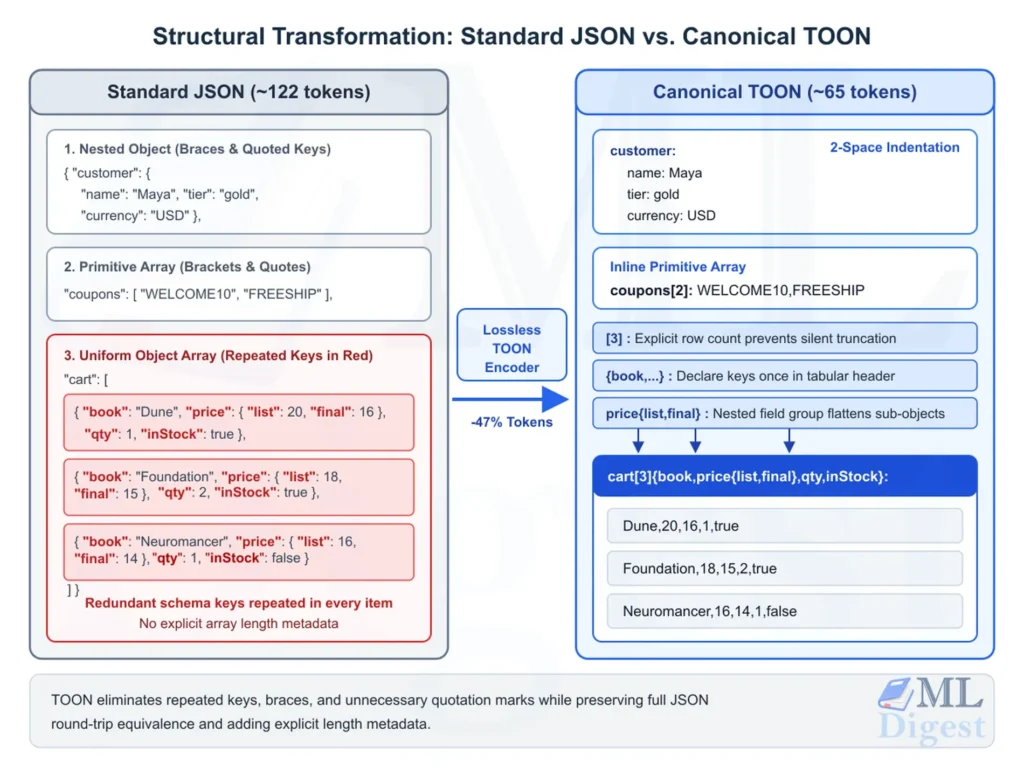
Consider an online bookstore checkout payload containing customer details, applied promo codes, and a three-item shopping cart. In formatted JSON, the field names repeat across cart items:
{
  "customer": {
    "name": "Maya",
    "tier": "gold",
    "currency": "USD"
  },
  "coupons": [
    "WELCOME10",
    "FREESHIP"
  ],
  "cart": [
    {
      "book": "Dune",
      "price": { "list": 20, "final": 16 },
      "qty": 1,
      "inStock": true
    },
    {
      "book": "Foundation",
      "price": { "list": 18, "final": 15 },
      "qty": 2,
      "inStock": true
    },
    {
      "book": "Neuromancer",
      "price": { "list": 16, "final": 14 },
      "qty": 1,
      "inStock": false
    }
  ]
}Encoding the same JSON-model values as TOON removes those repeated keys. The exact token count and percentage saving must be measured with the target model’s tokenizer:
customer:
  name: Maya
  tier: gold
  currency: USD
coupons[2]: WELCOME10,FREESHIP
cart[3]{book,price{list,final},qty,inStock}:
  Dune,20,16,1,true
  Foundation,18,15,2,true
Neuromancer,16,14,1,falseNotice how TOON adapts its syntax automatically based on the shape of each field:
- Nested Objects (
customer): Uses clean 2-space indentation without curly braces or unnecessary quotes. - Primitive Arrays (
coupons[2]): Collapses primitive values onto a single inline row while explicitly declaring the element count[2]. - Uniform Object Arrays (
cart[3]{...}): Declares the row count[3]and the column schema{book,price{list,final},qty,inStock}once in the header, folding the nestedpriceobject into a nested field group so that each item row remains completely flat.
2. Anatomy of the TOON Format (Specification v4.1)
The TOON Format Overview and the normative TOON v4.1 Specification define a deterministic mapping from the JSON data model (primitives, objects, and arrays) to UTF-8 text using the .toon file extension and the provisional text/toon HTTP media type.
For arrays and eligible maps, a conforming serializer selects one of four forms from the value’s shape and position. Ordinary objects still use indented fields, and empty arrays use key: [] or root [] rather than a length header.
| Form | Target Data Shape | Canonical Syntax Pattern | Example |
|---|---|---|---|
| Inline | Arrays of primitives (strings, numbers, booleans, null) | key[N]: v1,v2,...,vN | tags[3]: admin,ops,dev |
| Tabular | Arrays of uniform objects (identical keys, primitive or nested-uniform values) | key[N]{f1,f2}: followed by indented value rows | items[2]{sku,qty}: |
| Keyed Tabular | Objects with $\ge 2$ entries whose values are uniform objects | key[N:]{f1,f2}: followed by entryKey: v1,v2 rows | users[2:]{age,city}: |
| List | Mixed or non-uniform arrays, or arrays of arrays | key[N]: followed by - prefixed items | items[2]: with - rows |
Let us examine how these forms preserve JSON-model structure and values within the implementation’s supported numeric domain.
2.1 Tabular Arrays and Nested Field Groups
An array of objects qualifies for the tabular form when every element in the array is a non-empty object sharing the exact same set of keys, and every column holds either primitive values or uniform nested sub-objects. Even if two dictionaries in Python have their keys inserted in different orders, the encoder normalizes them to follow the field order declared in the header.
In TOON v4, tabular arrays gained nested field groups. Previously, if an array of orders contained a nested customer object ({"name": "Ada", "country": "DK"}), the nested object either forced a fallback to list form or required path-flattening options. In v4.1, uniform sub-objects fold directly into the header syntax as parent{child1,child2}, and the row cells are emitted via a depth-first traversal of the header tree:
orders[2]{id,customer{name,country},total}:
  1,Ada,DK,99
2,Bob,UK,149During decoding, the parser walks the header tree id -> customer.name -> customer.country -> total and reconstructs the nested dictionary {"id": 1, "customer": {"name": "Ada", "country": "DK"}, "total": 99} automatically.
2.2 Keyed Tabular Objects
Many real-world payloads store records in a dictionary keyed by an identifier (such as user IDs, server hostnames, or feature flag names) rather than a list. When an object contains at least two entries and all entry values are uniform objects, TOON v4.1 collapses the map into the keyed tabular form:
servers[2:]{host,port,tls}:
  alpha: 10.0.0.1,8080,true
beta: 10.0.0.2,9090,trueNotice the colon inside the brackets ([2:]). That single character distinguishes a keyed tabular object ([N:]) from a standard tabular array ([N]). Each indented line begins with entryKey: followed by the comma-separated leaf values. If the root object of the entire document qualifies for keyed tabular form, the leading key name is omitted ([2:]{host,port,tls}:).
2.3 Delimiter Scoping and Header Syntax
Every array header in TOON follows a strict grammar:
key[N<delimiter?>]<{fields}>:While comma (,) is the default delimiter, TOON supports two alternative delimiters that are declared directly inside the bracket and field header:
- Pipe delimiter (
|): Declared asitems[2|]{sku|name|price}:. This is ideal when your string values frequently contain commas (such as addresses or descriptions), because strings only need to be quoted if they contain the active delimiter. - Tab delimiter (
\t): Declared with a literal tab character inside the brackets and between field names. Tabs are single ASCII bytes (U+0009) that rarely appear in natural text and often merge cleanly in LLM tokenizers, yielding an extra 5% to 10% token reduction on text-heavy tables.
2.4 Quoting Rules, Type Preservation, and Comments
A common pitfall in naive prompt compression is stripping quotation marks so aggressively that types change. For example, unquoted true decodes as a boolean and unquoted 42 as a number, not as the strings "true" and "42". Under TOON v4.1, a leading-zero token such as 01234 decodes as a string, but encoders must still quote it because it is numeric-looking.
TOON solves this with a minimal, unambiguous quoting rule set. A string is written unquoted (even if it contains internal spaces or Unicode emoji like Hello 世界 👋) unless any of the following conditions hold:
- It is empty (
"") or has leading or trailing whitespace. - It matches a reserved literal (
true,false,null) or looks like a number ("42","-3.14","1e-6","05","+1"). - It starts with
"-"(which looks like a list item) or"#"(which looks like a comment). - It contains structural punctuation (
:,",\,[,],{,}), control characters (U+0000toU+001F), or the currently active delimiter.
In addition, TOON v4.1 supports full-line # comments. During decoding, a lexical pre-pass strips every line whose first non-space character is # before evaluating indentation or row counts. Because encoders never emit comments and always quote strings that begin with #, you can freely add human or prompt annotations inside a TOON block, and the decoder will strip them cleanly without breaking tabular row counts.
3. Empirical Benchmarks: Token Efficiency and Retrieval Accuracy
Saving tokens is only useful if the LLM can still understand the data accurately, so evaluating LLM performance should consider answer quality alongside token use. A natural question I asked when first evaluating TOON was: “Since LLMs are pre-trained heavily on JSON, does switching to TOON hurt their comprehension?”
According to the official TOON Benchmarks, which evaluate 244 data retrieval questions across four frontier and efficient models (claude-haiku-4-5-20251001, gemini-3.6-flash, gpt-5.4-nano, and grok-4.5, totaling 5,856 LLM evaluations using the o200k_base tokenizer), TOON actually achieves slightly higher average retrieval accuracy than formatted JSON while cutting token consumption by 42.6%.
| Format | Retrieval Accuracy | Total Tokens | Token Change vs. JSON | Efficiency Score (Acc% / 1K Tokens) |
|---|---|---|---|---|
| TOON | 72.2% ($\pm 2.8\%$) | 2,474 | $-42.6\%$ | 29.2 |
| JSON (compact) | $69.0\%$ ($\pm 2.9\%$) | 2,892 | $-32.9\%$ | 23.8 |
| YAML | $70.1\%$ ($\pm 2.9\%$) | 3,487 | $-19.1\%$ | 20.1 |
| JSON (formatted) | $71.4\%$ ($\pm 2.8\%$) | 4,308 | $0.0\%$ (baseline) | 16.6 |
| XML | $70.7\%$ ($\pm 2.9\%$) | 4,909 | $+13.9\%$ | 14.4 |
Why does TOON match or outperform JSON in retrieval accuracy while using 42.6% fewer tokens (and outperform minified JSON by 3.2 percentage points)? There are two structural reasons:
- Explicit Length Declarations (
[N]): Headers expose the declared record count and make count mismatches detectable. They do not prove that the declared count or the records are correct. - Shorter Contexts: Removing repeated keys can reduce the token distance between values. This may help some tasks, but the benchmark does not isolate a causal change in transformer attention mechanisms.
The TOON Efficiency Formalization, based on a byte-efficiency analysis, explains why declaring field names once can save bytes as rows, columns, and key lengths increase. This is a simplified byte-level model, not a proof of token savings: tokenization is not proportional to byte length. Deep indentation and inner-array list headers can favor compact JSON. The project’s empirical examples illustrate these trade-offs:
- Selected 100%-Tabular Datasets (Employee records, contacts with nested address groups, keyed feature flags): TOON reduces tokens by 54.6% to 66.5% compared to formatted JSON, and by 32.8% to 42.9% compared to compact JSON. These ranges describe those three datasets, not every tabular dataset. Across the separate flat-only track, TOON has 5.9% more tokens than CSV in aggregate; individual datasets vary.
- 33% to 50% Tabular Eligibility (E-commerce orders with mixed nesting, semi-uniform event logs): TOON saves 15.0% to 32.9% compared to formatted JSON, but uses 5.6% to 19.9% more tokens than minified JSON (
json.dumps(data, separators=(",", ":"))). - 0% Tabular Eligibility (Deeply nested configuration trees): TOON saves 34.9% against formatted JSON, but uses 6.7% more tokens than minified JSON due to multi-level indentation spaces.
When evaluating a RAG system, compare JSON and TOON using the same retrieved records, questions, and model settings to distinguish serialization effects from retrieval changes.
4. Hands-On Python Implementation with toons
To work with TOON in Python, we use toons, a community parser and serializer written in Rust with PyO3 bindings. The examples target version 0.9.0 and require Python 3.10 or later; see the API reference.
Install the package in your Python environment:
pip install toons==0.9.04.1 Basic Serialization, Deserialization, and Byte Comparison
Let us start by serializing a realistic context payload containing user metadata, primitive tags, a tabular list of transactions with a nested merchant group, and a keyed tabular dictionary of environment flags.
import json
import toons
from datetime import date

# Verify the installed library and supported TOON specification version
print(f"toons version: {toons.__version__}, TOON spec: {toons.__toon_spec__}")
# Output: toons version: 0.9.0, TOON spec: 4.1

context_payload = {
    "account": {
        "user_id": 4821,
        "name": "Ada Lovelace",
        "tier": "enterprise",
        "as_of": date(2026, 11, 12),
    },
    "roles": ["admin", "billing", "auditor"],
    "quotas": {
        "production": {"rpm": 5000, "burst": 1000, "enforced": True},
        "staging": {"rpm": 500, "burst": 100, "enforced": False},
    },
    "transactions": [
        {
            "tx_id": "tx_101",
            "merchant": {"name": "CloudCompute", "Region": "eu-central"},
            "amount": 249.50,
            "settled": True,
        },
        {
            "tx_id": "tx_102",
            "merchant": {"name": "VectorDB Inc", "Region": "us-east"},
            "amount": 89.00,
            "settled": True,
        },
        {
            "tx_id": "tx_103",
            "merchant": {"name": "ModelHub API", "Region": "eu-west"},
            "amount": 412.75,
            "settled": False,
        },
    ],
}

# 1. Serialize Python dict to canonical TOON
toon_output = toons.dumps(context_payload)
print("=== TOON Output ===")
print(toon_output)

# 2. Compare UTF-8 byte lengths (not token counts)
# Note: default=str handles the datetime.date object in standard json.dumps
json_pretty = json.dumps(context_payload, indent=2, default=str)
json_compact = json.dumps(context_payload, separators=(",", ":"), default=str)

print("\n=== Byte Length Comparison ===")
pretty_bytes = len(json_pretty.encode("utf-8"))
compact_bytes = len(json_compact.encode("utf-8"))
toon_bytes = len(toon_output.encode("utf-8"))
print(f"JSON (pretty):  {pretty_bytes} bytes")
print(f"JSON (compact): {compact_bytes} bytes")
print(f"TOON (v4.1):    {toon_bytes} bytes")
print(f"Savings vs pretty JSON:  {(1 - toon_bytes / pretty_bytes) * 100:.1f}%")
print(f"Savings vs compact JSON: {(1 - toon_bytes / compact_bytes) * 100:.1f}%")

# 3. Round-trip decoding back to Python dict
# Note: datetime.date encodes to an ISO 8601 string and decodes back as a str
decoded_payload = toons.loads(toon_output)
assert decoded_payload["transactions"][0]["merchant"]["name"] == "CloudCompute"
assert decoded_payload["quotas"]["production"]["rpm"] == 5000Running the script produces the following TOON representation:
account:
  user_id: 4821
  name: Ada Lovelace
  tier: enterprise
  as_of: 2026-11-12
roles[3]: admin,billing,auditor
quotas[2:]{rpm,burst,enforced}:
  production: 5000,1000,true
  staging: 500,100,false
transactions[3]{tx_id,merchant{name,Region},amount,settled}:
  tx_101,CloudCompute,eu-central,249.5,true
  tx_102,VectorDB Inc,us-east,89,true
tx_103,ModelHub API,eu-west,412.75,falseLook closely at what toons.dumps() did automatically:
accountbecame an indented object, anddate(2026, 11, 12)was serialized via.isoformat()as2026-11-12.rolesbecame an inline arrayroles[3]: admin,billing,auditor.quotaswas recognized as an object of two uniform sub-objects and collapsed into the keyed tabular headerquotas[2:]{rpm,burst,enforced}:.transactionsbecame a tabular arraytransactions[3]{tx_id,merchant{name,Region},amount,settled}:withmerchantfolded into a nested field group.
4.2 Custom Delimiters, File I/O, and Direct JSON Conversion
When your dataset contains strings with commas (for example, log messages or street addresses), using the default comma delimiter forces the encoder to quote those strings. Switching to pipe ("|") or tab ("\t") can avoid that quoting if no other quoting rule applies. Whether it saves tokens depends on the payload and tokenizer.
import io
import toons

log_records = {
    "logs": [
        {"id": 1, "service": "auth,sso", "msg": "Login succeeded, token issued"},
        {"id": 2, "service": "db,primary", "msg": "Query timeout, retrying"},
    ]
}

# With default comma delimiter, values containing commas must be quoted:
print("=== Comma Delimiter (Default) ===")
print(toons.dumps(log_records, delimiter=","))
# logs[2]{id,service,msg}:
#   1,"auth,sso","Login succeeded, token issued"
#   2,"db,primary","Query timeout, retrying"

# With pipe delimiter, commas inside values remain unquoted:
print("\n=== Pipe Delimiter ===")
pipe_toon = toons.dumps(log_records, delimiter="|")
print(pipe_toon)
# logs[2|]{id|service|msg}:
#   1|auth,sso|Login succeeded, token issued
#   2|db,primary|Query timeout, retrying

# File-like object I/O with dump() and load()
buffer = io.StringIO()
toons.dump(log_records, buffer, delimiter="\t")
buffer.seek(0)
restored = toons.load(buffer)
assert restored == log_records

# Direct conversion from a TOON string to formatted JSON for downstream tools
json_str = toons.to_json(pipe_toon, indent=2)
print("\n=== Converted to JSON via toons.to_json() ===")
print(json_str)
# {
#   "logs": [
#     {
#       "id": 1,
#       "service": "auth,sso",
#       "msg": "Login succeeded, token issued"
#     },
#     {
#       "id": 2,
#       "service": "db,primary",
#       "msg": "Query timeout, retrying"
#     }
#   ]
# }4.3 Type Nuances and Edge Cases in toons
When integrating toons into data pipelines, keep these documented type behaviors in mind:
- Numeric Canonicalization: TOON writes numbers in plain decimal notation without scientific exponents (
2.5e-4encodes as0.00025, and1.5e10encodes as15000000000). Arbitrary-precision Python integers survive round-tripping intact. Non-finite floats (float("nan"),float("inf"),float("-inf")) have no representation in the JSON/TOON data model and encode asnull(None). - String Type Preservation: If a Python string looks like a number (such as a leading-zero zip code
"01234"or"42") or a boolean ("true"),toons.dumps()quotes it ("01234"). On decode,"01234"returns as the Pythonstr'01234', whereas an unquoted12345returns as theint12345. - Unsupported Types and Cycles: Just like standard
json, passing a Pythonset, custom class instance, or non-string dictionary key raisesTypeError. Passing a dictionary containing a circular reference or nesting deeper than 1,000 containers raisesValueError.
5. Prompting LLMs and Validating Outputs with TOON
Using TOON in LLM pipelines can help with controlling the output of LLMs and reducing LLM operational costs. A short format hint and a small example are a useful starting point, but familiarity with YAML or CSV does not guarantee correct TOON generation. Evaluate prompt quality with the specific model and data shape you intend to use.
Keep the format hint and output-header instructions in versioned prompt templates so serialization and prompt changes can be tested together.
5.1 Best Practices for Input and Output Prompts
- Show, Do Not Describe (Input Prompts): Wrap your TOON payload in a fenced code block labeled
```toon(or```yaml) and include a single-sentence hint: “Data is in TOON format (2-space indent, arrays show length and fields).” - Anchor the Header Schema (Output Prompts): When asking an LLM to output TOON, provide the exact target header pattern (for example,
results[N]{id,category,confidence}:) and instruct the model to replace[N]with the actual number of emitted rows. - Validate with Strict Mode (
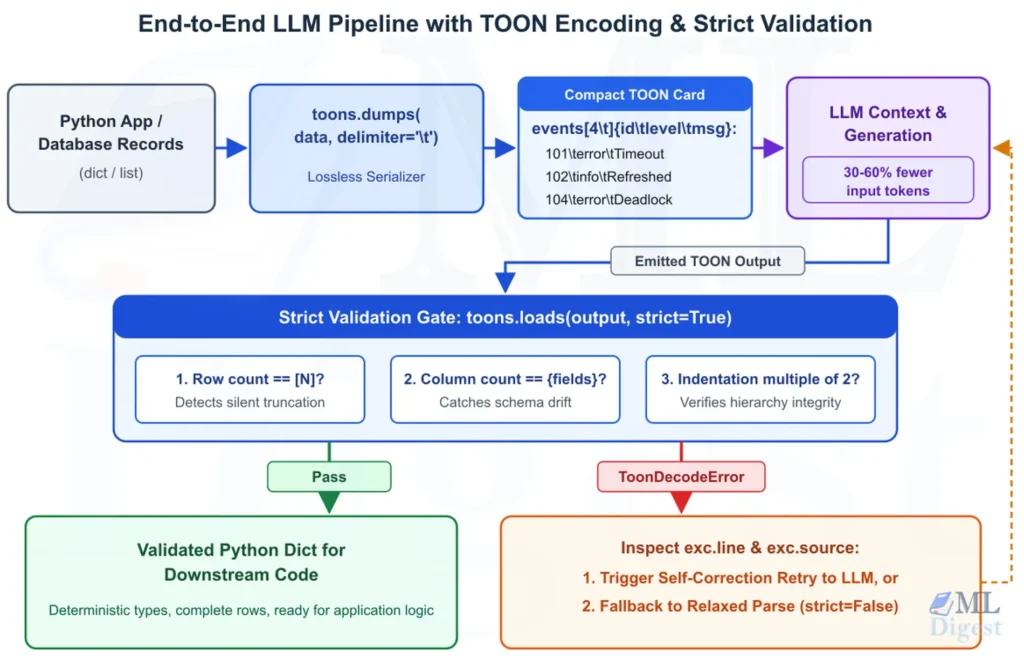
strict=True): This is where TOON shines as one of your structural guardrails for LLMs. If a model response is truncated mid-stream due tomax_tokensor if the model hallucinates an extra column in row 4,toons.loads(response, strict=True)immediately raises aToonDecodeErrorwith the exact 1-based.linenumber and.sourcetext.
5.2 Building a Self-Validating LLM Extraction Pipeline in Python
Let us write a complete, runnable Python module that prepares a TOON prompt from raw system events, parses an LLM’s filtered TOON response, demonstrates how strict=True catches truncation or count mismatches, and shows when to use strict=False for lenient recovery.
import re
import toons
from typing import Any


def build_filtering_prompt(events: list[dict[str, Any]]) -> str:
    """Encode input records as TOON and construct a concise LLM prompt."""
    toon_context = toons.dumps({"events": events})
    return (
        "System logs are provided in TOON format (2-space indent, arrays declare "
        "length [N] and fields {f1,f2,...}).\n\n"
        f"```toon\n{toon_context}\n```\n\n"
        "Task: Filter and return ONLY events with level 'error'. "
        "Use the exact header format `errors[N]{id,level,service,message}:` "
        "where [N] matches the number of returned rows. Output only a ```toon code block."
    )


def extract_toon_block(llm_response: str) -> str:
    """Extract the inner text from a fenced ```toon or ``` code block."""
    match = re.search(r"```(?:toon|yaml)?\s*\n(.*?)\n```", llm_response, re.DOTALL)
    return match.group(1).strip() if match else llm_response.strip()


def parse_and_validate_llm_toon(
    llm_response: str, allow_relaxed_fallback: bool = False
) -> dict[str, Any]:
    """
    Validate LLM-generated TOON using strict mode first.
    Raises ToonDecodeError with line diagnostics if truncated or malformed.
    """
    raw_toon = extract_toon_block(llm_response)
    try:
        # strict=True (default) verifies that row counts match [N],
        # column counts match {fields}, and indentation is a multiple of 2.
        return toons.loads(raw_toon, strict=True)
    except toons.ToonDecodeError as exc:
        print(f"[Strict Validation Failed] Line {exc.line}: {exc}")
        print(f"  Offending source line: {exc.source!r}")
        if allow_relaxed_fallback:
            print("  Attempting relaxed recovery with strict=False...")
            return toons.loads(raw_toon, strict=False)
        raise


if __name__ == "__main__":
    # 1. Prepare input prompt
    sample_events = [
        {"id": 101, "level": "error", "service": "payment", "message": "Gateway timeout"},
        {"id": 102, "level": "info", "service": "auth", "message": "Token refreshed"},
        {"id": 103, "level": "warn", "service": "search", "message": "High latency 450ms"},
        {"id": 104, "level": "error", "service": "database", "message": "Deadlock detected"},
    ]
    prompt = build_filtering_prompt(sample_events)
    print("=== Generated Prompt ===")
    print(prompt)

    # 2. Case A: Well-formed LLM response (includes a helpful # comment line)
    valid_llm_output = """```toon
                      # Filtered error events
                      errors[2]{id,level,service,message}:
                        101,error,payment,Gateway timeout
                        104,error,database,Deadlock detected
                      ```"""
    parsed_valid = parse_and_validate_llm_toon(valid_llm_output)
    print("\n=== Case A: Validated Output ===")
    print(parsed_valid)

    # 3. Case B: Truncated or miscounted LLM response (declared [3] but only emitted 2 rows)
    truncated_llm_output = """```toon
                      errors[3]{id,level,service,message}:
                        101,error,payment,Gateway timeout

                        104,error,database,Deadlock detected
                      ```"""
    print("\n=== Case B: Detecting Truncation / Blank Lines ===")
    try:
        parse_and_validate_llm_toon(truncated_llm_output, allow_relaxed_fallback=False)
    except toons.ToonDecodeError:
        # Now demonstrate how strict=False recovers when leniency is desired
        recovered = parse_and_validate_llm_toon(
            truncated_llm_output, allow_relaxed_fallback=True
        )
print("Recovered data:", recovered)Notice how strict=True acts as a built-in checksum for LLM outputs. In standard JSON, if an LLM intends to output 10 records, gets distracted, and closes the array ] after 8 records, json.loads() succeeds silently and you never know two records were dropped. In TOON, because the model writes errors[10]{...}: at the start of generation, emitting only 8 rows triggers a ToonDecodeError on decode, allowing your application to catch the discrepancy or request a retry.
Summary
TOON reduces repeated keys in uniform records while preserving JSON-model values within implementation limits. Measure savings against compact JSON with your target tokenizer. Python’s toons offers familiar serialization APIs; strict parsing catches structural inconsistencies, not all truncation, missing records, or application-schema errors.

Silpa brings 5 years of experience in working on diverse ML projects, specializing in designing end-to-end ML systems tailored for real-time applications. Her background in statistics (Bachelor of Technology) provides a strong foundation for her work in the field. Silpa is also the driving force behind the development of the content you find on this site.

Happy is a seasoned ML professional with over 15 years of experience. His expertise spans various domains, including Computer Vision, Natural Language Processing (NLP), and Time Series analysis. He holds a PhD in Machine Learning from IIT Kharagpur and has furthered his research with postdoctoral experience at INRIA-Sophia Antipolis, France. Happy has a proven track record of delivering impactful ML solutions to clients. Check more about him here: https://sites.google.com/site/slhappyin/
Subscribe to our newsletter!