A browser UI is a moving target. A button label changes, a modal appears, or a CSS selector is refactored, and a sensible automation stops working. Stagehand addresses this awkward middle ground: it lets you use AI where a page is ambiguous, while retaining ordinary, deterministic browser code where you already know what must happen. In practice, that makes it a useful SDK for teams that need browser automation to be adaptable without turning every workflow into an opaque autonomous agent.
This Python-focused article targets the Stagehand Python SDK v3. It explains the asynchronous session API: session.navigate(), session.act(), session.observe(), session.extract(), and session.execute(). It deliberately focuses on SDK and implementation patterns rather than repeating the broader agent-loop and governance discussion in the companion Browser Use guide.
1. What Stagehand Is, and Where It Fits
Stagehand is an open-source browser-automation framework from Browserbase. It supports TypeScript, Python, and Go. In Python, its central design idea is simple: an LLM should help only where browser automation needs interpretation, while regular code should continue to handle the portions that are already deterministic.
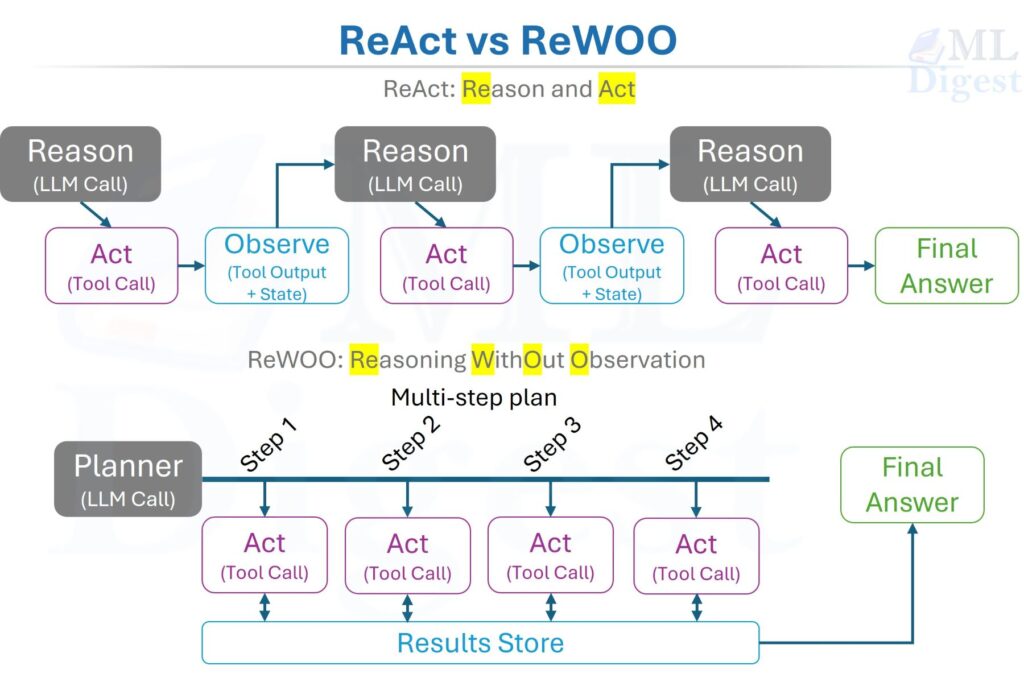
Traditional browser frameworks such as Playwright are excellent when you know the page structure. A selector such as button[data-testid="checkout"] is fast, inspectable, and does not require an LLM. Its weakness is brittleness when the target application changes that structure. At the other extreme, a free-running browser agent can reason about a changing page, but its decisions can be expensive and hard to constrain.
Stagehand is designed to let you choose the point between those extremes on every step:
| Need | Prefer | Why |
|---|---|---|
| A known URL | await session.navigate(url="...") | Direct navigation without an inference request |
| A control whose location or wording may drift | await session.act(input="...") | A natural-language action can re-locate the intended control |
| A page must be understood before any action | await session.observe(instruction="...") | It returns candidate actions for application code to inspect |
| Page data must enter another system | await session.extract(instruction="...", schema=...) | It returns a result that can be validated against a caller-provided schema |
| A bounded, multi-step browser task needs planning | await session.execute(execute_options=..., agent_config=...) | Stagehand can run an agent workflow; application code still owns the business policy |
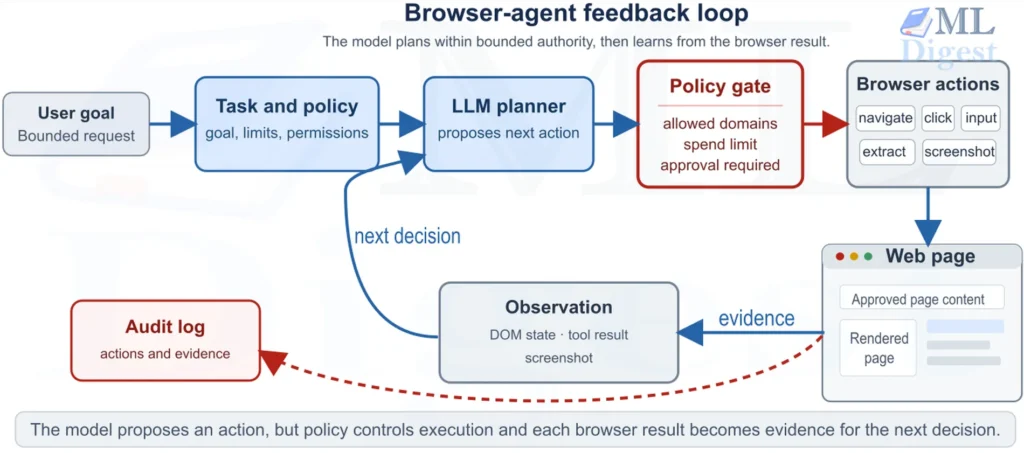
The final row matters. Stagehand can be part of an agent harness, but it does not remove the need for workflow state, authorization, human approval, or retry policy. Treat its agent capability as a browser component, rather than as a replacement for those system boundaries.
This boundary is also useful when deciding when not to use an AI agent: if a stable selector and deterministic code solve the task, adding model inference creates cost and another failure mode without a compensating benefit.
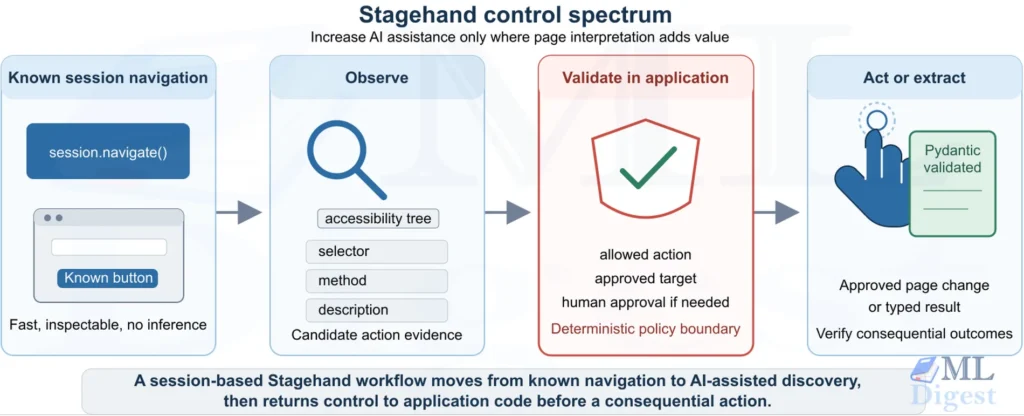
2. The Four Layers of Control
Stagehand v3 provides synchronous Stagehand and asynchronous AsyncStagehand clients. This article uses AsyncStagehand: create one client, start a browser session with await client.sessions.start(...), and use the bound session object for browser operations. End the session with await session.end(); the async client context manager closes the HTTP client and, in local mode, shuts down the embedded server.
Use session.navigate() when the destination URL is already known. This keeps navigation deterministic and outside the model loop:
await session.navigate(url="https://example.com/settings")This is the baseline. It is easy to test, explain in a code review, and retry under a clearly defined policy. For a known DOM-level interaction, Stagehand v3 can target a connected Playwright page by passing page=page to a session operation; use Playwright itself for deterministic locator work.
2.2 observe(): Discover Before Committing
session.observe() asks Stagehand to find candidate, actionable page elements. It returns structured action data in observed.data.result. Your application can filter those candidates against its own rules before accepting one.
observed = await session.observe(
    instruction="find the primary button that continues to the account-review step",
)
candidates = observed.data.resultAn observed action is useful evidence, not permission. For a low-risk button, code might require action.method == "click" and an expected description. For a high-impact operation, it should also require a server-side approval or an explicit policy decision.
2.3 act(): Perform an Intentional Instruction
session.act() accepts a natural-language instruction or an action dictionary created from session.observe(), then returns information about the action or actions performed:
# Inference finds a suitable target on the current page.
await session.act(input="open the filters panel")

# This sends the observed action payload back to Stagehand.
await session.act(input=candidates[0].to_dict(exclude_none=True))The first form is adaptive. The second form sends the application-selected observed action rather than asking Stagehand to find a fresh target. Neither form proves that the target is semantically safe. Validate the action before sending it and verify consequential results afterward. Set self_heal=True when starting the session only after testing its behavior for the workflow.
2.4 extract(): Turn a Page into Typed Data
session.extract() accepts a JSON Schema and can also accept a Pydantic model class. The response value is held in response.data.result. When given a Pydantic model, the SDK attempts to validate the result and returns the model instance on success; explicitly validate the value before relying on it.
from pydantic import BaseModel, Field


class Price(BaseModel):
    annual_usd: float = Field(ge=0)


response = await session.extract(
    instruction="extract the displayed annual price in US dollars",
    schema=Price,
)
raw_price = response.data.result
price = raw_price if isinstance(raw_price, Price) else Price.model_validate(raw_price)Schema validation means the answer has the required shape. It does not establish that the page was trustworthy, that the extracted value was current, or that the model interpreted the correct offer. Treat a schema as a parsing contract, then add business checks for truth and relevance.
3. How the AI Primitives Work
A natural-language browser instruction requires Stagehand to interpret the relevant browser context before it can find an element or return structured data. Conceptually, an AI-assisted call has four stages:
- Scope the page context. Use
options={"selector": "..."}withobserve()orextract()to narrow the target region when appropriate. A session operation can also target a supplied connected Playwrightpageor aframe_id. - Interpret the instruction. A model relates the instruction, such as “find the checkout button,” to the scoped page information.
- Produce a structured result.
session.observe()produces candidate actions,session.act()performs a bounded action, andsession.extract()returns data underresponse.data.resultfor the application to validate against its schema. - Record application evidence. Store the browser or external session identifier where available, source URL, request outcome, and elapsed time with each consequential operation.
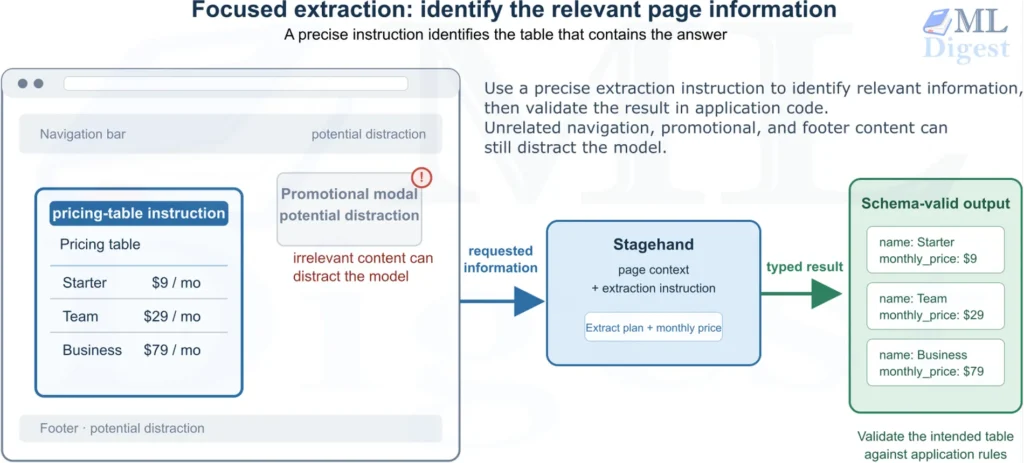
The value of scoping is practical. More irrelevant page content can increase token cost and give the model more plausible but wrong targets. Each AI call has a cost, so workflows become more expensive when they make more calls or give the model more page content to read.
Reducing the number of calls and keeping requests focused usually makes the workflow faster and cheaper. More importantly, it reduces the chances that the model will make an ambiguous interpretation.
3.1 Scope the Request Before You Ask
Navigate to the relevant page and state the intended region precisely. Extraction accepts a CSS selector through options. For example:
from pydantic import BaseModel, Field


class Plan(BaseModel):
    name: str = Field(min_length=1)
    monthly_price: str = Field(min_length=1)


class Pricing(BaseModel):
    plans: list[Plan]


response = await session.extract(
    instruction="From the pricing table, extract each plan name and its monthly price.",
    schema=Pricing,
    options={"selector": "table.pricing"},
)
raw_pricing = response.data.result
pricing = raw_pricing if isinstance(raw_pricing, Pricing) else Pricing.model_validate(raw_pricing)The instruction is a semantic constraint, while options={"selector": "..."} limits the extraction to a CSS-selected page region. Use a page-specific selector that identifies the intended region. If unrelated content could alter a high-value result, also validate it against an independent source or navigate to a simpler, purpose-built page.
3.2 Use Screenshots Only for Visual Facts
Use options={"screenshot": True} with session.extract() only when the needed information exists in pixels rather than page text, for example a sale badge or chart label. It includes a screenshot of the current viewport in the extraction call. Treat visual output as evidence that still needs application validation.
4. A Runnable Python Example
Install the Stagehand Python v3 SDK, Pydantic, and python-dotenv in a Python 3.9-or-newer environment. Local runs also require Chrome or Chromium to be installed:
uv pip install "stagehand>=3.23,<4" "pydantic>=2" python-dotenv
# Or: pip install "stagehand>=3.23,<4" "pydantic>=2" python-dotenvThe example uses Stagehand v3 local mode. AsyncStagehand(server="local", ...) starts the embedded local server, and session = await client.sessions.start(...) launches the local browser. The activity remains read-only and demonstrates navigation, extraction, action discovery, application validation, and execution of an approved action. Store a Google key in GOOGLE_API_KEY; the example uses google/gemini-3.5-flash-lite, in a local .env file that is excluded from version control.
import asyncio
import os

from dotenv import load_dotenv
from pydantic import BaseModel, Field, HttpUrl
from stagehand import AsyncStagehand

load_dotenv()


class Book(BaseModel):
    title: str = Field(min_length=1)
    price_gbp: str = Field(min_length=1)
    product_url: HttpUrl


class BookResults(BaseModel):
    books: list[Book] = Field(min_length=3, max_length=3)


async def main() -> None:
    google_api_key = os.environ.get("GOOGLE_API_KEY")
    if not google_api_key:
        raise RuntimeError("Set GOOGLE_API_KEY before running this local-browser example.")
    model_name = "google/gemini-3.5-flash-lite"

    async with AsyncStagehand(
        server="local",
        model_api_key=google_api_key,
        local_ready_timeout_s=30.0,
    ) as client:
        session = await client.sessions.start(
            model_name=model_name,
            browser={"type": "local", "launch_options": {"headless": True}},
        )
        try:
            await session.navigate(url="https://books.toscrape.com/")

            response = await session.extract(
                instruction=(
                    "Extract exactly the first three books. Return each title, displayed "
                    "price in GBP, and product URL."
                ),
                schema=BookResults,
            )
            raw_books = response.data.result
            books = (
                raw_books
                if isinstance(raw_books, BookResults)
                else BookResults.model_validate(raw_books)
            )
            for book in books.books:
                print(f"{book.title}: {book.price_gbp} ({book.product_url})")

            # Discover an action first. The program, not the model, decides whether
            # the candidate satisfies the low-risk policy for this read-only demo.
            observed = await session.observe(
                instruction="find the Next button in the pagination control",
            )
            next_action = next(
                (
                    action
                    for action in observed.data.result or []
                    if action.method == "click" and "next" in action.description.lower()
                ),
                None,
            )
            if next_action is None:
                raise RuntimeError("A safe pagination action was not found.")

            # Send the application-approved action object back to Stagehand.
            await session.act(input=next_action.to_dict(exclude_none=True))
            print("Advanced to the next catalogue page.")
        finally:
            await session.end()


if __name__ == "__main__":
asyncio.run(main())The description returned by session.observe() is not an application policy field and can vary. A real application should apply stronger validation than a substring match, for example an expected URL, page state, action method, allowed target region, and a server-side policy for anything that changes data. The code is intentionally a pattern demonstration, not an authorization system.
4.1 Local Server and Session Lifecycle
The v3 client starts the embedded server lazily when its first local request runs. Start the browser with await client.sessions.start(model_name=..., browser={"type": "local", ...}), then end it with await session.end(). Exiting the AsyncStagehand context closes its HTTP resources and shuts down the embedded local server. For a remote Browserbase session, omit server="local", configure both a Browserbase key and a model key on the client, and start the session with browser={"type": "browserbase"}.
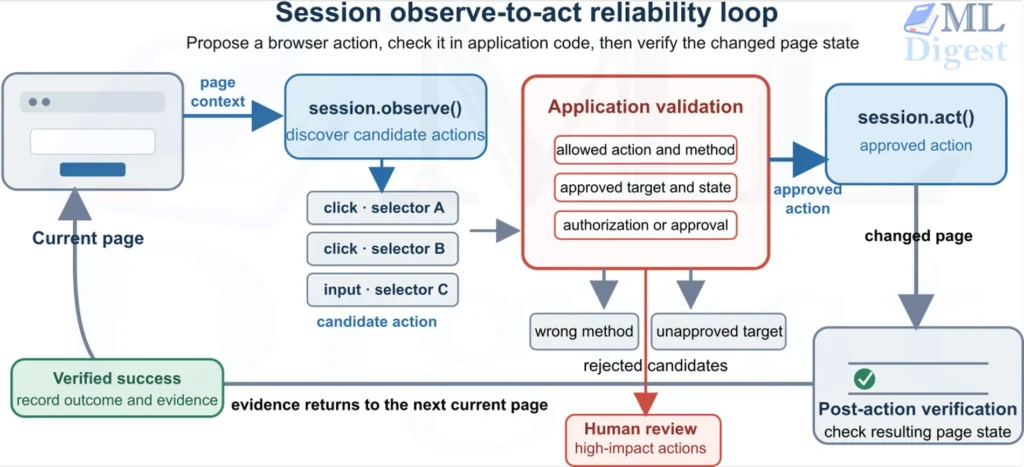
5. The Most Useful Pattern: Observe, Validate, Then Act
The session.observe() result bridges AI flexibility and deterministic execution. It lets code inspect what the model found before an action occurs. This is particularly valuable for login, checkout, deletion, and publishing workflows.
observed = await session.observe(
    instruction="find the button that submits the expense report",
)
submit = next(
    (
        action
        for action in observed.data.result or []
        if action.method == "click" and "submit" in action.description.lower()
    ),
    None,
)

if submit is None or not policy.allows(
    action=submit,
    user_id=user_id,
    report_id=report_id,
):
    raise PermissionError("Submission is not authorized.")

await session.act(input=submit.to_dict(exclude_none=True))Passing the serialized observed action to session.act() gives Stagehand the application-approved action object instead of a new natural-language request. That is useful for benign UI drift, but for an important action, re-check the target and verify the resulting business state. If self_heal=True is enabled when the session starts, include a policy for its behavior when a target is stale.
This observe-validate-act boundary is a browser-specific form of LLM guardrails: keep authorization decisions in application code, not in a model’s interpretation of a page.
6. Make Extraction Useful to Downstream Code
Extraction becomes robust when the schema and instruction express the business contract together. Start with the smallest useful shape and describe ambiguous fields precisely.
from pydantic import BaseModel, Field, HttpUrl


class Job(BaseModel):
    title: str = Field(min_length=1, description="The visible job title")
    location: str = Field(min_length=1, description="The stated work location")
    apply_url: HttpUrl = Field(description="The job's direct application URL")
    posted_date: str | None = Field(description="None when no date is shown")


response = await session.extract(
    instruction="Extract the job posting details. Do not infer a date if the page does not show one.",
    schema=Job,
)
raw_job = response.data.result
job = raw_job if isinstance(raw_job, Job) else Job.model_validate(raw_job)Useful follow-up checks are domain-specific:
- Check source identity. Require the expected hostname and record the source URL with the data.
- Check freshness. Reject or flag content whose visible date or retrieval time is too old for the use case.
- Check invariants. Validate currency, units, allowed categories, numeric ranges, and duplicates.
- Cross-check high-value fields. Compare a critical price, status, or identifier with an independent source or a version-compatible deterministic browser check.
- Keep raw evidence appropriately. Store an approved page snapshot, source URL, or screenshot reference when an operator must later review a decision. Redact personal and secret data.
The right level of validation depends on the cost of an error. Use model calibration and uncertainty-aware design when a model’s confidence is part of a downstream decision, but do not mistake a confident extraction for verified truth.
7. Reliability and Cost Engineering
7.1 Break Work into Small Steps
session.act() works best for one intentional transition at a time. Prefer:
await session.act(input="open the filters panel")
await session.act(input="choose four-star rating")
await session.act(input="apply the filters")over a compound instruction that blends navigation, selection, judgement, and submission. Small steps create useful checkpoints. They make failures local, simplify retries, and allow your code to inspect the page state between actions.
7.2 Cache Repeated, Non-Sensitive Work Carefully
Do not assume that act(), observe(), or extract() exposes a cache switch or cache metadata. The multi-step session.execute() operation accepts should_cache=True to ask the service to capture a cache entry. Test caching behavior, scope, and invalidation before using it in a production workflow.
Caching is appropriate only for a repeatedly visited, stable, public workflow. It is not a default for dynamic pages, credential-bearing calls, or workflows where stale behavior could matter. When session.execute() returns a cache_entry, record its opaque cache_key with the operation evidence.
7.3 Measure the Whole Browser Operation
Measure wall-clock time around each session operation in application code. For recorded session activity, call await client.sessions.replay(id=session.id) and inspect its page actions, durations, and any available token-usage fields. Combine those signals with action failures and task correctness.
Emit the same operation identifiers and timing data into OpenTelemetry traces where possible. Correlating browser steps with the request, policy, and downstream service spans makes a slow or incorrect outcome diagnosable across the whole workflow.
A useful dashboard separates:
- Outcome quality: percentage of outputs that pass both schema and business validation.
- Operational reliability: completion rate, action-error rate, retry count, and median time to a verified result.
- Model efficiency: measured inference duration, available provider usage data, cache-hit rate when supported, and cost per verified outcome.
- Safety behavior: blocked domain changes, denied actions, approval requests, and secret-handling violations.
This framing prevents a familiar trap: optimizing token cost while quietly degrading task success. The broader agentic-system evaluation discipline applies here, even when Stagehand is only the browser layer.
8. Testing a Stagehand Workflow
Do not evaluate a browser automation only on the page used during development. A credible test set includes pages and states that resemble production variation:
| Test case | What to verify |
|---|---|
| Copy or layout changes | An AI-assisted action still chooses the intended semantic target, or fails clearly |
| Missing target | The workflow stops with an actionable error instead of clicking a related control |
| Delayed content | Timeouts and retries stay bounded, then surface the failure |
| Stale authentication | The workflow requests reauthentication rather than improvising credentials |
| Untrusted page instruction | Application policy, not page text, controls what the automation can do |
| Changed target after observation | Using a stored observed action does not bypass a required approval or verification step |
| Schema-valid but wrong data | Business validation catches the wrong currency, domain, range, or record |
For state-changing steps, use a staging application or test account and assert the external result directly. A click call returning success proves that a browser operation completed, not that the intended business transaction is correct. Testing machine learning code provides complementary principles for separating unit, integration, and end-to-end tests.
Treat instructions found in browser content as untrusted input. A page can attempt to redirect the model’s task, so defend this browser workflow against prompt injection with scoped instructions, allowlisted actions, and approval checks that do not depend on page text.
9. Production Checklist
Before releasing a Stagehand workflow, confirm the following:
- Every AI-assisted step has a clearly defined purpose, input scope, timeout, and failure path.
- Known navigation uses
session.navigate()rather than an unnecessary model call. session.observe()results are validated in application code before sensitive or state-changing actions.session.extract()uses JSON Schema or a Pydantic model, andresponse.data.resultalso passes domain-specific rules.- Browser identities and credentials use least privilege, with a separate test profile or account.
- Production secrets come from a managed secret store or deployment-injected environment variable; a gitignored
.envfile is for local development only. - Sensitive values use
options={"variables": ...}withsession.observe()andsession.act(), rather than being interpolated into an instruction. - Any available caching is evaluated for correctness as well as cost before production use.
- The workflow records source URLs, relevant browser/session identifiers, operation metadata, policy decisions, and redacted evidence.
- Tests cover UI variation, slow pages, missing elements, stale sessions, and prompt-injection attempts.
- Every important mutation has a post-condition check and a safe retry strategy.
Summary
Stagehand is most useful when you do not have to choose between a brittle browser flow and a completely unconstrained browser agent. In the Stagehand Python v3 asynchronous client, use session.navigate() for known destinations, session.observe() to discover uncertain targets, application code to validate them, session.act() to execute a bounded step, and session.extract() with JSON Schema or a Pydantic model to retrieve structured data from response.data.result. Use session.execute() only for a bounded multi-step task, with application-defined authorization and post-condition checks around it.

Silpa brings 5 years of experience in working on diverse ML projects, specializing in designing end-to-end ML systems tailored for real-time applications. Her background in statistics (Bachelor of Technology) provides a strong foundation for her work in the field. Silpa is also the driving force behind the development of the content you find on this site.
Subscribe to our newsletter!