Imagine you are an engineer building a bridge. Before opening it to traffic, you test steel beams under load and verify each bolt’s strength. A failure in any component can collapse the entire structure.
Writing machine learning code is surprisingly similar. You might train a model that achieves 95% accuracy on a held-out test set and believe you are done. But buried inside your preprocessing pipeline, there could be a subtle normalization bug that only surfaces on certain input distributions. A custom loss function might silently produce NaN values for edge-case batches. A data augmentation step might be leaking label information. The model’s accuracy metric gives you no signal for any of these issues.
That is why unit testing matters for ML code: not because the model looks right, but because individual components need to be provably correct before you can trust what the model learns.
1. Why ML Testing Is Fundamentally Different
Before diving into how to write tests, it is worth understanding why ML code is harder to test than typical software.
In traditional software engineering, a function that sorts a list has a clear contract: given [3, 1, 2], return [1, 2, 3]. The expected output is deterministic and exact. If the output is wrong, the test fails unambiguously.
Machine learning code breaks this contract in three important ways.
Expected outputs are often harder to specify exactly. For many ML components, especially during training, the result depends on learned parameters, batch composition, or stochastic behavior such as dropout. For a fixed model in evaluation mode the output can still be deterministic, but you often cannot rely on a single hand-written expected tensor the way you would in a regular unit test.
Bugs manifest as degraded performance, not crashes. A bug in a normalize() function does not throw an exception. The pipeline runs, the model trains, and you get a slightly worse metric. This silent failure mode is far more dangerous than a stack trace.
Data is an implicit input to the system. The behavior of your preprocessing, batching, and augmentation logic depends entirely on the statistics and shape of your data. A preprocessing function that works perfectly on clean tabular data might corrupt data that contains missing values or unexpected categorical strings.
This means ML testing requires a different mindset: you are not just verifying output values; you are verifying shapes, dtypes, statistical properties, invariants, and gradients.
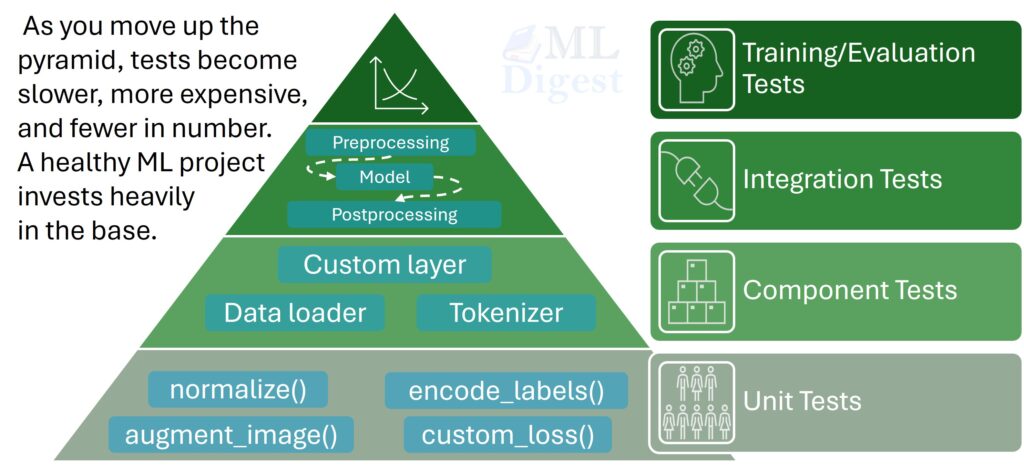
2. What to Test in ML Code
Not everything needs a dedicated test, and not all bugs are equally damaging. A useful mental model is to ask: “If this function silently returned a wrong value, would the model training still look plausible?” If the answer is yes, that function is a high-priority testing target.
2.1 Data Preprocessing and Transforms
Data preprocessing is the most common source of silent bugs. Normalization, standardization, encoding, reshaping, and type casting all touch every sample in your dataset. A mistake here contaminates everything downstream.
Key things to verify:
- Output shape matches expectation for a given input shape.
- Output dtype is what the model expects (e.g.,
float32, notfloat64). - Value ranges are within bounds when the transform is supposed to enforce them (e.g., pixel values in
[0, 1]after min-max scaling). - Missing values or edge cases (empty strings, zero-length sequences) are handled gracefully.
- The inverse transform of an invertible operation correctly recovers the input.
2.2 Feature Engineering Functions
Custom feature engineering can be tricky because the logic is domain-specific and hard to eyeball. Test that:
- Computed features match hand-calculated values for small, manually verified inputs.
- Categorical encodings produce the expected number of columns and handle unseen categories correctly. This becomes especially important once you move beyond one-hot features into schemes such as target or mean encoding, where leakage and train-test mismatches are easier to introduce.
- Time-based features respect boundaries (e.g., no look-ahead leakage).
2.3 Model Components
For custom layers, attention heads, or loss functions written in PyTorch or TensorFlow, there are additional properties to verify beyond just output values.
- Output shape: The most common and most useful assertion.
- Gradient flow: Does calling
.backward()populate all parameter gradients without producingNaN? - Parameter count: A quick sanity check that your architecture is built as intended.
- Behavior under specific inputs: A dropout layer at
eval()mode should be the identity function. In training mode, batch normalization applied to identical values should normalize them to approximately zero before any learned affine scale and bias are applied.
Gradient checks are particularly valuable because a layer can have the right shape and still train badly if gradients become unstable. That is closely related to the failure modes discussed in overcoming the vanishing and exploding gradient problem in neural networks.
2.4 Custom Loss Functions
A custom loss function is one of the riskiest components in an ML pipeline. Bugs here directly corrupt training, and there is no lint checker for mathematical errors. If you want a broader overview of how different objectives behave, this pairs well with Deep Dive to Neural Network Loss Functions. Always verify:
- Loss is non-negative (for most losses).
- Loss is zero (or near-zero) when predictions perfectly match targets.
- Loss is finite for realistic inputs (guard against division by zero).
- Loss is differentiable with respect to its inputs.
3. Setting Up Your Test Environment
For Python-based ML projects, pytest is the recommended testing framework. It is lightweight, requires minimal boilerplate, and integrates naturally with the conventions of modern Python.
Install it directly:
pip install pytestA minimal project layout that separates tests cleanly from source code looks like this:
my_ml_project/
├── src/
│   ├── preprocessing.py
│   ├── model.py
│   └── loss.py
├── tests/
│   ├── test_preprocessing.py
│   ├── test_model.py
│   └── test_loss.py
└── requirements.txt
Run all tests from the project root with:
pytest tests/ -v4. Writing Unit Tests for ML Code
4.1 Testing Data Preprocessing
Consider a standard min-max normalization function:
# src/preprocessing.py
import numpy as np

def min_max_normalize(x: np.ndarray) -> np.ndarray:
    """Scale values in x to the range [0, 1]."""
    x_min = x.min()
    x_max = x.max()
return (x - x_min) / (x_max - x_min)A well-structured unit test file for this function looks like the following:
# tests/test_preprocessing.py
import numpy as np
import pytest
from src.preprocessing import min_max_normalize


def test_output_range_is_zero_to_one():
    """Normalized values must all fall within [0, 1]."""
    x = np.array([2.0, 5.0, 1.0, 8.0, 3.0])
    result = min_max_normalize(x)
    assert result.min() >= 0.0
    assert result.max() <= 1.0


def test_minimum_value_maps_to_zero():
    x = np.array([2.0, 5.0, 1.0])
    result = min_max_normalize(x)
    # The original minimum (1.0) should map to 0.0
    assert result[2] == pytest.approx(0.0)


def test_maximum_value_maps_to_one():
    x = np.array([2.0, 5.0, 1.0])
    result = min_max_normalize(x)
    # The original maximum (5.0) should map to 1.0
    assert result[1] == pytest.approx(1.0)


def test_output_shape_is_preserved():
    x = np.random.rand(100, 10)
    result = min_max_normalize(x)
    assert result.shape == x.shape


def test_constant_array_produces_non_finite_values_by_default():
    """Without an explicit guard, a constant input divides by zero in NumPy."""
    x = np.array([3.0, 3.0, 3.0])
    result = min_max_normalize(x)
assert not np.isfinite(result).all()Notice the last test. It documents the current edge-case behavior explicitly: with plain NumPy division, a constant array typically yields non-finite values rather than raising an exception by default. If you later add a guard that raises ValueError or returns zeros, you update the test to match that new contract. This is the self-documenting power of unit tests.
4.2 Testing a Custom PyTorch Layer
Suppose you are implementing a Squeeze-and-Excitation block from scratch. Before training anything, test the layer in isolation:
# tests/test_model.py
import torch
import pytest
from src.model import SqueezeExcitationBlock


@pytest.fixture
def se_block():
    """Reusable fixture: a SE block with 64 channels and reduction ratio 16."""
    return SqueezeExcitationBlock(channels=64, reduction=16)


def test_output_shape_matches_input_shape(se_block):
    """SE block is a channel-wise attention module; shape must be preserved."""
    x = torch.randn(8, 64, 32, 32)  # (batch, channels, height, width)
    output = se_block(x)
    assert output.shape == x.shape


def test_output_values_are_scaled_not_shifted(se_block):
    """SE block multiplies (scales) input features; a zero input must give zero output."""
    x = torch.zeros(4, 64, 16, 16)
    output = se_block(x)
    assert torch.allclose(output, torch.zeros_like(output))


def test_gradients_flow_through_block(se_block):
    """Gradient flow check: all parameters must receive gradients after backward()."""
    x = torch.randn(4, 64, 16, 16, requires_grad=True)
    output = se_block(x)
    loss = output.sum()
    loss.backward()

    for name, param in se_block.named_parameters():
        assert param.grad is not None, f"No gradient for parameter: {name}"
assert not torch.isnan(param.grad).any(), f"NaN gradient for parameter: {name}"The gradient flow test is something that has no parallel in traditional software testing. It is uniquely ML-specific and one of the most valuable tests you can write for a custom layer.
4.3 Testing a Custom Loss Function
Here is a test suite for a custom Focal Loss implementation, a loss designed for class-imbalanced problems like object detection:
# tests/test_loss.py
import torch
import pytest
from src.loss import FocalLoss


@pytest.fixture
def focal_loss():
    return FocalLoss(alpha=0.25, gamma=2.0)


def test_loss_is_non_negative(focal_loss):
    logits = torch.randn(32, 10)
    targets = torch.randint(0, 10, (32,))
    loss = focal_loss(logits, targets)
    assert loss.item() >= 0.0


def test_perfect_predictions_give_near_zero_loss(focal_loss):
    """When the model is perfectly confident and correct, loss should approach 0."""
    # Large positive logit for class 0, all samples belong to class 0
    logits = torch.zeros(10, 5)
    logits[:, 0] = 100.0  # overwhelmingly confident about class 0
    targets = torch.zeros(10, dtype=torch.long)
    loss = focal_loss(logits, targets)
    assert loss.item() == pytest.approx(0.0, abs=1e-3)


def test_loss_is_finite_for_random_inputs(focal_loss):
    """Guard against NaN or Inf for typical random inputs."""
    logits = torch.randn(64, 10)
    targets = torch.randint(0, 10, (64,))
    loss = focal_loss(logits, targets)
    assert torch.isfinite(loss)


def test_loss_is_differentiable(focal_loss):
    """Loss must be differentiable with respect to logits for training to work."""
    logits = torch.randn(16, 10, requires_grad=True)
    targets = torch.randint(0, 10, (16,))
    loss = focal_loss(logits, targets)
    loss.backward()
    assert logits.grad is not None
assert torch.isfinite(logits.grad).all()5. Taming Non-Determinism
The most common objection to unit testing ML code is randomness. How do you write a deterministic test for a function that samples from a distribution or uses random weight initialization?
The answer is to control randomness explicitly within each test using seeds. Most ML frameworks provide a mechanism for this.
import torch
import numpy as np
import random

def set_seed(seed: int = 42):
    """Fix all sources of randomness for reproducible tests."""
    torch.manual_seed(seed)
    np.random.seed(seed)
    random.seed(seed)
    # For GPU reproducibility (at the cost of some performance):
    torch.backends.cudnn.deterministic = True
torch.backends.cudnn.benchmark = FalseIn pytest, one simple option is to keep the helper directly in conftest.py so every test file can use it:
# tests/conftest.py
import random

import numpy as np
import pytest
import torch


def set_seed(seed: int = 42):
    torch.manual_seed(seed)
    np.random.seed(seed)
    random.seed(seed)
    torch.backends.cudnn.deterministic = True
    torch.backends.cudnn.benchmark = False

@pytest.fixture(autouse=True)
def fix_random_seeds():
    """Automatically fix seeds before every test in the suite."""
    set_seed(42)
    yield  # run the test
# teardown (if needed) goes hereWith autouse=True, this fixture runs before every test in the suite without needing to be explicitly called. Your tests can now assume a stable random environment.
For functions where you cannot or do not want to fix seeds (such as testing that a dropout layer actually drops different units on different passes), test statistical properties instead of exact values:
def test_dropout_preserves_expected_activation():
    layer = torch.nn.Dropout(p=0.5)
    layer.train()  # dropout is only active in train mode
    x = torch.ones(1000, 100)
    output = layer(x)
    # PyTorch uses inverted dropout: surviving values are scaled by 1/(1-p) = 2.0.
    # With p=0.5, roughly half the values are zeroed, but the survivors are doubled,
    # preserving the expected value. The overall mean should remain ~1.0.
    assert 0.9 < output.mean().item() < 1.1
6. Mock Data and Test Fixtures
Using real datasets in unit tests creates two problems: tests become slow (real data is large), and tests become brittle (real data can change). The solution is to use minimal, hand-crafted mock data that is just large enough to exercise the code path you care about.
Here is a reusable pytest fixture that provides a small mock tabular dataset:
# tests/conftest.py
import numpy as np
import pandas as pd
import pytest
import torch


@pytest.fixture
def mock_tabular_data():
    """A minimal DataFrame that mimics the structure of the real training data."""
    np.random.seed(42)
    return pd.DataFrame({
        "age":       np.random.randint(18, 70, size=100),
        "income":    np.random.uniform(20000, 120000, size=100),
        "category":  np.random.choice(["A", "B", "C"], size=100),
        "label":     np.random.randint(0, 2, size=100),
    })


@pytest.fixture
def mock_image_batch():
    """A minimal batch of fake image tensors for testing vision model components."""
return torch.randn(8, 3, 224, 224) # (batch_size, channels, H, W)These fixtures can be shared across test files and updated in one place when your data schema changes.
7. Integration Tests
Once individual components pass their unit tests, integration tests verify that your pipeline holds together end-to-end. In ML, the most valuable integration test is a training smoke test: run a full training loop on a tiny dataset for a small number of steps and assert that the loss decreases.
# tests/test_integration.py
import torch
from torch.utils.data import DataLoader, TensorDataset
from src.model import MyModel
from src.loss import FocalLoss


def test_training_loop_reduces_loss():
    """
    Smoke test: verify that the model can overfit a tiny dataset in a few steps.
    If loss does not decrease, something in the pipeline (optimizer, loss, forward
    pass) is likely broken.
    """
    # Tiny dataset: 32 samples, 10 features, 3 classes
    X = torch.randn(32, 10)
    y = torch.randint(0, 3, (32,))
    dataset = TensorDataset(X, y)
    loader = DataLoader(dataset, batch_size=8)

    model = MyModel(input_dim=10, num_classes=3)
    optimizer = torch.optim.Adam(model.parameters(), lr=1e-3)
    criterion = FocalLoss(alpha=0.25, gamma=2.0)

    model.train()
    initial_loss = None
    final_loss = None

    for epoch in range(20):
        for X_batch, y_batch in loader:
            optimizer.zero_grad()
            logits = model(X_batch)
            loss = criterion(logits, y_batch)
            loss.backward()
            optimizer.step()
            final_loss = loss.item()
        if initial_loss is None:
            initial_loss = final_loss

    assert final_loss < initial_loss, (
        f"Loss did not decrease: initial={initial_loss:.4f}, final={final_loss:.4f}"
)This test exercises the interaction between your data loader, model forward pass, loss computation, and optimizer update in a single, fast-running check. It will catch mismatches in tensor shapes, missing zero_grad() calls, or a disconnected computation graph that would prevent gradients from flowing.
8. Automating Tests with Continuous Integration
Writing tests is only half the story. The other half is making sure they run automatically on every code change. GitHub Actions provides a free, easy way to do this for any repository.
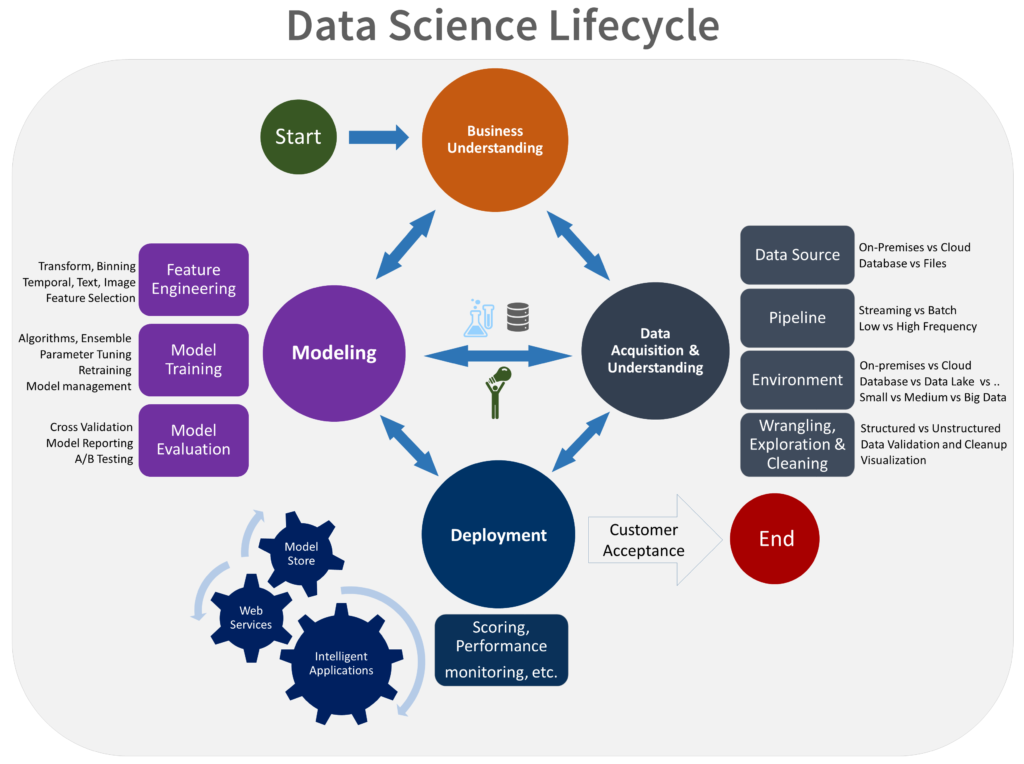
In practice, this is part of a broader engineering workflow: tests are most useful when they are embedded into the full experimentation and delivery lifecycle described in Data Science Process Lifecycle.
A minimal workflow file for a PyTorch ML project:
# .github/workflows/tests.yml
name: Run ML Tests

on:
  push:
    branches: [ main ]
  pull_request:
    branches: [ main ]

jobs:
  test:
    runs-on: ubuntu-latest
    steps:
      - uses: actions/checkout@v4
      - name: Set up Python
        uses: actions/setup-python@v5
        with:
          python-version: "3.12"
      - name: Install dependencies
        run: pip install -r requirements.txt
      - name: Run tests
run: pytest tests/ -v --tb=shortWith this in place, every pull request to your main branch triggers the full test suite. A failing test blocks the merge, preventing regressions from reaching production.
9. Best Practices
9.1 Prefer pytest.approx Over Exact Float Comparison
Floating-point arithmetic is inherently imprecise. Never use == to compare float values in tests. Use pytest.approx instead:
# Wrong: will fail due to floating-point precision
assert result == 0.333333333

# Correct: tolerates small numerical differences
assert result == pytest.approx(1/3, rel=1e-5)9.2 Test Shape Before Values
When testing a new model component for the first time, start with the output shape and dtype, then add value-level assertions. A shape test will catch the vast majority of bugs instantly and is trivially easy to write.
9.3 Name Tests After the Behavior Being Tested
A test name like test_normalize_output_is_between_zero_and_one is far more informative than test_normalize_1. When a test fails in CI, the test name should tell you exactly what broke.
9.4 Keep Tests Fast
Unit tests should run in milliseconds. If a test takes more than a few seconds, it belongs in the integration test layer. Avoid loading real models or real datasets in unit tests.
9.5 Test the Unhappy Path
Do not only test that your function works when given valid inputs. Test that it fails correctly when given invalid inputs. A normalize() function that silently accepts a None input and returns garbage is a bug waiting to happen.
10. Tooling Reference
| Tool | Purpose |
|---|---|
| pytest | Primary testing framework for Python |
| pytest-cov | Measure test coverage |
| unittest.mock | Mock external dependencies (data sources, APIs) |
| Hypothesis | Property-based testing: generate many inputs automatically |
| Great Expectations | Data validation and pipeline testing |
| deepchecks | ML-specific testing: data drift, label leakage, model robustness |
| GitHub Actions | CI/CD automation for running tests on every commit |
The goal of testing machine learning code is not to achieve 100% coverage for its own sake. It is to build a safety net that gives you the confidence to refactor, extend, and deploy your code, knowing that silent failures in preprocessing, model components, and loss functions will be caught before they corrupt a training run or surface in production.
Start with the highest-risk pieces: data preprocessing transforms, custom loss functions, and any component you wrote from scratch. Add a training smoke test. Wire it up to CI. That foundation alone will save far more debugging time than it costs to build.

Silpa brings 5 years of experience in working on diverse ML projects, specializing in designing end-to-end ML systems tailored for real-time applications. Her background in statistics (Bachelor of Technology) provides a strong foundation for her work in the field. Silpa is also the driving force behind the development of the content you find on this site.
Subscribe to our newsletter!