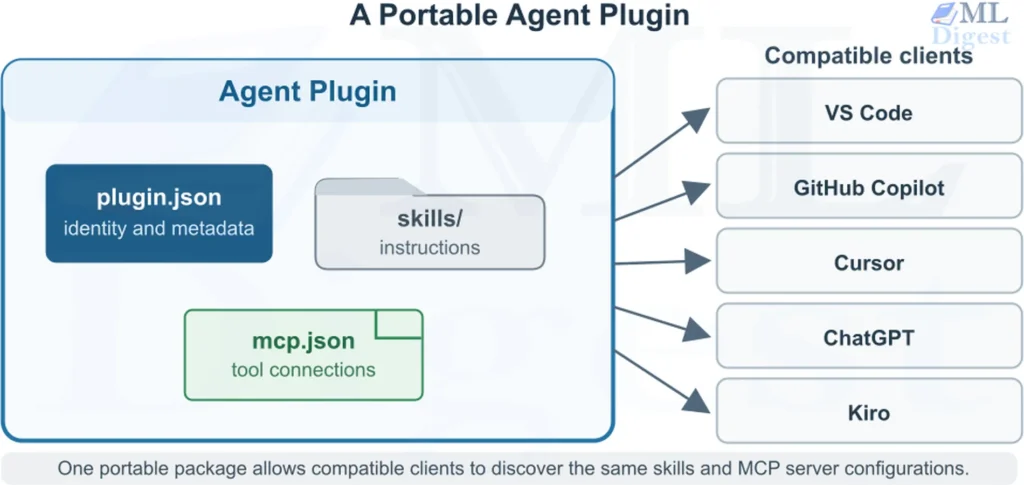
Agent Plugins provide a standard way to package reusable instructions, tools, and data connections for AI agents. Instead of maintaining separate integrations for ChatGPT, GitHub Copilot, Cursor, VS Code, and other clients, developers can place Agent Skills and Model Context Protocol (MCP) servers inside one portable directory. The result is a small but important interoperability layer for building, sharing, and maintaining agent capabilities without tying them to one platform.
The easiest way to understand an Agent Plugin is to imagine a meal kit:
- An Agent Skill is the recipe that explains what to do.
- An MCP server supplies the tools and ingredients.
- An Agent Plugin is the box that packages them together.
The plugin does not decide who sells the box, who may open it, or how the kitchen operates. Those responsibilities remain with the client.
1. What Is an Agent Plugin?
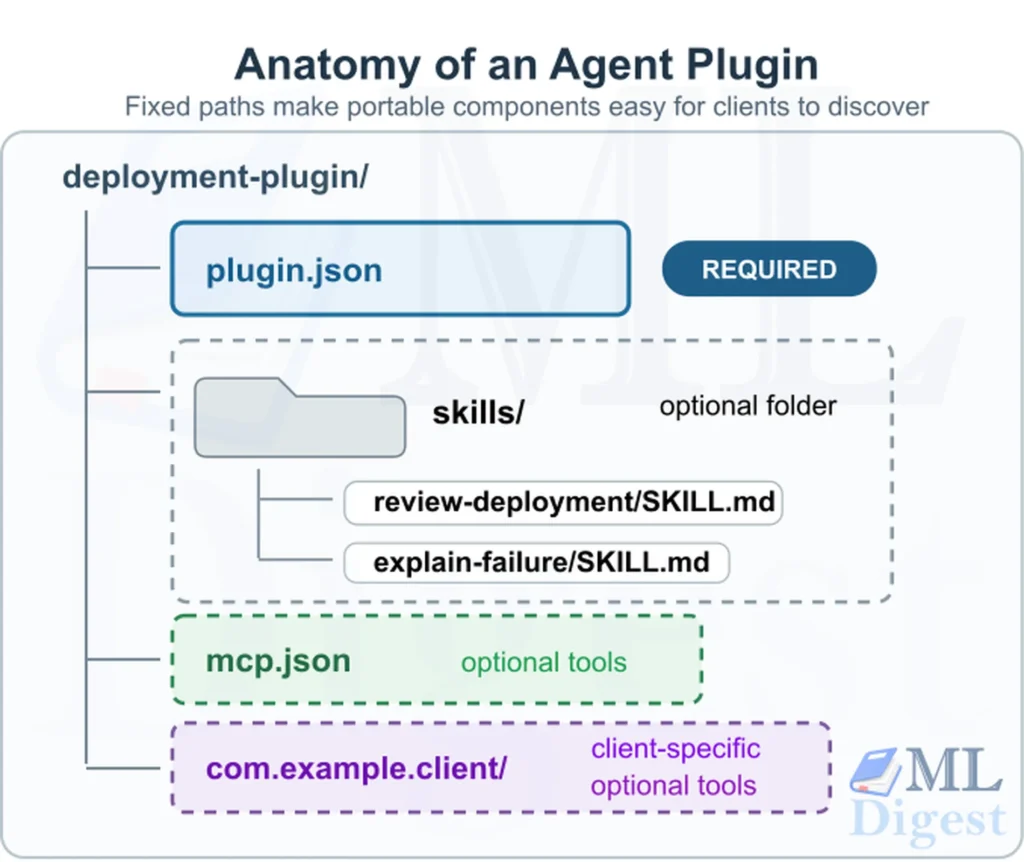
According to the official Agent Plugins specification, an Agent Plugin is a self-contained directory with a root-level plugin.json manifest and optional components in fixed locations.
The standard currently packages two portable component types:
- Agent Skills, which provide reusable instructions and supporting resources.
- MCP servers, which connect agents to external tools, APIs, and data.
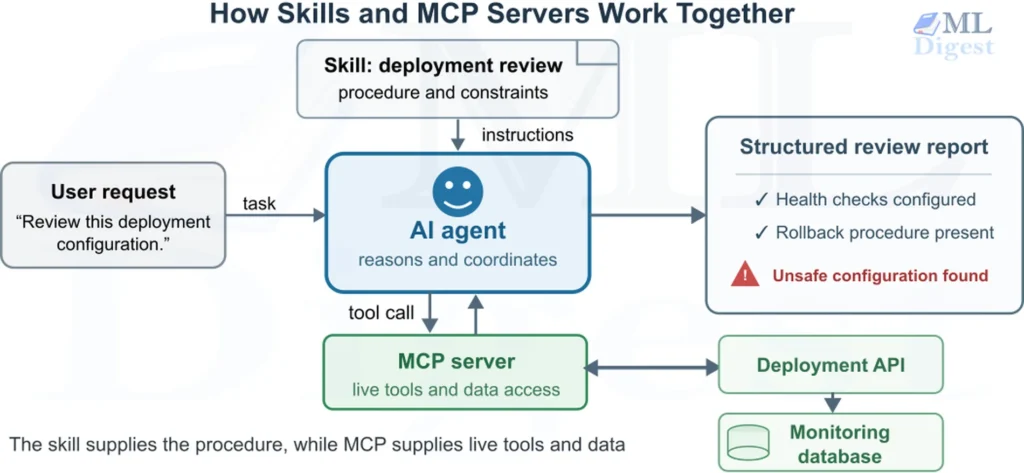
This design fills a gap between two existing standards. Agent Skills teach an agent how to perform a task, while the Model Context Protocol gives it controlled access to external capabilities. Agent Plugins place both inside a predictable package.
Only manifest, plugin.json, is mandatory. A plugin may or may not contain skills, MCP servers, or both.
2. Why Agent Plugins Matter
Without a shared format, developers may need to package the same skills and MCP servers differently for every agent client. Agent Plugins provide one common structure, so a capability can be packaged once and used by compatible clients.
This reduces duplicated setup and makes plugins easier to share, version, and review. It is especially useful for teams that use several AI agents.
Benefits
- Authors reuse skills and MCP configurations instead of rebuilding them for each client.
- Teams can distribute, audit, and version agent capabilities in a consistent format.
- Client developers get fixed locations for discovery and may support skills or MCP servers independently.
3. The Anatomy of an Agent Plugin
A typical plugin has the following structure:
deployment-plugin/
├── plugin.json
├── skills/
│   ├── review-deployment/
│   │   ├── SKILL.md
│   │   ├── scripts/
│   │   │   └── check_config.py
│   │   └── references/
│   │       └── deployment-checklist.md
│   └── explain-failure/
│       └── SKILL.md
├── mcp.json
├── com.example.client/
│   └── hooks/
├── LICENSE
└── CHANGELOG.md
Each location has a specific purpose:
| Location | Purpose | Mandatory |
|---|---|---|
plugin.json | Identifies the plugin and target specification | Yes |
skills/ | Contains immediate subdirectories with SKILL.md files | No |
mcp.json | Declares MCP server connections | No |
| Reverse-domain directory | Stores client-specific files | No |
LICENSE | Describes usage and redistribution terms | No |
CHANGELOG.md | Records plugin changes | No |
The fixed layout is intentional. A client should not need to search an entire repository or interpret custom manifest paths to find portable components.
4. Understanding plugin.json
Every plugin must contain exactly one portable manifest named plugin.json at its root.
The smallest valid manifest is:
{
    "$schema": "https://agent-plugins.org/schemas/1.0.0/plugin.schema.json",
    "name": "deployment-tools"
}The two required fields are:
$schema, which identifies the specification and validation contract.name, which identifies the plugin.
The manifest may also contain:
version: A string that identifies the plugin version. Semantic Versioning is recommended, but any string is allowed.description: A short human-readable summary of the plugin’s purpose.author: An object with optionalname,email, andurlfields.homepage: A URL to the plugin’s homepage.repository: A URL to the plugin’s source repository.license: The plugin’s license identifier.keywords: An array of strings that describe the plugin’s functionality. These keywords may be used for discovery and search.extensions: An object for client-specific metadata.
A more useful production manifest might look like this:
{
    "$schema": "https://agent-plugins.org/schemas/1.0.0/plugin.schema.json",
    "name": "deployment-tools",
    "version": "1.0.0",
    "description": "Skills and MCP connections for reviewing deployments.",
    "author": {
        "name": "Example Engineering",
        "email": "engineering@example.com",
        "url": "https://example.com"
    },
    "homepage": "https://example.com/deployment-tools",
    "repository": "https://github.com/example/deployment-tools",
    "license": "Apache-2.0",
    "keywords": [
        "deployment",
        "operations",
        "code-review"
    ]
}4.1 Plugin naming rules
A plugin name must be 1 to 64 characters long, use lowercase ASCII letters, digits, periods, or hyphens, and begin and end with a letter or digit. Consecutive periods (..) and hyphens (--) are not allowed.
- Valid:
deployment-tools,acme.operations,review3. - Invalid:
Deployment-Tools,-deployment,deployment--tools,acme..operations.
4.2 The manifest is closed
A “closed” manifest means plugin.json has a fixed set of allowed top-level fields, such as name, version, description, and extensions. Arbitrary fields are not part of the portable plugin format.
This prevents mistakes such as writing descripton instead of description, and stops one client from treating its private configuration as a cross-client standard.
The schema marks unknown fields as invalid through additionalProperties: false. In practice, a client should warn about an unknown top-level field and ignore it when the rest of the manifest is valid. Other validation errors prevent the manifest from loading.
Put client-specific metadata inside extensions:
{
    "$schema": "https://agent-plugins.org/schemas/1.0.0/plugin.schema.json",
    "name": "deployment-tools",
    "extensions": {
        "com.example.agent": {
            "showDeploymentPanel": true
        }
    }
}Use a reverse-domain key, such as com.example.agent, to reduce naming conflicts between clients.
5. Agent Skills Inside a Plugin
Each immediate subdirectory under skills/ may contain one SKILL.md file that conforms to the official Agent Skills specification.
For example:
skills/
└── review-deployment/
        ├── SKILL.md
        ├── scripts/
        │   └── check_config.py
        └── references/
                └── checklist.md
A minimal skill might contain:
---
name: review-deployment
description: Review a deployment configuration for reliability and safety. Use when the user asks for a pre-deployment check.
---

Review the supplied deployment configuration.

1. Identify the target environment.
2. Check resource limits and health probes.
3. Look for embedded credentials.
4. Verify rollback and monitoring settings.
5. Report blocking issues before optional improvements.The client examines only immediate child directories of skills/. It does not recursively search arbitrary nested folders for more skills.
This predictable discovery rule makes loading efficient. It also supports progressive disclosure:
- The client initially reads compact skill metadata.
- It loads the complete instructions when the skill becomes relevant.
- It accesses scripts, references, and assets only when required.
For complex agent systems, progressive disclosure helps control context usage. The agent sees the information needed for the current task rather than loading an entire knowledge base into every request.
6. MCP Servers Inside a Plugin
Skills explain how to perform work, but instructions alone cannot query a private database, inspect a live deployment, or call an internal API. MCP servers provide those operational capabilities.
Agent Plugins declares MCP servers in a root-level mcp.json file. Version 1.0 supports:
stdiofor a local subprocessstreamable-httpfor a current remote MCP endpointssefor the legacy HTTP+SSE transport
6.1 Local MCP server example
{
    "$schema": "https://agent-plugins.org/schemas/1.0.0/mcp.schema.json",
    "mcpServers": {
        "deployment-validator": {
            "type": "stdio",
            "command": "python",
            "args": [
                "${PLUGIN_ROOT}/server.py"
            ],
            "cwd": "${PLUGIN_ROOT}",
            "env": {
                "DATA_DIR": "${PLUGIN_DATA}/validator"
            }
        }
    }
}The client launches a stdio server as a subprocess. MCP messages travel through standard input and standard output.
Two standardized variables make local configurations portable:
${PLUGIN_ROOT}points to the installed plugin directory.${PLUGIN_DATA}points to client-managed persistent storage for that plugin.
Bundled scripts and read-only configuration should normally use ${PLUGIN_ROOT}. Caches, generated files, virtual environments, and other persistent state should use ${PLUGIN_DATA}.
6.2 Remote MCP server example
{
    "$schema": "https://agent-plugins.org/schemas/1.0.0/mcp.schema.json",
    "mcpServers": {
        "deployment-api": {
            "type": "streamable-http",
            "url": "https://deploy.example.com/mcp",
            "headers": {
                "X-Tenant": "public-example"
            }
        }
    }
}Non-loopback remote endpoints must use HTTPS. Plugin authors must not embed secrets in headers or env. Agent Plugins 1.0 does not define portable credential references or an OAuth configuration format. Authentication and credential storage remain client responsibilities.
7. Skills, MCP Servers, Plugins, and Agent Harnesses
These concepts operate at different layers:
| Concept | Primary responsibility | Analogy |
|---|---|---|
| Agent Skill | Reusable task instructions | Recipe |
| MCP server | Access to tools and data | Kitchen equipment |
| Agent Plugin | Portable packaging | Meal kit |
| Agent client or harness | Execution, permissions, context, and user experience | Kitchen and chef |
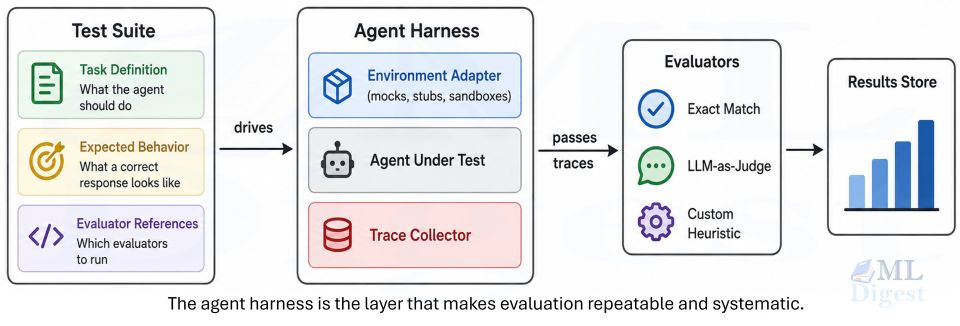
An agent harness controls how the model operates. It may manage tool approval, context construction, retries, memory, logs, and execution limits. A plugin supplies components to that environment, but it does not replace the environment.
This separation prevents a common architectural mistake: treating an Agent Plugin as a complete autonomous agent. It is a package of capabilities, not the reasoning loop, model, runtime, or security boundary.
Likewise, agent workflows determine the sequence of steps, handoffs, and decisions used to complete work. A plugin can contribute skills or tools to a workflow, but it does not prescribe that workflow’s control flow.
8. What the Standard Does Not Cover
Agent Plugins deliberately defines a small interoperability floor. Version 1.0 does not standardize:
- Distribution or marketplaces
- Installation and updates
- Permission systems
- Sandboxing
- User interfaces
- Commands
- Hooks
- Sub-agents
- Rules
- Credential storage
- Runtime selection
This narrow scope is a feature rather than an omission. Commands, hooks, and permission models differ substantially between clients. Attempting to standardize them immediately would make the format harder to adopt and more likely to encode one vendor’s architecture.
Client-specific capabilities may live in reverse-domain extension namespaces, but another client is free to ignore them.
The official compatible clients directory should be used to verify current native support. As of September 2026, the directory includes clients such as ChatGPT and Codex, Cursor, GitHub Copilot, Kiro, VS Code, NanoClaw, Hermes Agent, Grok Bot, and OpenClaw. The list can change independently of the specification.
A third-party installer may also translate a portable plugin into another client’s native format. Translation-based compatibility should not be confused with native conformance to the Agent Plugins specification.
9. Disadvantages, Privacy, and Reliability
Agent Plugins simplify distribution, but a plugin is not a security or trust boundary. Review every skill, script, dependency, and MCP connection before installing it.
- Security and maintenance: Local MCP servers can run programs, and remote servers can receive data. Updates, dependencies, authentication, and outages add operational work.
- Client differences: Clients may support different components, transports, permissions, and authentication flows. A client may support skills but not MCP, or support only some MCP transports. Permissions, confirmation prompts, authentication, and extension namespaces are also client-managed. A plugin can therefore be structurally portable without behaving identically everywhere.
- Additional operational dependencies: Remote servers can be unavailable, local runtimes can be missing, authentication can expire, and API schemas can change. A standalone skill has fewer moving parts because it is primarily instruction content.
- Privacy and secrets: A plugin can remain private, but recipients can read every file it contains. Never include credentials in
plugin.json,mcp.json, skills, scripts, or Git history. Keep sensitive logic behind authenticated services and use client-managed secret storage. - Persistent data: Tool results and plugin state may become part of an agent’s memory system. Define retention, access, and deletion rules before persisting sensitive operational data.
- Reliability: Skills provide guidance. MCP can improve results by supplying current data or deterministic checks, but it also adds failure points. Test representative tasks and tool failures as part of agentic system evaluation. Start with a skill and add MCP only when it provides clear value.
10. Building a Minimal Agent Plugin
The following example creates a plugin that reviews Python code.
10.1 Create the directory structure
python-review-plugin/
├── plugin.json
└── skills/
        └── review-python/
                └── SKILL.md
10.2 Add the manifest
{
    "$schema": "https://agent-plugins.org/schemas/1.0.0/plugin.schema.json",
    "name": "python-review-plugin",
    "version": "1.0.0",
    "description": "Review Python code for correctness, clarity, and maintainability.",
    "license": "MIT",
    "keywords": [
        "python",
        "review",
        "quality"
    ]
}10.3 Add the skill
---
name: review-python
description: Review Python code for correctness, security, typing, clarity, and maintainability. Use when the user requests a Python code review.
---

Review the supplied Python code in this order:

1. Identify correctness bugs and unsafe behavior.
2. Check error handling and resource management.
3. Review type annotations and public interfaces.
4. Identify unnecessary complexity or duplication.
5. Suggest focused tests for important edge cases.

Report findings by severity. Include a concrete correction for each blocking issue.This is already a useful plugin. An MCP server is optional and should only be added when the skill needs live tools or external data.
10.4 Register and use the plugin in VS Code
Installation is client-specific. For example, to use this local plugin in VS Code:
- Save the
python-review-plugindirectory somewhere stable on your computer. - Enable agent plugins and register the directory in VS Code
settings.jsonby pressingCtrl+Shift+Pand searching forPreferences: Open Settings (JSON). Add:
{
    "chat.plugins.enabled": true,
    "chat.pluginLocations": {
        "C:/path/to/python-review-plugin": true
    }
}- Reload VS Code if the plugin does not appear immediately.
- In Chat, open Configure Skills and confirm that
review-pythonis available. - Ask for a Python code review. When the request matches the skill description, the client can load its instructions and apply them to the code.
To use the same package in another client, follow that client’s plugin-installation instructions. Compatible clients can discover the portable plugin.json and skills/ layout, but they may expose installation and skills differently.
10.5 Register and use the plugin in GitHub Copilot CLI
- Save the
python-review-plugindirectory somewhere stable on your computer. - As shown in this documentation, install the plugin by running:
copilot plugin install /path/to/python-review-pluginor, you can run it from inside the Copilot CLI instance by running:
/plugin install /path/to/python-review-plugin- Confirm that
review-pythonis available by running:
copilot plugin list11. Security Considerations
Portability does not imply safety. A plugin can contain instructions that influence agent behavior and MCP configuration that starts a local executable or connects to a remote service. Treat untrusted instructions and tool output as possible prompt injection input.
Before installing a plugin, inspect:
- The source repository and maintainer identity
- Every packaged
SKILL.md - Local MCP commands and their arguments
- Remote MCP URLs
- Environment variables and headers
- Bundled scripts and executable files
- Required permissions
- Dependency lockfiles and licenses
- Update and release history
- The client-specific extension directories
Treat MCP servers as executable integrations
A stdio MCP server can execute a local program with the privileges of the client process. A remote MCP server can receive data sent through tool calls. Both therefore require the same care as other software integrations.
Apply least privilege:
- Run the agent with limited filesystem and network access.
- Require confirmation for destructive operations.
- Restrict credentials to the narrowest necessary scope.
- Avoid placing secrets directly in plugin files.
- Log tool invocations and review unexpected behavior.
- Pin dependencies where reproducibility matters.
These controls complement broader LLM guardrails and agent security policies. The plugin format itself is not a sandbox or trust system.
Keep paths inside the package
Plugin-relative paths must begin with ./ and resolve within the plugin root. Clients must reject package paths that escape through .., symbolic links, junctions, or equivalent mechanisms.
This rule protects package integrity, but it does not sandbox a subprocess after launch. Runtime isolation remains a client responsibility.
12. Practical Best Practices
- Keep the portable core genuinely portable: Place broadly reusable behavior in standard skills and MCP configuration. Use client extensions only when the feature cannot be represented by the portable core.
- Prefer small, focused skills: A plugin may contain several skills. Each should represent a clear capability with a precise activation description. A large general-purpose skill is harder for an agent to select and harder for a reviewer to audit.
- Separate instructions from live capabilities: Use a skill for procedures, examples, constraints, and domain knowledge. Add an MCP server only when the task needs execution or current external data.
- Make failures independent: Design the plugin so that one unavailable MCP server does not make every skill useless. This aligns with the specification, which requires clients to continue loading independently valid components after isolated failures.
- Document requirements explicitly: Describe system packages, network access, credentials, and runtime requirements in the repository documentation and relevant skill metadata. A portable layout does not guarantee that every operating environment contains the same dependencies.
- Test with more than one client: A package can satisfy the schema while depending accidentally on one client’s behavior. Test skill discovery, MCP startup, environment expansion, and failure handling across the clients that the plugin claims to support.
13. Common Misconceptions
- “An Agent Plugin is an MCP server”: An MCP server is one possible component. A plugin may contain no MCP server at all.
- “An Agent Plugin is a complete agent”: A plugin does not define the model, reasoning loop, memory system, permissions, or user interface. Those belong to the client or agent runtime.
- “Every field belongs in
plugin.json”: The root manifest has a closed set of portable fields. Client-specific configuration belongs underextensionsor inside a reverse-domain directory. - “Compatibility means identical behavior everywhere”: Clients may support different component types and MCP transports. They also control permissions, installation, and user experience. Portability standardizes discovery and configuration, not every runtime decision.
- “A valid plugin is automatically trustworthy”: Schema validity proves that a package follows a structural contract. It does not prove that its instructions, scripts, dependencies, or remote services are safe.
14. The Current State of the Standard
Agent Plugins 1.0.0 is the current published specification. The official specification repository also contains a 1.1.0 working draft, but plugin authors should target the published 1.0.0 schema unless they are deliberately participating in draft implementation work.
The standard is developed publicly under a technical governance model. Governance roles are held by individuals rather than companies, and no single vendor may control a majority of maintainer seats.
Its narrow scope is likely its greatest strength. Rather than attempting to standardize the entire agent ecosystem, it defines a stable envelope around two already useful primitives: Agent Skills and MCP servers.
Summary
Agent Plugins turn reusable agent capabilities into portable, inspectable packages. A required plugin.json identifies the package, skills/ contains reusable instructions, and mcp.json describes connections to tools and data. Client-specific behavior remains isolated in namespaced extensions.
The standard reduces duplicated integration work, but it does not solve distribution, permissions, sandboxing, discovery, or trust. It does not require public distribution, although every file included in a package is visible to its recipients. Teams must keep proprietary implementations behind controlled service boundaries, inject secrets through client-managed systems, and apply strong runtime controls.
Compared with a skill alone, a plugin with MCP can produce more reliable results by accessing current data and deterministic tools. It also introduces more failure modes. Reliability therefore comes from careful component design, validation, monitoring, least privilege, and tested fallbacks, not from the package format itself.

Silpa brings 5 years of experience in working on diverse ML projects, specializing in designing end-to-end ML systems tailored for real-time applications. Her background in statistics (Bachelor of Technology) provides a strong foundation for her work in the field. Silpa is also the driving force behind the development of the content you find on this site.

Happy is a seasoned ML professional with over 15 years of experience. His expertise spans various domains, including Computer Vision, Natural Language Processing (NLP), and Time Series analysis. He holds a PhD in Machine Learning from IIT Kharagpur and has furthered his research with postdoctoral experience at INRIA-Sophia Antipolis, France. Happy has a proven track record of delivering impactful ML solutions to clients. Check more about him here: https://sites.google.com/site/slhappyin/
Subscribe to our newsletter!