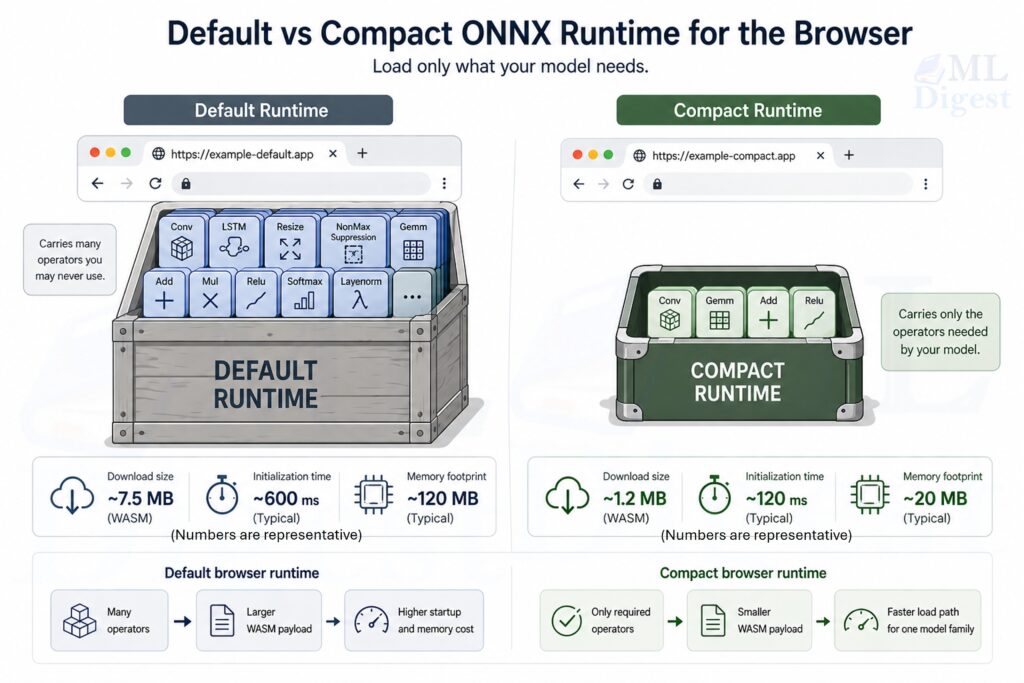
Imagine trying to deliver a single cup of coffee by sending an entire coffee shop to a customer’s home. That is roughly what happens when a web application loads a full machine learning runtime even though the model only needs a small subset of its capabilities.
ONNX Runtime compaction is the practice of building a browser runtime that contains only the operators and features a specific model actually needs. The goal is not to change the model’s predictions. The goal is to reduce the cost of getting that model into a browser session.
It is also a different optimization lever from model-side techniques such as quantization or pruning. Those methods reduce model compute or weight footprint, while compaction reduces the browser runtime wrapped around the model.
If you need a refresher on what ONNX is, why teams export models to it, and how the broader deployment lifecycle works, see this post on Intro to ONNX Model Deployment. This article stays narrow: how to make browser inference smaller, faster to load, and easier to ship in performance-sensitive frontends.
In practical terms, compaction can reduce an onnxruntime-web WebAssembly payload from a general-purpose build of roughly 20 to 25 MB to a model-specific build that is often close to 1 to 2 MB before network compression. With gzip or Brotli at the CDN layer, the transfer size can become small enough that browser inference stops feeling like a heavyweight feature.
Why Compaction Exists
Browser ML has a different bottleneck profile from server inference. On a server, the expensive step is often repeated computation. In the browser, the expensive step frequently arrives earlier:
- downloading the runtime,
- initializing the WebAssembly module,
- parsing or loading the model,
- and holding all of it in memory inside a tab.
The default browser runtime is intentionally broad. It is built to support many different ONNX graphs, many operator types, and many usage patterns. This leads to three major problems:
- Large initial payload: the browser downloads a much bigger binary than necessary.
- Slower startup time: users wait longer before inference can begin.
- Higher memory pressure: larger artifacts and heavier initialization increase memory usage.
That generality is useful during experimentation, but it is wasteful when production serves one or two stable models with a known operator set.
Compaction solves that mismatch by specializing the runtime for the workload.
This matters even more in environments such as:
- user-facing web applications
- low-bandwidth mobile networks
- embedded browser experiences
- micro-frontend architectures
- performance-sensitive dashboards and enterprise tools
A mental model that maps to the real system
Think of a browser inference deployment as three things shipped together:
- a runtime engine,
- a model artifact,
- a small application layer that feeds tensors in and reads outputs out.
If the model only uses 15 operators, shipping support for 150 operators is similar to bundling an entire tool warehouse when the job only needs a small tray of tools.
What Actually Gets Smaller
Compaction is easier to understand if you separate the browser stack into concrete deployable artifacts.
1. The WebAssembly engine
ort-wasm.wasm is the compiled execution engine. It is written in C++ in the ONNX Runtime project and compiled to WebAssembly (WASM) so that it can run inside the browser at near-native speed.
This is the largest part of the browser runtime in many deployments because it contains compiled kernels and runtime machinery.
When teams say they are making ONNX Runtime smaller in the browser, this file is often the main target.
2. The JavaScript loader
ort-wasm.mjs is the JavaScript module that loads the WebAssembly binary, configures the environment, and exposes the runtime API to the application.
It handles the connection between your web application and the compiled runtime. It is not usually the largest asset, but it must stay in sync with the .wasm binary that was built alongside it.
3. The model artifact
Minimal browser builds require the ORT model format, stored as .ort, rather than a raw .onnx file. The ORT format is designed for ONNX Runtime itself and reduces some of the loading and parsing overhead that would otherwise remain.
4. The operator contract
The .mjs and .wasm files must come from the same build.
They are tightly linked during compilation. If you mix a JavaScript loader from one build with a WASM binary from another, initialization may fail or behave unpredictably.
The operator allowlist, often emitted as a file such as required_operators.config, tells the build system which kernels must remain in the runtime.
If that contract is incomplete, the runtime may build successfully and still fail at inference time.
The Core Mechanism
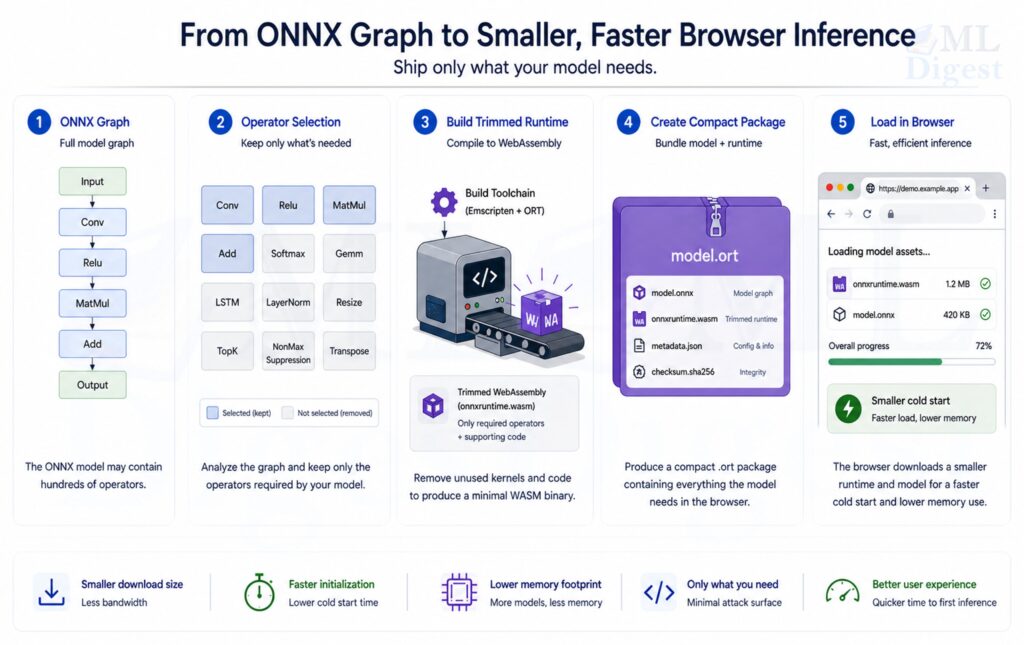
At a high level, compaction is a specialization pipeline:
- run the conversion tool to extract the operators the model uses and convert it to
.ortformat (both outputs come from this single step), - build ONNX Runtime WebAssembly using the generated operator config,
- deploy the
.wasm, matching.mjs, and.ortfile as one versioned unit.
That is the whole idea. Nothing changes about the model’s predictions. You are simply removing unused capability from the runtime build.
%%{init: {'theme': 'base', 'themeVariables': {
    'fontSize': '22px',
    'fontFamily': 'Arial',
    'primaryTextColor': '#000000'
}}}%%
flowchart LR
    M[Model.onnx] --> O[Extract used operators]
    O --> C[required_operators.config]
    C --> B[Build minimal ort-wasm]
    M --> F[Convert model to .ort]
    B --> P[Publish ort-wasm.wasm + ort-wasm.mjs]
    F --> P2[Publish model.ort]
    P --> D[Browser deployment]
    P2 --> D
Why the Size Reduction Can Be Dramatic
The size reduction is often surprisingly large because the baseline runtime is optimized for breadth, not for one fixed model. If the full runtime size is $S_{full}$ and the compact runtime size is $S_{compact}$, then the relative reduction is:
$$
\text{reduction} = \frac{S_{full} – S_{compact}}{S_{full}} \times 100\%
$$
Using a representative example:
$$
S_{full} = 23\ \text{MB}, \quad S_{compact} = 1.5\ \text{MB}
$$
$$
\text{reduction} \approx \frac{23 – 1.5}{23} \times 100\% \approx 93.5\%
$$
That reduction matters because the browser pays for runtime size more than once:
- during the first network fetch,
- during decompression,
- during WebAssembly compilation or instantiation,
- and often during memory allocation inside the page.
This is why a smaller runtime can improve both startup latency and perceived smoothness, even before you measure steady-state inference speed.
Where This Fits in the Broader ONNX Story
General ONNX deployment post also covers export correctness, numerical parity, execution providers, quantization, packaging, and production serving.
Compaction sits later in that lifecycle. It assumes you already have:
- a working ONNX model,
- a model that runs correctly in ONNX Runtime,
- and a deployment scenario where browser startup cost matters enough to justify a custom runtime build.
That distinction is important. Compaction is not a replacement for export validation. It is a footprint optimization after correctness is already established. If the runtime is already lean but the model artifact still dominates transfer or load time, post-training quantization is usually the next nearby optimization to evaluate.
The Building Blocks of a Compact Browser Setup
Operator pruning
Every ONNX model is a graph of operators such as MatMul, Add, Reshape, or Softmax. The full ONNX Runtime build ships support for well over a hundred operator types across multiple data types, while a typical production model uses only a small fraction of that surface. A compact runtime keeps only the kernels the deployed graph actually requires, discarding everything else from the compiled binary.
This is why the operator config file matters so much. It converts an abstract question, “What does the model use?”, into a concrete build input that the ONNX Runtime build system acts on directly.
Minimal build mode
The ONNX Runtime build system supports minimal builds, commonly through flags such as --minimal_build. This removes runtime features that are helpful for general compatibility but unnecessary for tightly controlled browser deployments.
The practical tradeoff is simple:
- less generality,
- less runtime overhead,
- and more responsibility to keep the model and runtime synchronized.
ORT format conversion
The .ort format is not just a cosmetic change in file extension. It is a requirement for minimal builds because the reduced runtime does not include the full ONNX format parser and relies on the ORT format for model loading. The conversion script that produces .ort files also emits the required_operators.config used by the build system, so the model artifact and the operator contract are always derived from the same source model and stay in sync by construction.
Binary size flags
Additional build flags, such as --disable_wasm_exception_catching, --disable_rtti, --skip_tests, and --config MinSizeRel, further reduce binary size by removing development or metadata-heavy features that are not required in production browser bundles.
End-to-End Workflow
Step 1: Prepare the build environment
You need the ONNX Runtime source tree, the Emscripten toolchain for WebAssembly compilation, Python dependencies, and a build system such as CMake with Ninja.
Typical setup tasks include:
- cloning the ONNX Runtime repository recursively,
- initializing the Emscripten environment,
- installing Python packages such as
flatbuffersandonnx, - and confirming that CMake and Ninja are available on the system path.
Step 2: Extract the required operators
This step defines the runtime contract. If the contract is too broad, the runtime stays larger than necessary. If it is too narrow, inference breaks in production.
The useful mindset is not “How do I shrink the binary?” It is “Which exact kernels must exist for this model family to remain valid?”
In practice, operator extraction requires no separate tool invocation. The convert_onnx_models_to_ort command in Step 3 produces the required_operators.config as a byproduct of ORT conversion, so both outputs come from the same pass over the model.
Step 3: Convert ONNX models to ORT format
ONNX Runtime provides tooling to convert .onnx models to .ort artifacts. This command also generates the required_operators.config file needed in the next step:
python -m onnxruntime.tools.convert_onnx_models_to_ort [PATH_TO_ONNX_MODEL_FOLDER]The script produces two outputs: the .ort artifact for deployment and a required_operators.config listing every kernel the optimized graph needs. To further reduce build size by pruning unused data types from each kernel, pass --enable_type_reduction; the config is then named required_operators_and_types.config and can yield a smaller runtime in exchange for a narrower supported type surface.
Step 4: Build the compact WASM runtime
The core build command usually combines minimal build mode, operator pruning, and size-oriented flags:
.\build.bat --config MinSizeRel --update --build --build_wasm --minimal_build --include_ops_by_config "required_operators.config" --disable_wasm_exception_catching --disable_rtti --skip_tests --cmake_generator NinjaConceptually, this command does four things:
- targets the browser WebAssembly runtime,
- removes unused operator support,
- strips unneeded runtime features,
- and asks the compiler to optimize for smaller binaries.
Step 5: Deploy the assets as one release unit
A working deployment usually includes:
ort-wasm.wasmort-wasm.mjs- the converted
.ortmodel - the exact operator config used for the build, at least in internal release records
Treat those files as one versioned bundle. Operationally, this matters as much as the build itself.
A Concrete Browser Example
Consider a browser-based review classifier for an e-commerce page. The model predicts whether a review is negative, neutral, or positive. The product motivation for browser inference is straightforward:
- inference should feel immediate,
- review text should not need to leave the device for classification,
- and the feature should not require extra backend capacity for each prediction.
In that setup, runtime compaction matters because the model logic may be small while the default browser runtime remains comparatively large.
What the model likely needs
The deployed graph may depend on a short list of tensor operations such as:
- embedding-related lookups,
- matrix multiplication,
- add,
- reshape,
- and softmax.
There is no benefit in shipping a wide catalog of unrelated kernels if the application will never execute them.
Example deployment structure
You might host the assets like this:
/onnx/ort-wasm.wasm/onnx/ort-wasm.mjs/onnx/review-sentiment.ort
Example browser integration
Below is a beginner-friendly TypeScript example:
import * as ort from 'onnxruntime-web';

// All ONNX Runtime assets live in one public folder.
const ASSET_BASE_URL = 'https://example.com/onnx/';

// The JavaScript loader and the WASM binary must come from the same build.
ort.env.wasm.wasmPaths = {
    wasm: `${ASSET_BASE_URL}ort-wasm.wasm`,
    mjs: `${ASSET_BASE_URL}ort-wasm.mjs`
};

// Compact builds are usually configured conservatively.
ort.env.wasm.numThreads = 1;
ort.env.wasm.simd = false;
ort.env.wasm.proxy = false;

async function loadSession() {
    return ort.InferenceSession.create(`${ASSET_BASE_URL}review-sentiment.ort`, {
        executionProviders: ['wasm']
    });
}

async function predictReview(session: ort.InferenceSession, tokenIds: number[]) {
    // Example input shape: [1, sequence_length]
    const inputTensor = new ort.Tensor('int64', BigInt64Array.from(tokenIds.map(BigInt)), [1, tokenIds.length]);

    const results = await session.run({ input_ids: inputTensor });

    // Replace 'logits' with the actual output name from your model.
    const logits = results.logits.data as Float32Array;

    let bestIndex = 0;
    for (let i = 1; i < logits.length; i++) {
        if (logits[i] > logits[bestIndex]) bestIndex = i;
    }

    const labels = ['negative', 'neutral', 'positive'];
    return labels[bestIndex];
}What this example teaches
Even if the reader is not deeply familiar with ONNX internals, the important lesson is easy to see:
- the app loads a small custom runtime
- the app loads a compact model file
- inference happens directly in the browser
- the feature becomes more feasible because startup cost is much lower
How to Think About Performance
Compaction improves the path to first inference more than it changes the mathematical work performed by the model itself. That distinction helps avoid unrealistic expectations.
In browser settings, the most useful metrics are often:
- time to first inference,
- model load latency,
- total bytes transferred on a cold cache,
- peak memory after initialization,
- and repeat-visit behavior with CDN and browser caching.
If a compact runtime cuts network transfer dramatically, users may perceive the feature as faster even if steady-state per-token or per-image compute time changes only modestly.
%%{init: {'theme': 'base', 'themeVariables': {
    'fontSize': '20px',
    'fontFamily': 'Arial',
    'primaryTextColor': '#000000'
}}}%%
flowchart TD
    A[Cold page load] --> B[Fetch runtime assets]
    B --> C[Instantiate WASM]
    C --> D[Load model]
    D --> E[Run first inference]

    F[Compaction helps most here] -.-> B
    F -.-> C
    F -.-> D
How This Fits into a Micro-Frontend Architecture
In a micro-frontend setup, deployment details become more sensitive because the UI shell, asset host, and model-consuming component may not share the same route base.
One frontend may host the ONNX assets while another shell or root application loads them. In such cases, using absolute paths is often the safest design.
That is why configurations like the following are helpful:
const MFE_UI_URL = 'https://your-mfe-ui-domain.com/onnx/';

ort.env.wasm.wasmPaths = {
    wasm: `${MFE_UI_URL}ort-wasm.wasm`,
    mjs: `${MFE_UI_URL}ort-wasm.mjs`
};This avoids ambiguity about where the runtime assets are served from.
In distributed frontend systems, relative paths often fail because different parts of the UI are served from different origins or route bases.
Practical Tips for Real Projects
- Keep the
.mjsand.wasmfiles together: Do not mix files from different builds. They are a matched pair. - Treat the `.ort` model as part of the same package: The model is not independent from the compact runtime strategy. The runtime, model format, and operator contract are coupled.
- Start with one stable model: For a first production rollout, validate the pipeline with one model family before trying to support many unrelated models through the same compact runtime.
- Use conservative runtime settings first: Minimal builds often start with settings such as:
numThreads = 1,simd = false,proxy = false. Those values reduce the chance that the application expects browser runtime features that the compact build does not include. - Cache aggressively: Versioned runtime assets are strong candidates for browser and CDN caching. The performance win compounds over time because repeat visits can skip most of the network cost.
- Compress the payload at the server layer: If a 1.2 MB WASM artifact compresses to roughly 400 to 500 KB over the network, the practical transfer reduction is dramatic. Note that the 23 MB baseline build would also benefit from compression (typically to roughly 6 to 8 MB with gzip), so the fair comparison is compressed-to-compressed. Even then, the reduction remains well above 90 percent. This is why compaction and compression should be treated as complementary optimizations, not competing ones.
- Measure startup, not only file size: A smaller artifact is useful only if it improves the user experience. Always track browser-observable outcomes, not just build outputs.
Common Failure Modes
The model works locally but fails in production
This often points to one of three issues:
ort-wasm.mjsandort-wasm.wasmcame from different builds,- the application is resolving the asset path incorrectly,
- or the browser cannot fetch the assets because of hosting or origin configuration.
The runtime loads but inference fails
This usually means the operator allowlist is incomplete. The build succeeded, but the runtime does not contain a kernel the model needs. To fix this, regenerate the required_operators.config by rerunning convert_onnx_models_to_ort against the final production model and rebuild the runtime.
The build is small but startup is still slow
Check for:
- missing cache headers,
- repeated downloads of the model,
- missing gzip or Brotli compression,
- expensive preprocessing code outside the runtime,
- or an oversized model that dominates load time even after runtime compaction.
When ONNX Runtime Compaction Is a Strong Fit
Compaction is especially effective when:
- the model architecture is stable,
- browser inference is part of the product experience,
- cold-start latency matters,
- the operator set is relatively small,
- and deployment is controlled enough that rebuilding the runtime is acceptable when the model changes.
It is less convenient when one browser application must support many unrelated and frequently changing models through a single universal runtime.
Conclusion
ONNX Runtime compaction is one of the most practical ways to make browser-side machine learning feel lightweight enough for real product use. It is valuable because it addresses the part of browser ML that users notice first: download size, initialization time, and memory overhead.
The central idea is simple. Build only what the model needs, keep the generated assets synchronized, ship the runtime and model as one versioned unit, and measure success in time to first inference rather than in binary size alone.
If a team already has a correct ONNX model and the remaining problem is frontend footprint, compaction is often the most direct systems-level optimization available.

Silpa brings 5 years of experience in working on diverse ML projects, specializing in designing end-to-end ML systems tailored for real-time applications. Her background in statistics (Bachelor of Technology) provides a strong foundation for her work in the field. Silpa is also the driving force behind the development of the content you find on this site.

Happy is a seasoned ML professional with over 15 years of experience. His expertise spans various domains, including Computer Vision, Natural Language Processing (NLP), and Time Series analysis. He holds a PhD in Machine Learning from IIT Kharagpur and has furthered his research with postdoctoral experience at INRIA-Sophia Antipolis, France. Happy has a proven track record of delivering impactful ML solutions to clients. Check more about him here: https://sites.google.com/site/slhappyin/
Subscribe to our newsletter!