Imagine teaching a child to understand the world. You do not just show them a picture of a dog and say “dog.” You show them a picture of a dog playing on the beach and say, “Look, a dog is playing on the beach.” The child learns not only to recognize the dog and the beach but also to understand the *relationship* between them—the action of playing. This ability to connect and describe is far more powerful than simple recognition.
This is the core problem that BLIP (Bootstrapping Language-Image Pre-training) sets out to solve in the world of AI. While earlier models could match an image to a simple label, BLIP is designed to build a deeper, more contextual understanding of how language and vision intertwine. It is a framework that bridges the gap between seeing and describing, enabling AI to not only recognize objects but to generate rich, accurate descriptions and answer questions about what it sees.
BLIP is a Multi-modal Transformer based architecture designed to bridge the gap between Natural Language Processing (NLP) and Computer Vision (CV). It leverages pre-training on a large scale of image-text pairs. BLIP is designed to enhance performance across various vision-language tasks.
Key Features
- Unified Vision-Language Understanding and Generation: BLIP excels in both understanding-based tasks (e.g., image-text retrieval) and generation-based tasks (e.g., image captioning).
- Noisy Web Data Utilization: BLIP effectively uses noisy web data by bootstrapping captions. A captioner generates synthetic captions, and a filter removes noisy ones.
- State-of-the-Art Performance: BLIP achieves state-of-the-art results on various vision-language tasks.
- Generalization Ability: It demonstrates strong generalization when transferred to video-language tasks in a zero-shot manner.
Architecture and Working of BLIP
The architecture of the BLIP model involves a multimodal mixture of encoder-decoder (MED) components, tailored for both understanding and generation tasks.
1. Architecture of BLIP
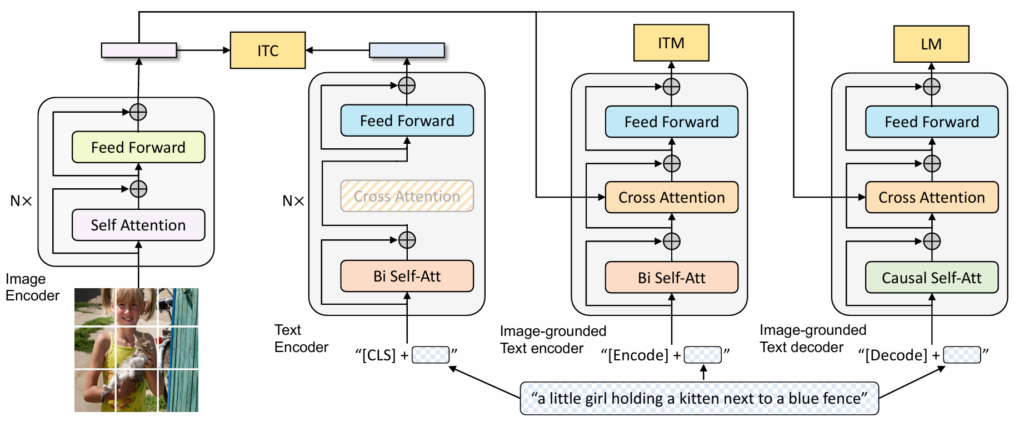
The BLIP model architecture includes:
- Unimodal Encoder: Separately encodes images and text.
- Image Encoder: A visual transformer (ViT) divides an input image into patches and encodes them as a sequence of embeddings, using an additional [CLS] token to represent the global image feature. It can be initialized from ViT pre-trained on ImageNet.
- Text Encoder: The text encoder is the same as BERT. A [CLS] token is appended to the beginning of the text input to summarize the sentence. The text transformer is initialized from BERTbase.
- Image-grounded Text Encoder: It injects visual information by inserting an additional cross-attention (CA) layer between the self-attention (SA) layer and the feed forward network (FFN) for each transformer block of the text encoder. A task-specific [Encode] token is appended to the text, and the output embedding of [Encode] is used as the multimodal representation of the image-text pair.
- Image-grounded Text Decoder: It replaces the bi-directional self-attention layers in the image-grounded text encoder with causal self-attention layers. A [Decode] token is used to signal the beginning of a sequence, and an end-of-sequence token is used to signal its end. The decoder shares the same cross-attention layers and feed forward networks as the encoder.
2. Pre-training Objectives of BLIP
To achieve its ambitious goal, BLIP cannot rely on a single learning strategy. It needs to understand, match, and generate. This is why it is trained by jointly optimizing three objectives simultaneously, each with a distinct purpose:
- Image-Text Contrastive Loss (ITC): This is the “matching” objective. Like in CLIP, its goal is to teach the model what images and texts belong together. It aligns the feature space of the visual and text transformers. It pulls the representations of a correct image-text pair closer in feature space while pushing incorrect pairs apart. This gives the model a foundational understanding of what concepts look like. A momentum encoder is introduced to produce features, and soft labels are created from the momentum encoder as training targets to account for potential positives in the negative pairs.
- Image-Text Matching Loss (ITM): This is the “*understanding*” objective. It goes a step further than ITC by asking a more difficult question: “Does this text *truly* describe this image?” ITM is a binary classification task where the model predicts whether an image-text pair is positive (matched) or negative (unmatched) given their multimodal feature. Thus, it trains a multimodal encoder to look at an image and a sentence together and predict if they are a match. This forces the model to learn a fine-grained alignment between specific words and regions in the image. Hard negative mining strategy is adopted to find more informative negatives.
- Language Modelling Loss (LM): This is the “*generating*” objective. Understanding is not enough; the model must also be able to communicate. This loss trains the model to generate a textual description for a given image, word by word. This is what empowers BLIP to perform tasks like image captioning. It optimizes a cross-entropy loss which trains the model to maximize the likelihood of the text in an autoregressive manner.
During pre-training, the text encoder and text decoder share all parameters except for the SA layers, as the differences between the encoding and decoding tasks are best captured by the SA layers.
3. CapFilt: Captioning and Filtering
One of the biggest challenges in training vision-language models is the “garbage in, garbage out” principle. The web is full of images and text, but the captions are often noisy, irrelevant, or generic (e.g., “image.jpg”). Training on this messy data can severely limit a model’s performance.
Instead of undertaking the impossible task of manually cleaning a dataset of millions of images, BLIP introduces a clever, automated solution called CapFilt (Captioning and Filtering). This is the “bootstrapping” part of its name and is a key innovation. The model essentially teaches itself to be a better data cleaner.
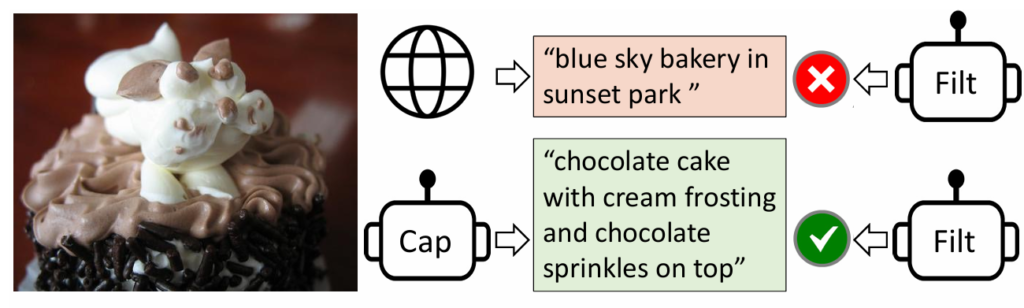
CapFilt consists of two modules that are fine-tuned individually:
- Captioner: An image-to-text model that is fine-tuned to generate new, synthetic captions for each web image. This creates a new, potentially better, set of descriptive texts. Nucleus sampling is employed to generate synthetic captions, as it leads to better performance due to the more diverse and surprising captions generated.
- Filter: A model trained to determine if an image-text pair is a good match. The filter then sifts through both the original web captions and the new synthetic captions, discarding any pairs it considers to be “noisy” or mismatched.
The captioner and the filter work together to achieve substantial performance improvement on various downstream tasks by bootstrapping the captions.
Getting Started with BLIP: A Practical Walkthrough
Let us walk through a hands-on example of using BLIP for image captioning. This step-by-step guide will help you set up your environment, load the BLIP model, and generate captions for images using Python.
# Step 1: Install required libraries
# Run this in your terminal before executing the code
# pip install torch transformers numpy pillow

# Step 2: Import necessary modules
from transformers import BlipProcessor, BlipForConditionalGeneration
from PIL import Image
import requests

# Step 3: Load the BLIP processor and model from Hugging Face
processor = BlipProcessor.from_pretrained('Salesforce/blip-image-captioning-base')
model = BlipForConditionalGeneration.from_pretrained('Salesforce/blip-image-captioning-base')

# Step 4: Prepare the input image
# Load an image from a URL
url = "https://storage.googleapis.com/sfr-vision-language-research/BLIP/demo.jpg"
image = Image.open(requests.get(url, stream=True).raw).convert("RGB")

# Alternatively, load a local image
# image = Image.open("path/to/your/image.jpg").convert("RGB")

# Step 5: Run unconditional image captioning
# Preprocess the image and generate a caption
inputs = processor(images=image, return_tensors="pt")
output = model.generate(**inputs)
caption = processor.decode(output[0], skip_special_tokens=True)
print(f"Generated Caption: {caption}")
# Example output: "a woman sitting on the beach with a dog"

# Step 6: Run conditional image captioning
# Provide a prompt to guide the caption generation
text = "a photo of"
inputs = processor(image, text, return_tensors="pt")
out = model.generate(**inputs)
conditional_caption = processor.decode(out[0], skip_special_tokens=True)
print(f"Conditional Caption: {conditional_caption}")
# Example output: "a photo of a woman sitting on the beach with her dog"This example demonstrates how BLIP can be used to generate both unconditional and conditional captions for images. By following these steps, you can experiment with BLIP and explore its capabilities in vision-language tasks.
BLIP vs. CLIP (Contrastive Language-Image Pre-training)
| Feature | BLIP | CLIP |
|---|---|---|
| Model Architecture | Dual-encoder with a focus on fine-grained alignment | Dual-encoder primarily using contrastive learning |
| Training Approach | Combines contrastive learning and caption-based supervision | Relies on large-scale contrastive learning |
| Flexibility | Adapts well to specialized tasks through fine-tuning | Generalizes well but less adaptable to highly specialized tasks |
| Performance | Excels in tasks requiring detailed language-image relationships | Performs robustly in general image-text matching and classification tasks |
Applications of BLIP

BLIP has several applications across various domains:
- Visual Question Answering (VQA): BLIP can answer questions about image content, useful in educational tools and customer support.
- Image Captioning: It generates descriptive captions for images, benefiting accessibility and content creation.
- Automated Content Moderation: It identifies and filters inappropriate content by understanding image and text context.
- E-commerce and Retail: It enhances product discovery and recommendations by understanding product images and user reviews.
- Healthcare: BLIP can assist in providing preliminary diagnoses or descriptions of medical images.
Limitations and Challenges of BLIP
- Data Quality and Diversity:
- BLIP models can inherit biases from training data, affecting fairness.
- Requires diverse training datasets for good performance across contexts.
- Complexity in Training:
- Training BLIP models needs considerable computational resources.
- Risk of overfitting on specific data types or tasks.
- Alignment and Coherence:
- Ensuring accurate alignment and understanding between text and images is challenging.
- Maintaining coherence in generating text from images can be difficult.
- Scalability and Efficiency:
- Maintaining efficiency in processing time and memory usage becomes challenging as the model scales.
- Adapting pre-trained models to specific applications without extensive retraining can be difficult.
- Dependence on Training Data: Performance may be limited by the quality and diversity of the training data.
- Limited Generalization: It might not generalize well to new, unseen tasks or datasets.
- Sensitivity to Input Quality: Requires high-quality input images to generate accurate captions.
- Contextual Understanding: May not always understand the broader context of the image.

Happy is a seasoned ML professional with over 15 years of experience. His expertise spans various domains, including Computer Vision, Natural Language Processing (NLP), and Time Series analysis. He holds a PhD in Machine Learning from IIT Kharagpur and has furthered his research with postdoctoral experience at INRIA-Sophia Antipolis, France. Happy has a proven track record of delivering impactful ML solutions to clients. Check more about him here: https://sites.google.com/site/slhappyin/
Subscribe to our newsletter!