Imagine an AI agent as a highly capable generalist engineer walking into a new team on the first day. It can reason well, write code, inspect files, run tools, and adapt quickly. But it still does not know your deployment checklist, your preferred libraries, your team’s failure patterns, or the internal conventions that make work reliable. In other words, the agent has intelligence, but it does not yet have operational memory. It needs the right procedure, the right defaults, the right gotchas, and the right local context.
That gap is exactly where Agent Skills fit.
Agent Skills are portable packages of instructions, scripts, and supporting resources that teach an agent how to perform a specific class of tasks. They provide specialized knowledge on demand, rather than forcing the agent to carry every detail in every conversation. The result is a system that is more reliable, easier to reuse, and more efficient with context.
This matters because most real agent failures are not caused by weak reasoning alone. They are caused by missing local procedure. The agent does not know which command is safe, which validator must run before execution, which API quirk always breaks the pipeline, or which output structure your team expects. Skills package that knowledge into a reusable, auditable form.
This article explains what Agent Skills are, why they matter, how they work, how to create them in VS Code, how to evaluate them, and how agent builders integrate them into real systems.
Why Agent Skills Matter
From a machine learning perspective, Agent Skills solve a very familiar problem: a foundation model is broad, but any production workflow requires specialization.
A useful mental model is:
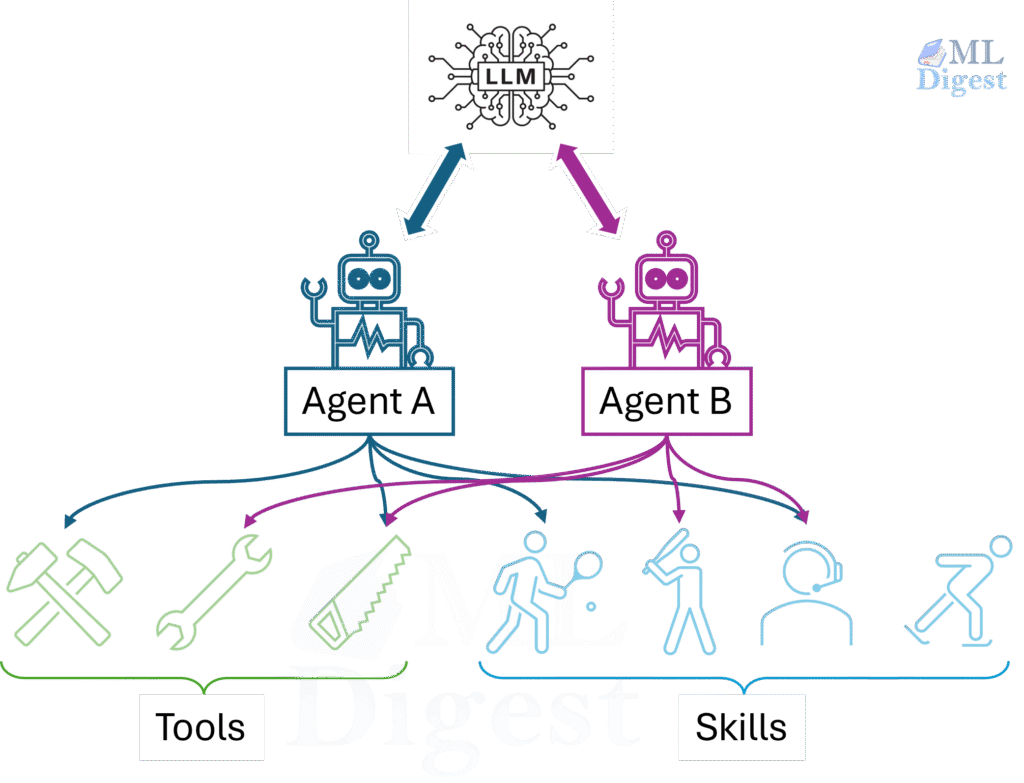
- the model provides general reasoning
- tools provide actions
- skills provide task-specific procedural knowledge
This separation is important. A tool tells the agent what it can do. A skill tells the agent how to do it well in a particular environment.
They reduce repeated prompting
Without a skill, users often restate the same operational context again and again:
- which library to use by default
- which scripts to run and in what order
- which validation steps are mandatory
- which edge cases usually cause failure
That repeated prompting is expensive and brittle. A skill converts repeated human coaching into reusable machine-readable procedure.
They improve reliability
Many agent failures are not caused by lack of intelligence. They are workflow mistakes. They are caused by missing local knowledge. For example:
- “Use
pdfplumberfor text extraction, then fall back to OCR only for scanned PDFs.” - “Validate the field mapping before filling the form.”
- “During code review, explicitly check SQL injection, authentication, and concurrency hazards.”
These are not generic facts from pretraining. They are procedural rules, team preferences, and local constraints. Skills are valuable precisely because they capture this missing layer.
They preserve context budget
The central design idea behind Agent Skills is progressive disclosure.
The agent does not load every skill in full when a session begins. Instead, it loads only a lightweight catalog, usually the skill name and description. Full instructions are typically loaded only when the agent decides a skill is relevant, or when the user explicitly invokes the skill. Scripts, references, and templates are loaded even later, only if the instructions point to them.
This is roughly analogous to retrieval in ML systems: bring in the right task-specific context only when it becomes useful. The analogy is helpful but not exact, because a skill is not just retrieved knowledge. It can also define procedure, resource loading, and execution patterns.
They support portability and governance
Because a skill is just a structured folder, it is easy to:
- version in Git
- review in code review
- share across teams
- move between compatible agent products
- audit for security and quality
This makes Agent Skills much more operationally attractive than ad hoc prompt snippets copied from one chat session to another.
A Short Executive Summary
If you remember only five points, remember these:
- A skill is a folder with a
SKILL.mdfile and optional supporting files. - The
descriptionfield is the primary signal used for automatic skill activation. - The body of
SKILL.mdshould contain concise, reusable procedure rather than generic advice. - Strong skills usually include defaults, gotchas, and validation steps.
- Good skills should be evaluated along two axes: triggering accuracy and output quality.
What an Agent Skill Is
At the specification level, an Agent Skill is a directory containing a SKILL.md file. Optional subdirectories can include scripts, references, templates, and other resources.
The minimal shape looks like this:
my-skill/
├── SKILL.md
├── scripts/        # optional executable helpers
├── references/     # optional deeper documentation
└── assets/         # optional templates or resources
The SKILL.md file contains two layers:
- YAML frontmatter for metadata
- Markdown instructions for the agent
The only universally required frontmatter fields are:
namedescription
The name must match the parent directory name and follow the specification’s naming constraints. The description is the key activation signal, because it tells the agent what the skill does and when to use it.
Here is a minimal example:
---
name: roll-dice
description: Roll dice with true randomness. Use when asked to roll a die, roll dice, or generate a random dice roll.
---

# Roll Dice

Use a shell command to generate a random integer from 1 to the requested number of sides.This simple format is the reason skills are portable. They are plain files, easy to read, version, audit, share, and evolve.
How Agent Skills Work
The easiest way to understand the runtime behavior is to think of a skill as a three-stage memory structure.
flowchart TD
    A[Session starts] --> B[Load skill catalog<br/>name + description only]
    B --> C{Does the task match<br/>a skill description?}
    C -- No --> D[Proceed without skill]
    C -- Yes --> E[Load full SKILL.md instructions]
    E --> F{Does the skill need additional scripts, references, or assets?}
    F -- No --> G[Execute task]
    F -- Yes --> H[Load only required support files]
    H --> G[Execute task]
This is progressive disclosure in action.
The three layers of disclosure
You can summarize the mechanism like this:
| Layer | What is loaded | When it is loaded | Why it matters |
|---|---|---|---|
| Catalog | name + description | Session start | Lets the agent know which skills exist |
| Instructions | Full SKILL.md body | On activation | Gives the agent the procedure |
| Resources | scripts/, references/, assets/ | On demand | Keeps context lean until extra detail is required |
This design matters because context is expensive. If the agent loaded every skill body at the start of a session, most of that information would be irrelevant noise.
An ML-style way to reason about value
From a machine learning point of view, it is useful to think of a skill’s practical value as a rough product of trigger quality and execution quality:
$$
\text{Skill Value} \approx P(\text{correct trigger}) \times \Delta \text{task quality} – \text{context and latency cost}
$$
This is not a formal metric from the specification. It is a design heuristic. A skill is useful only if:
- it activates on the right tasks
- it improves outcomes once activated
- the improvement justifies the added tokens, time, and complexity
That simple equation explains why the documentation emphasizes both trigger optimization and output evaluation.
Agent Skills, Tools, Prompt Files, and Custom Instructions
It is helpful to distinguish several related concepts that are easy to blur together.
Skills vs tools
Tools give the agent capabilities such as reading files, running scripts, or querying APIs. Skills do not replace tools. Instead, skills orchestrate tool usage.
In short:
- tools answer: “What actions are available?”
- skills answer: “What procedure should I follow for this kind of task?”
Skills vs custom instructions
This distinction is especially important in VS Code.
Use Agent Skills when you want:
- specialized workflows
- reusable task-specific capability packages
- scripts, templates, and supporting files
- optional loading only when relevant
- portability across compatible agent products
Use custom instructions when you want:
- persistent coding style rules
- repository conventions
- language or framework preferences
- review, formatting, or commit guidelines that should always apply
An intuitive framing is this:
- custom instructions shape the agent’s baseline behavior
- skills add temporary specialist capability
Skills vs one-off prompts
A one-off prompt solves a single problem. A skill captures the reusable pattern behind many similar problems.
If you find yourself repeatedly saying the same things to an agent, you probably do not need a longer prompt. You probably need a skill.
The Structure of SKILL.md
The Agent Skills specification defines SKILL.md as YAML frontmatter followed by Markdown instructions.
Required frontmatter
---
name: pdf-processing
description: Extract text, fill forms, and merge PDF files. Use when the user is working with PDF documents, form filling, or document extraction.
---Optional frontmatter in the open specification
The open specification also supports optional fields such as:
licensecompatibilitymetadataallowed-tools(experimental, with implementation-dependent support)
These fields are useful when a skill has explicit environment requirements, licensing constraints, or client-specific metadata.
VS Code-specific frontmatter extensions
VS Code supports additional frontmatter properties for user experience:
argument-hintuser-invocabledisable-model-invocation
These are useful when you want to expose a skill as a slash command, hide it from manual invocation, or disable automatic model triggering.
What belongs in the body
The Markdown body is where the actual behavior lives. A strong body usually contains:
- a short “when to use this skill” section
- a default step-by-step procedure
- preferred tools or libraries
- examples of inputs and outputs
- common gotchas and failure modes
- references to scripts or support files
There is no mandated Markdown schema, but there is a strong design recommendation: keep the main file concise, and move deeper detail into references/ or other support files.
The documentation recommends keeping SKILL.md under roughly 500 lines and 5,000 tokens.
Why the description Field Deserves Special Attention
If SKILL.md is the operational brain of the skill, the description is the routing function.
At startup, the agent usually sees only the name and description. In automatic triggering flows, that means the description does most of the work required for activation.
Bad description:
description: Helps with PDFs.Better description:
description: Extract text and tables from PDFs, fill PDF forms, and merge files. Use this skill when the user is working with PDF documents, forms, OCR fallbacks, or document extraction workflows.Strong descriptions usually do four things:
- state the capability clearly
- state when to use it
- reflect user intent rather than internal implementation
- define boundaries so the skill does not trigger too broadly
One subtle but important point from the documentation is that skills are often most helpful on tasks that exceed the agent’s default competence. A simple single-step task may not trigger a skill even if the text overlaps, because the agent may decide it does not need specialized guidance. This is normal in many implementations and does not necessarily mean the description is wrong.
A Concrete Example of a Well-Structured Skill
Suppose you want a skill that helps an agent analyze tabular datasets. A good skill needs a clear scope, a default workflow, a few gotchas, and explicit validation.
Example SKILL.md
---
name: tabular-analysis
description: Analyze CSV, TSV, and Excel data files. Use this skill when the user wants summary statistics, derived columns, charts, cleaning, or exploratory analysis of tabular datasets, even if they do not explicitly mention CSV analysis.
compatibility: Requires Python 3.11+ and uv.
---

# Tabular Analysis

## When to use this skill

Use this skill for tabular data exploration, cleaning, aggregation, and chart generation.

## Default approach

1. Inspect the file schema first.
2. Load the data with Python.
3. Validate column names and missing values before computing results.
4. Use pandas for manipulation and matplotlib for simple charts.
5. Save outputs to files when results may be large.

## Available scripts

- `scripts/profile.py` — generate a quick dataset profile
- `scripts/validate_columns.py` — validate expected columns

## Gotchas

- Dates often arrive as strings and must be parsed explicitly.
- Revenue columns may contain commas or currency symbols.
- If a chart is requested, label both axes and include a clear title.

## Workflow

1. Run `uv run scripts/profile.py <input-file>`.
2. Review null counts and inferred column types.
3. If required columns are missing, stop and report the issue clearly.
4. Perform the requested analysis.
5. Validate outputs before finalizing.This example is worth studying because it captures the recurring structure of good skills:
- a clear activation boundary
- a default path rather than a menu of equal options
- lightweight references to scripts
- explicit gotchas
- a validation step before completion
How to Create a Skill in VS Code
VS Code has strong support for Agent Skills through GitHub Copilot. The workflow is intentionally straightforward.
Where VS Code looks for skills
VS Code recognizes both project-level and personal skills.
Common project locations include:
.github/skills/.claude/skills/.agents/skills/
Common personal locations include:
~/.copilot/skills/~/.claude/skills/~/.agents/skills/
You can also configure additional discovery locations using the chat.agentSkillsLocations setting.
Basic creation flow
- Create a skill directory such as
.github/skills/webapp-testing/. - Add a
SKILL.mdfile. - Optionally add
scripts/,references/, or example files. - Open Copilot Chat in Agent mode.
- Run
/skillsto confirm the skill is discoverable. - Trigger the skill naturally, or invoke it explicitly with
/skill-name.
VS Code also supports AI-assisted creation. You can use /create-skill to generate a new skill or ask the agent to extract a skill from a successful conversation.
Slash-command behavior in VS Code
VS Code exposes skills as slash commands in chat. Two properties are especially useful:
user-invocable: falsehides the skill from the slash-command menu while preserving automatic model invocation.disable-model-invocation: trueprevents automatic invocation and makes the skill manual-only.
This gives you a clean distinction between:
- background skills that should load automatically when relevant
- operator skills that a user should invoke deliberately
A practical creation checklist for VS Code users
If you are creating your first skill in VS Code, this sequence is reliable:
- Put the skill under
.github/skills/if it is repository-specific. - Keep the first version small.
- Verify discovery with
/skills. - Test one natural prompt and one explicit slash-command invocation.
- Only after that, add scripts and evaluation cases.
This order matters because it isolates two common failure modes early: discovery problems and poor activation wording.
Best Practices for Authoring High-Quality Skills
The Agent Skills documentation is especially strong on authoring discipline. The most important patterns are not about fancy formatting. They are about information economy and procedural clarity.
Start from real expertise
The documentation strongly advises against generating skills from generic background knowledge alone. The best skills are extracted from:
- actual agent-assisted task completions
- internal runbooks and design docs
- code review comments
- issue trackers and incident reports
- real failures and how the team resolved them
This principle is crucial. A good skill should capture what your organization knows that the base model does not.
Add what the agent lacks, omit what it already knows
This is the most important compression rule.
Do not spend context explaining concepts the agent is already likely to know, such as what PDFs are or how HTTP works. Spend context on the information that changes behavior:
- preferred libraries
- forbidden approaches
- local conventions
- hidden dependencies
- environment-specific pitfalls
- output requirements that the agent would otherwise miss
You can think of a skill as encoding the delta between generic model knowledge and successful execution in your environment.
Design coherent skill boundaries
Good skills have strong internal cohesion.
If a skill is too narrow:
- several skills may need to activate for one task
- instructions may overlap or conflict
- activation overhead increases
If a skill is too broad:
- activation becomes imprecise
- irrelevant material enters context
- maintenance becomes difficult
This is very similar to software design. A good skill feels like a well-designed module: focused, composable, and understandable.
Favor procedures over declarations
A skill should teach the agent how to solve a class of problems rather than memorizing one exact answer.
Weak instruction:
Join orders to customers and sum the amount column.Better instruction:
1. Read the schema reference.
2. Identify relevant tables.
3. Join using the project’s foreign-key convention.
4. Apply filters from the user request.
5. Aggregate numeric fields as needed.The second version is reusable because it generalizes beyond a single prompt.
When several approaches are possible, pick a default. Agents usually perform better when the path of least resistance is also the preferred path.
Agents perform better when the skill says:
- “Use
pdfplumberby default. Use OCR only for scanned PDFs.”
than when it says:
- “You can use
pypdf,pdfplumber,PyMuPDF, or OCR.”
Defaults reduce search cost and improve consistency.
Match specificity to task fragility
Some workflows are flexible. Others are brittle.
For flexible tasks such as exploratory analysis or code review, explain the goal and the important checks, then let the agent adapt.
For fragile tasks such as migrations, deployments, and destructive operations, be prescriptive:
- exact command
- exact order
- explicit validation gate
- stop conditions
The more brittle the workflow, the more concrete the instructions should be.
Include a gotchas section
One of the highest-value authoring patterns is a dedicated gotchas section. This is where you store facts the agent is likely to get wrong even if it is otherwise competent.
Examples include:
- soft-delete filters that must always be applied
- inconsistent identifier names across systems
- misleading health endpoints
- formatting requirements that are not obvious from the prompt
As a practical rule, every time you correct the agent during a real task, ask whether that correction belongs in the skill’s gotchas.
Use validation loops
Strong skills do not stop at “do the task.” They also specify how to verify that the work is correct.
The recurring pattern is:
- perform the task
- run a validator
- inspect failures
- fix the issue
- rerun the validator
- finalize only after validation passes
This single pattern often improves reliability more than adding many extra prose instructions.
Keep the main skill lean
Once a skill activates, the full body of SKILL.md competes for attention with conversation history, system instructions, and other active skill content. Large skills can become self-defeating.
The recommended pattern is:
- keep only the essential procedure in
SKILL.md - move deeper reference material into
references/ - tell the agent exactly when to load the reference file
That last point matters. “See references/ for details” is vague. “Read references/api-errors.md if the API returns a non-200 response” is much more useful.
Using Scripts Inside Skills
Sometimes natural-language instructions are enough. Sometimes the agent keeps reinventing the same helper logic. That is when scripts become valuable.
The guidance from the documentation is clear:
- use one-off commands for simple external tools
- bundle reusable scripts for repeated or fragile operations
Referencing scripts from SKILL.md
Scripts are referenced using relative paths from the skill directory root.
Example:
## Available scripts

- `scripts/validate.sh` — validates configuration
- `scripts/process.py` — processes results

## Workflow

1. Run `bash scripts/validate.sh "$INPUT_FILE"`
2. Run `python3 scripts/process.py --input results.json`Self-contained Python scripts with inline dependencies
For Python, the documentation recommends self-contained scripts where possible. PEP 723 metadata works well with uv run.
# /// script
# dependencies = [
#   "pandas>=2.2,<3",
# ]
# requires-python = ">=3.11"
# ///

import argparse
import json
import pandas as pd

parser = argparse.ArgumentParser(description="Profile a tabular dataset")
parser.add_argument("input_file")
args = parser.parse_args()

df = pd.read_csv(args.input_file)

summary = {
    "rows": len(df),
    "columns": list(df.columns),
    "null_counts": df.isna().sum().to_dict(),
}

print(json.dumps(summary, indent=2))The agent can run this with:
uv run scripts/profile.py data.csvScript design rules for agentic execution
This is one of the most practical parts of the documentation. Good agent-facing scripts should:
- avoid interactive prompts entirely
- expose usage with
--help - return actionable error messages
- prefer structured outputs such as JSON, CSV, or TSV
- separate data on stdout from diagnostics on stderr
- support safe defaults and, where appropriate,
--dry-run - be idempotent when retries are likely
- avoid huge stdout dumps unless explicitly requested
These are not stylistic preferences. They directly affect whether an agent can use the script reliably.
How to Evaluate Whether a Skill Is Actually Good
One of the strongest ideas in the Agent Skills documentation is that skill authoring should be treated as an agent evaluation problem, not merely as a writing exercise.
You do not know a skill is good because one demo went well. You know it is good because it improves results consistently across varied, realistic tasks.
Evaluating Output Quality
The recommended pattern is to create evaluation cases in evals/evals.json.
Each test case contains:
- a realistic prompt
- an expected output description
- optional input files
- later, a set of assertions
Example:
{
  "skill_name": "csv-analyzer",
  "evals": [
    {
      "id": 1,
      "prompt": "I have a CSV of monthly sales data in data/sales_2025.csv. Can you find the top 3 months by revenue and make a bar chart?",
      "expected_output": "A bar chart image showing the top 3 months by revenue, with labeled axes and values.",
      "files": ["evals/files/sales_2025.csv"]
    }
  ]
}Evaluate with and without the skill
Each case should be run at least twice:
- once with the skill enabled
- once without the skill, or with the previous version as the baseline
This creates a meaningful comparison. Without a baseline, it is very hard to tell whether the skill is adding value or merely restating what the model already does well.
Add assertions after the first pass
It is recommended to write detailed assertions after you inspect the first outputs. That is sensible, because you often do not know what “good” should look like until you have seen a few real runs.
Good assertions are objective and verifiable:
- “The output includes a chart image file.”
- “The chart shows exactly 3 months.”
- “Both axes are labeled.”
Weak assertions are vague or brittle:
- “The output is good.”
- “The report uses exactly this sentence.”
Record evidence, not just pass or fail
When grading, store evidence along with each assertion result. That evidence is what makes iteration useful. It tells you not only that the skill failed, but how it failed.
Measure cost as well as quality
The suggested benchmark includes:
- pass rate
- token usage
- duration
This is important because a skill is not automatically good just because it improves quality by a small amount. The gain should justify the extra cost.
Human review still matters
Assertions catch objective failures. Humans catch misalignment, awkward output structure, and technically correct but practically unhelpful behavior.
The recommended iteration loop is:
- run the eval suite
- grade assertions
- review outputs as a human
- inspect execution traces
- revise the skill
- rerun the suite
This is one of the most effective ways to turn a decent skill into a robust one.
How to Optimize Skill Triggering
A skill that never triggers is useless. A skill that triggers too often becomes noise.
That is why the documentation treats triggering as a separate evaluation problem.
Build a labeled query set
Create realistic prompts labeled with should_trigger: true or false. The recommended scale is about 20 prompts:
- 8 to 10 that should trigger
- 8 to 10 that should not trigger
The most useful negatives are near misses. For example, a CSV-analysis skill should not necessarily trigger for a CSV-to-database ETL request.
Run multiple times
Because model behavior is nondeterministic, each query should be tested multiple times. The documentation suggests starting with 3 runs and computing a trigger rate.
Use train and validation splits
This recommendation will feel familiar to anyone with an ML background. If you optimize the description on every query, you risk overfitting to those exact phrasings. A train and validation split gives you a better estimate of whether the improved description generalizes.
Revise by concept, not by keyword stuffing
If a skill does not trigger on a prompt, do not simply paste missing keywords from that prompt into the description. Instead, ask:
- which user intent category is missing?
- which adjacent task boundary is unclear?
- what broader phrasing would capture the same family of requests?
That approach produces descriptions that generalize instead of memorizing examples.
How Agent Builders Integrate Skills
The client implementation guide is especially relevant if you are building an AI coding tool, an internal agent platform, or any client that wants to support the Agent Skills standard.
Beyond Integrated Editors: Frameworks like CrewAI and AutoGen
Because Agent Skills use an open, file-based format, they are not permanently locked to VS Code or Claude Code. You can bridge these files into standalone Python frameworks like CrewAI or AutoGen to give those agents local specialized knowledge.
These frameworks run in isolated execution environments and will not magically discover skills. To integrate them, you must write code to parse the YAML frontmatter (for name and description) and the Markdown body (for instructions), and append them to the agent’s system prompt or tool structure.
For example, using Python to parse the SKILL.md file allows you to extract the instructions and assign them directly to a CrewAI agent’s backstory parameter. You essentially become the engine performing the “Discovery, Parsing, and Disclosure” steps manually.
Discovery, Parsing, Disclosure, Activation, Retention
The integration lifecycle has five major stages.
1. Discover skills
At session startup, the client scans configured directories for subdirectories containing SKILL.md.
Common scopes include:
- project-level skills
- user-level skills
- organization-level skills
- built-in packaged skills
The .agents/skills/ path has emerged as an important interoperability convention, even though the open specification does not mandate a storage location.
Useful scanning rules include:
- skip directories such as
.git/andnode_modules/ - optionally respect
.gitignore - bound scan depth and total directory count
- resolve name collisions with a deterministic precedence rule
One particularly important recommendation is trust gating. Project-level skills may come from untrusted repositories, so clients should consider loading them only when the workspace is trusted.
2. Parse SKILL.md
The client parses the YAML frontmatter and the Markdown body.
The guide recommends a lenient approach when possible:
- warn on cosmetic issues
- load skills that are still usable
- skip only fundamentally broken files, such as those with missing descriptions or completely unparseable YAML
This improves cross-client compatibility.
3. Disclose the catalog to the model
The model should initially see only a catalog of available skills, not full skill bodies. The catalog normally contains:
namedescription- optionally a
location
This can be placed in a system prompt section or surfaced through a dedicated activation tool.
4. Activate the chosen skill
The documentation describes two common activation patterns:
- file-read activation, where the model reads
SKILL.mddirectly - dedicated tool activation, where the client exposes something like
activate_skill(name)
The dedicated-tool approach gives the harness more control. It can:
- validate skill names
- wrap content in structured tags
- list bundled resources
- strip or preserve frontmatter
- enforce permissions
- collect analytics
5. Preserve skill context during the session
Once injected, skill content should not be casually removed during context compaction. Otherwise, the agent can silently lose the instructions that explain how to perform the task correctly.
The client guide also recommends:
- deduplicating repeated activations
- protecting skill content during context pruning
- optionally delegating some skills to subagents
VS Code-Specific Integration Details
GitHub Copilot in VS Code is one of the clearest production-grade examples of Agent Skills support.
What VS Code adds beyond the open standard
The open standard defines the portable file format. VS Code adds user-facing ergonomics and product integration, including:
- discovery across common local skill directories
- slash-command invocation
- AI-assisted skill generation through
/create-skill - a Chat Customizations editor
- extension-contributed skills through
chatSkills
Contributing skills from extensions
VS Code extensions can package skills under a skills/ directory and register them in package.json.
Example:
{
  "contributes": {
    "chatSkills": [
      {
        "path": "./skills/my-skill/SKILL.md"
      }
    ]
  }
}The directory name and the name field inside SKILL.md must match. This is explicitly required for extension-contributed skills, and it is also the expected convention for local skills that follow the Agent Skills specification.
VS Code also supports shared skills copied from community repositories and skills bundled in agent plugins. The security implication is straightforward: a skill is not just documentation. It can instruct the agent to read files, run scripts, and use tools.
That is why shared skills should be reviewed with the same seriousness as any executable automation asset.
Common Mistakes to Avoid
The documentation, taken as a whole, points to a predictable set of failure modes.
Mistake 1: writing generic instructions
If the skill says only “handle errors carefully” or “follow best practices,” it is probably not adding much value. The model already knows generic advice.
Mistake 2: putting too much into SKILL.md
When the main file becomes a long manual, irrelevant detail competes for attention with the actual task. Move deep reference material out of the main body.
Mistake 3: giving the agent too many equal options
If the skill lists many equal alternatives without a default, the agent has to choose from scratch every time. That increases variability.
Mistake 4: skipping validation
Without a validation loop, the agent may stop at the first plausible answer rather than the first correct one.
Mistake 5: evaluating on only one happy-path demo
A single successful run is not evidence of robustness.
Mistake 6: optimizing descriptions by keyword stuffing
Keyword stuffing may improve a small benchmark temporarily, but it often hurts generalization.
A Practical End-to-End Checklist
If you are building your first serious skill, the following checklist is a useful default.
- Start from a real task completed with an agent.
- Extract the reusable procedure.
- Define a tight scope.
- Write a strong
descriptionthat captures user intent and boundaries. - Write a concise
SKILL.mdbody with defaults and gotchas. - Add a validation loop.
- Bundle scripts only when repeated logic justifies them.
- Validate the skill structure.
- Test triggering with realistic positive and negative prompts.
- Test output quality against a baseline.
- Review failures, traces, and human feedback.
- Iterate.
For tool or platform builders
- Discover skills from standard locations.
- Parse frontmatter and body robustly.
- Expose only the catalog at session start.
- Support both model-driven and user-driven activation.
- Preserve activated skill content during context management.
- Allow safe access to bundled resources.
- Add diagnostics for malformed skills and name collisions.
- Apply trust checks for project-level skills.
Final Thoughts
Agent Skills matter because they solve a very practical systems problem: how to make general-purpose AI agents behave more like specialists without retraining the model and without bloating every prompt.
They do this through a simple design:
- a portable file-based format
- progressive disclosure for context efficiency
- optional scripts and references for real workflows
- evaluation loops for systematic refinement
For readers with a machine learning background, the key idea is straightforward: a skill is a reusable package of task-specific procedural context that improves performance by being injected only when relevant.
That makes Agent Skills more than a convenience feature. They are becoming an important interface layer between foundation models and the real operational knowledge that makes AI systems useful in practice.
References
- Agent Skills overview
- What are skills?
- Specification
- Quickstart
- Best practices
- Optimizing descriptions
- Evaluating skills
- Using scripts
- Client implementation
- VS Code integration

Silpa brings 5 years of experience in working on diverse ML projects, specializing in designing end-to-end ML systems tailored for real-time applications. Her background in statistics (Bachelor of Technology) provides a strong foundation for her work in the field. Silpa is also the driving force behind the development of the content you find on this site.
Subscribe to our newsletter!