These terms are frequently used interchangeably, but they refer to different layers of software abstraction. Most confusion comes from accidentally mixing three separate questions:
- What can I call from my code?
- How do I install and ship it?
- Who controls the program flow once the application runs?
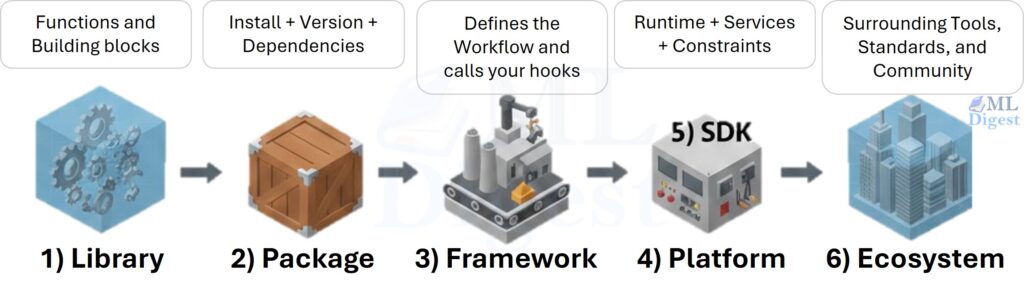
To keep the concepts separate, anchor each term to a single diagnostic question:
- Library: What functionality can my code call?
- Package: How is that functionality delivered, installed, and versioned?
- Framework: Who controls the program flow: my code or the framework?
- Platform: What environment am I building for, and what constraints does it impose?
- SDK: What kit do I use to build against a specific platform?
- Ecosystem: What is the surrounding world of tools, practices, and community?
The terms are intentionally defined by how they behave in practice (control flow, distribution, platform integration), rather than by how marketing pages label them.
One important note
In practice, many real projects combine these categories (for example, an SDK can ship as a package and include libraries and a CLI). The goal here is not to enforce labels, but to provide a mental model that makes documentation and tooling choices easier to interpret.
Quick map (where each term shows up)
- If you are reading Python import docs: you are likely looking at a library.
- If you are reading installation/version docs: you are likely looking at a package.
- If you are reading project structure/lifecycle docs: you are likely looking at a framework.
- If you are reading quotas/regions/managed services docs: you are likely looking at a platform.
- If you are reading credentials/resources/regions docs: you are likely looking at an SDK.
- If you are reading tooling/community/workflow docs: you are likely looking at an ecosystem.
1. Library
A library is a collection of reusable code (functions, classes, utilities) that your program calls to perform specific tasks.
Key idea
You call the library. Your code remains in control of the program flow.
Another way to say this: libraries are generally composable. You can call them in whatever order fits your script, notebook, or application.
What a library usually provides
- APIs: functions/classes you import and call
- Data structures: tensors, arrays, datasets, tokenizers
- Algorithms: optimizers, losses, metrics, search, preprocessing
ML-flavored examples
- NumPy: arrays and linear algebra primitives
- scikit-learn: classical ML algorithms and preprocessing
- PyTorch: tensors, autograd, neural network building blocks
- Transformers (Hugging Face): pretrained model interfaces and tokenization
Example (you are in charge)
import numpy as np

x = np.array([1, 2, 3])
y = x.mean()
print(y)In this snippet, you decide when to create arrays, when to compute, and what to print.
Common boundary cases
- “It feels like a framework.” Some libraries are large and opinionated, but the decisive test is still control flow: if you are writing the top-level loop (training loop, orchestration loop, request loop), it is library-like.
- “It has a CLI.” A library can ship with a CLI, but the CLI is not what makes it a framework. It is simply another interface to the same functionality.
2. Package
A package is a distributable unit of software. It is the unit you typically install from a package manager.
In other words:
- A library describes what you can use.
- A package describes how it is delivered.
Key idea
A package is how software is shipped and installed.
If a library answers “what can I call?”, a package answers “what do I install to get that, and what does it pull in with it?”
What a package can contain
- One or more libraries
- Command-line tools (CLI)
- Configuration files and default assets
- Documentation
- Dependencies (things it needs to work)
ML-flavored examples
torchon PyPI: package that delivers the PyTorch libraryscikit-learnon PyPI: package that delivers scikit-learntransformerson PyPI: package that delivers Hugging Face Transformerstensorflowon PyPI: package that delivers TensorFlow
Practical nuance (why this matters)
- Same library name, different package name: sometimes the import name differs from the install name.
- Install:
pip install scikit-learn - Import:
import sklearn
- Install:
- One package, multiple libraries: a package can ship several submodules.
- Platform-specific builds: ML packages may ship different wheels for CPU/GPU.
Useful distinctions (especially in Python)
- Distribution name vs import name: the name shown by the package manager (for example, on PyPI) is the distribution name;
import ...uses the module name. - Package vs module vs repository: a GitHub repository might produce one or many distributable packages; a package might expose one or many importable modules.
- Dependency surface area: packages define dependency graphs and version resolution rules. This matters in ML because transitive dependencies can affect CUDA compatibility, performance, and reproducibility.
3. Framework
A framework is an opinionated foundation for building applications. It usually defines:
- a project structure
- lifecycle hooks
- conventions and default patterns
Key idea: inversion of control
The framework calls your code. This is often described as Inversion of Control (IoC).
Think of it like this:
- With a library, you write a script and call functions.
- With a framework, you write components/handlers that the framework discovers and runs.
Visual (described diagram)
Imagine two flow charts:
1) Library flow: your_script() → calls library.fn() → returns to your_script().
2) Framework flow: framework.run() → calls your_callback() / your_handler() at the right time.
If you want a slightly more precise framing: frameworks typically provide an execution model (routing, lifecycle hooks, dependency injection, training loops, scheduling) and you provide plug-ins to that model.
ML-adjacent examples
- FastAPI / Flask / Django: web frameworks for model serving and ML backends
- PyTorch Lightning (often framework-like): structured training loops and conventions
- Ray (framework/platform-oriented): distributed execution patterns
Library vs framework (quick table)
| Dimension | Library | Framework |
|---|---|---|
| Control flow | You control flow | Framework controls flow |
| Structure | Minimal constraints | Strong conventions |
| Typical feel | Toolbox | Skeleton you fill in |
Practical nuance
- Frameworks impose “shape.” They tend to define where code lives (folders, modules), how configuration is expressed, and how components are discovered.
- They reduce accidental complexity. In exchange for conventions, you get less boilerplate and fewer architectural decisions to make.
- They can be libraries in disguise. Some tools can be used in both modes. If you can use them as a set of functions in your own script, you are using them as a library. If you define handlers and the tool runs the loop, you are using it as a framework.
4. SDK (Software Development Kit)
An SDK is a comprehensive collection of tools used to build applications for a specific platform (a cloud service, OS, mobile device, or hardware). It is a superset that often includes libraries, but adds more:
- Client Libraries: Code to communicate with APIs
- Compiler/Debugger: Tools to build and fix code (e.g., Android SDK, CUDA Toolkit)
- Documentation: Guides and references
- Code Samples: Example implementations
- Utilities: CLIs, emulators, or testing tools
Key idea
An SDK is the “toolbox” provided by a platform vendor.
While a library gives you code to run, an SDK gives you the entire toolchain needed to develop for a specific target.
You can think of it as: a library (or set of libraries) + tooling + conventions + docs, all packaged to make integration easy.
What makes an SDK different from a library
- Scope: A library does one thing (e.g., “handle HTTP requests”). An SDK facilitates the entire development lifecycle for a platform (e.g., “Build an Android App”).
- Ownership: SDKs are almost always provided by the owner of the platform (AWS, Google, Apple, NVIDIA).
ML-flavored examples
- AWS SDK for Python (
boto3): upload data to S3, trigger SageMaker training jobs, manage IAM - Google Cloud SDK / client libraries: interact with GCS, Vertex AI, BigQuery
- Azure SDK for Python: interact with Blob Storage, ML services, identity
- Weights & Biases SDK (
wandb): log metrics, artifacts, runs, and dashboards - CUDA Toolkit (often treated as an SDK): build and run GPU-accelerated code against NVIDIA GPUs
Tiny example (SDK-style integration)
import boto3

s3 = boto3.client("s3")
s3.upload_file("model.onnx", "my-bucket", "models/model.onnx")This is less about general algorithms and more about integrating with a platform (AWS).
Practical nuance
- An SDK is often a bundle: client libraries plus CLIs, code generators, local emulators, and examples.
- SDK vs API: an API is the interface offered by the platform; the SDK is the developer-facing toolkit that makes calling that API convenient and consistent.
5. Platform
A platform is the execution and integration environment you build for. It is not primarily a code artifact you import; it is the set of capabilities, constraints, and operational rules that shape what your software can do.
Key idea
A platform is the target environment that defines the “rules of the game.”
If a framework answers “who controls the flow?” and an SDK answers “what kit do I use to integrate?”, a platform answers:
- Where will this run?
- What services exist around it?
- What constraints (quotas, auth, latency, data locality, compliance) must my system respect?
What a platform usually provides
- Runtime environment: compute, GPUs, containers, serverless
- Managed services: storage, queues, feature stores, model registries, monitoring
- Identity and access: IAM, service principals, policies, audit logs
- Operational guardrails: quotas, rate limits, regions, cost model
- Interfaces: APIs and events that software integrates with
ML-flavored examples
- AWS / Azure / Google Cloud: managed storage, training, deployment, IAM, regions
- Kubernetes (as a platform): scheduling, networking, service discovery, deployment primitives
- Databricks: managed Spark + notebooks + job orchestration + governance
- Snowflake: data platform with warehouses, governance, and integrations
- NVIDIA CUDA (as a platform surface): hardware + drivers + execution model constraints
- Hugging Face Hub (as a platform surface): model hosting, versioning, and deployment primitives
6. Ecosystem
An ecosystem is the complete environment around a technology: the tools, libraries, frameworks, best practices, community, tutorials, plugins, and companies supporting it.
Key idea
Everything surrounding a technology that makes it usable in the real world.
An ecosystem is not a single thing you install. It is the network effect around a technology: tooling, conventions, and community knowledge that make teams productive.
What an ecosystem includes
- libraries and frameworks
- package managers and build tools
- docs, tutorials, conferences
- community Q&A, maintainers, governance
- integrations and plugins
- common workflows and conventions
ML-flavored examples
- Python ML ecosystem: NumPy, pandas, scikit-learn, PyTorch, JAX, Matplotlib, pip/conda, Jupyter
- PyTorch ecosystem: torch, torchvision/torchaudio, Lightning, Accelerate, Triton, community extensions
- Hugging Face ecosystem: transformers, datasets, tokenizers, accelerate, hub, spaces
- MLOps ecosystem: MLflow, W&B, DVC, BentoML, Airflow, Prefect, Kubernetes tooling
Common boundary cases
- Package vs library: a package is how code is delivered and installed; a library is the code itself that you call after installation.
- Framework vs library: a framework defines the structure and flow of your application; a library is a set of functions you call within your own structure and flow.
- SDK vs framework: an SDK is a toolkit for integrating with a platform; a framework is a code structure and execution model that may or may not be tied to a specific platform.
- SDK vs library: an SDK is a curated set of tools for a specific platform; a library is a general-purpose set of reusable code that may or may not be tied to a specific platform.
- Platform vs ecosystem: a platform is a specific target environment (for example, AWS). An ecosystem is the broader surrounding world (tools, plugins, community patterns) that may span multiple platforms.
- Platform vs SDK: an SDK is code and tooling that makes platform integration convenient; the platform is the environment itself.
- Platform vs framework: frameworks impose conventions and control flow within your application; platforms impose operational and integration constraints around your application.
- Ecosystem vs framework: a framework is a specific code structure and execution model; an ecosystem includes many frameworks, libraries, and tools that work together.
- Ecosystem vs library: a library is a specific set of reusable code; an ecosystem includes many libraries, tools, and community resources that make development productive.
- Ecosystem vs package: a package is a specific distributable unit of code; an ecosystem includes many packages, tools, and community resources that make development productive.
A unifying mental model
Analogy: “Building and shipping an ML model”
- Library: the algorithms and building blocks (tensors, optimizers, metrics)
- Package: the box that delivers those blocks (
pip install ...) - Framework: the assembly line that decides the workflow (training loop structure, web routing)
- Platform: the factory site and regulations (runtime, managed services, quotas, regions, compliance)
- SDK: the kit to integrate with a platform (auth, clients, retries, pagination, resource management)
- Ecosystem: the whole industry and supply chain around it (tools, norms, community)
Quick decision guide
Use this when you are reading docs or choosing tooling:
- If it says “import this and call”: it is likely a library.
- If it says “install via pip/conda/npm”: you are dealing with a package.
- If it says “create a project and implement these hooks/handlers”: it is likely a framework.
- If it says “regions, quotas, managed services, compliance”: it is likely describing a platform.
- If it says “authenticate and manage platform resources”: it is likely an SDK.
- If it says “plugins, tooling, community patterns”: it is describing an ecosystem.
Fast disambiguation prompts
When a term still feels fuzzy, these prompts usually clarify it:
- “Where is the entry point?” If it is your
main()/notebook cell, you are likely using libraries. If it isframework run, you are likely using a framework. - “What do I install?” If the discussion is about version pins, wheels, resolvers, and dependency graphs, you are in package-land.
- “What environment does this run in?” If the docs revolve around regions, quotas, managed services, compliance, and deployment primitives, you are in platform territory.
- “What platform does this target?” If the docs revolve around credentials, clients, retries, pagination, and service-specific errors, you are in SDK territory.
- “What else must exist for this to be productive?” If the answer includes tooling, plugins, best practices, and community norms, you are talking about an ecosystem.
Summary
- Library: reusable code you call (you control the flow)
- Package: installable distribution unit (how code is delivered)
- Framework: execution model that calls your code (inversion of control)
- Platform: target environment and constraints (runtime, services, quotas)
- SDK: platform-oriented integration kit (platform truths included)
- Ecosystem: the surrounding tools, norms, and community that make it productive

Silpa brings 5 years of experience in working on diverse ML projects, specializing in designing end-to-end ML systems tailored for real-time applications. Her background in statistics (Bachelor of Technology) provides a strong foundation for her work in the field. Silpa is also the driving force behind the development of the content you find on this site.
Subscribe to our newsletter!