Imagine a desk full of devices with no common port standard. Your monitor needs one cable, your keyboard another, your external drive a third, and every new laptop forces you to buy a fresh set of adapters. The hardware is useful, but the integration story is chaotic.
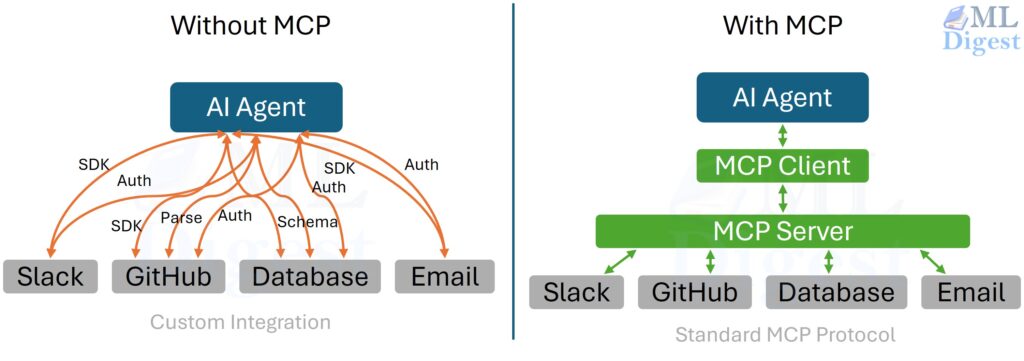
The Model Context Protocol, or MCP, solves an analogous problem for AI systems. It provides a standard way for AI clients such as chat applications, coding assistants, IDE agents, and workflow runtimes to connect to external capabilities. Instead of hard-wiring every integration into every AI application, developers can expose tools, resources, and prompts through MCP servers and let many clients reuse them.
That is the high-level intuition: MCP is a standard port for AI.
Just as important is what MCP is not:
- It is not a model.
- It is not an agent framework.
- It is not a replacement for your application logic.
MCP is the communication layer that lets models reach beyond their context window in a structured, inspectable, and portable way.
This article starts with intuition, then moves into the mechanics: the architectural model, the protocol surface, representative JSON-RPC messages, design trade-offs, security boundaries, and implementation patterns. Along the way, think of each section as a whiteboard sketch that gradually turns into an engineering blueprint.
1. Why MCP exists
Without a common protocol, AI integrations tend to become one-off bridges.
One assistant has its own file connector. Another has its own database wrapper. A third has a custom issue-tracker API. All three may expose similar capabilities, but they do so through incompatible interfaces.
That creates three recurring problems.
- Fragmentation: A capability built for one assistant is hard to reuse elsewhere. Teams repeatedly rebuild the same connector behind different APIs.
- Weak boundaries: Tool logic, credentials, business rules, and prompting often get mixed together in one application, which makes security and auditing harder.
- Inconsistent behavior: Two assistants may both claim to “search tickets,” yet accept different inputs, return different shapes, and follow different approval paths.
MCP addresses this by standardizing the boundary between an AI client and a capability provider. In practice, it gives you:
- a shared contract for capability discovery
- structured inputs and outputs
- transport independence
- a cleaner control plane where the client remains in charge
The short version is simple: build a capability once as an MCP server, then reuse it across many AI clients.
2. The core mental model
The easiest way to reason about MCP is to picture three layers.
2.1 MCP client
At the protocol level, the client is the component that speaks MCP to one particular server. It is not always the entire application the user sees.
In practice, a host application such as Claude.ai, Visual Studio Code, an IDE assistant, or an agent runtime manages the overall user experience and may instantiate multiple MCP clients under the hood. Each of those clients typically owns one direct connection to one MCP server.
The host application is responsible for:
- hosting the conversation
- deciding when to ask the model for the next step
- discovering available capabilities
- validating requests
- deciding whether a tool call is allowed
- feeding results back into the model loop
The MCP client is responsible for:
- managing the connection to one server
- speaking the protocol
- enforcing the declared contracts
- relaying messages between the host and the server
- handling transport details such as framing, buffering, and error handling
- exposing a clean API for the host to interact with
- logging and observability of the interaction
- enforcing security policies such as approval requirements, rate limits, and access controls
So there is a useful distinction to keep in mind:
- the host is the application the user interacts with
- the client is the protocol-level component the host creates to communicate with a specific server
In other words, the host orchestrates the full experience, while each client handles one server connection.
2.2 MCP connection
This is the protocol boundary. Messages typically move over a transport such as stdio or Streamable HTTP. In the HTTP transport, SSE (Server-Sent Events) may be used for streaming or server-initiated messages, but SSE by itself is no longer the main transport to point to.
Think of this layer as the cable and connector standard. It is the disciplined interface through which requests, results, errors, and metadata pass.
2.3 MCP servers
Each MCP server is a focused capability provider. A server may expose some combination of:
tools: callable actions with JSON Schema-defined inputsresources: addressable content, usually referenced through URIsprompts: reusable prompt templates or starter message bundles
A useful design intuition is this: a server should usually feel like a sharply scoped service, not a giant kitchen-sink integration.
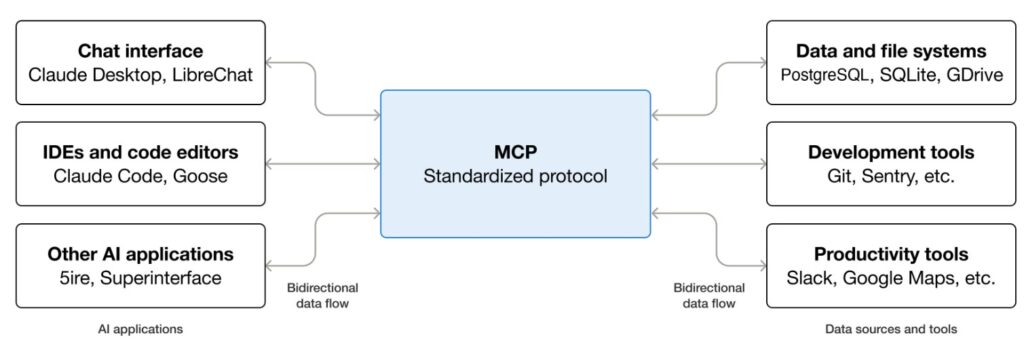
The important architectural idea is that the model does not directly talk to infrastructure. The client does. That keeps authority, policy, and logging outside the model weights.
One nuance is worth adding: MCP is not only server-to-client. After capability negotiation, servers can also request certain client-side capabilities, such as sampling, elicitation, or roots, if the host has chosen to expose them.
2.4 A concrete host-and-server example
One practical way to picture this is through Visual Studio Code. In that setup, Visual Studio Code is the MCP host. When it opens a connection to the Sentry MCP server, the Visual Studio Code runtime creates an MCP client instance dedicated to that connection. If Visual Studio Code also connects to the filesystem MCP server, it creates a second MCP client instance for that server as well.
The key idea is that one host can manage several independent MCP connections at the same time. Each connection has its own client-side handle, and each handle speaks to one specific server.
That distinction matters because people often say “client” when they really mean the user-facing app. More precisely, the user-facing app is the host, and the clients are the internal protocol participants it spins up to talk to servers.
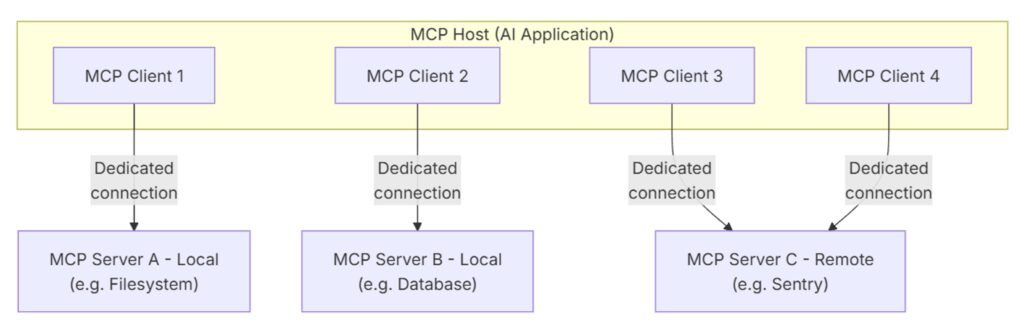
It is also helpful to separate the idea of a server from the idea of a location. An MCP server is simply the program that exposes context or actions through the protocol. Some servers run locally, such as the filesystem server launched over stdio on the same machine. Others run remotely, such as Sentry’s hosted MCP server reached over HTTP transport. In both cases, the architectural roles stay the same: the host manages the connection, the client speaks the protocol, and the server exposes the capability.
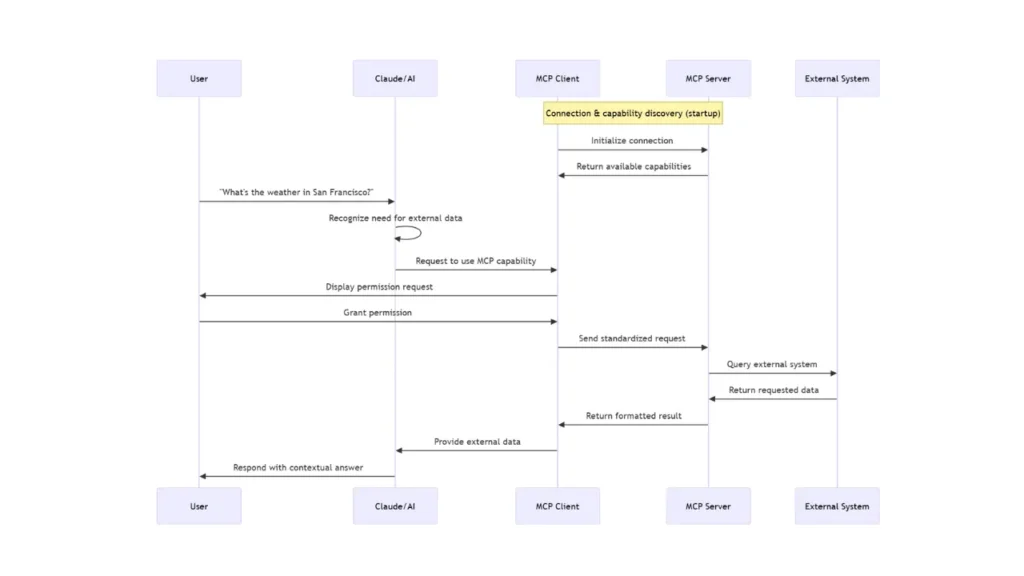
A concrete usecase can be found in descope blog as given below:
3. The main building blocks
Once the three-layer picture is clear, the main building blocks are straightforward.
- Client: The client connects to one server, discovers what it exposes, validates calls, and feeds results back into the conversation.
- Server: The server is the capability provider. It decides what to expose and how narrowly to expose it. Typical examples include:
- a repository server exposing read-only source files as resources
- a ticketing server exposing search and update operations as tools
- a documentation server exposing curated prompts for summarization or triage
- Tools: Tools are actions. They take structured arguments and return structured content.
Examples includesearch_tickets,query_sql,run_tests,create_branch, orsend_email. - Resources: Resources are readable content addressed through URIs. They provide content to the model.
Examples includefile://,git://,db://, or custom schemes such asmem://. - Prompts: Prompts are reusable instruction/message templates. They help standardize common tasks such as issue triage, report generation, onboarding flows, or code review summaries.
- Transport: The transport carries the protocol messages. MCP is transport-agnostic, which means the same conceptual API can work across different underlying channels.
- Client capabilities: MCP is bidirectional. Depending on negotiation, clients may expose capabilities back to servers as well, such as
sampling,elicitation, orroots.
This separation is subtle but powerful. It means the meaning of the interaction stays stable even when the deployment shape changes.
4. What MCP solves in practice
MCP is useful because it improves both engineering ergonomics and system governance.
- Portability: The same server can be reused by multiple clients instead of being tied to one product.
- Separation of concerns: The client focuses on orchestration, user experience, approvals, and logging. The server focuses on scoped capability delivery.
- Least privilege: Servers can expose only the subset of data or actions that should be reachable. For example, a server may offer access only to one directory tree, one database view, or one ticketing project.
- Observability: Because calls cross an explicit boundary, it becomes natural to log request IDs, inputs, outputs, durations, and failures.
- Composability: Small, focused servers compose well. One workflow may use one server for code search, another for issue tracking, and a third for deployment metadata.
This is why MCP is appealing in both startup and enterprise settings. It improves speed of integration and clarity of control.
5. How an MCP session typically unfolds
One clean way to picture an MCP session is as a relay race, where each high-level handoff contains a few precise protocol actions underneath it:
- The user hands intent to the client
- The interaction starts in the user-facing application, such as a chat app, IDE assistant, or agent runtime.
- The client owns the conversation state and decides when it needs model help for the next step.
- The client hands structured options to the model
- The client connects to one or more MCP servers over a transport such as
stdioor Streamable HTTP. In the HTTP case, SSE may be used for streaming responses or server-to-client messages. - The client and server exchange an
initializehandshake so both sides can declare identity and capabilities. - After a successful handshake, the client sends
notifications/initializedbefore normal operation begins. - The client discovers available tools, resources, and prompts, then presents those structured options to the model.
- The client connects to one or more MCP servers over a transport such as
- The model hands back a proposed action
- Given the user request, prior context, and discovered schemas, the model proposes a tool call, resource read, or prompt retrieval.
- At this stage, the model is still making a proposal, not directly performing the action.
- The client decides whether to run it
- The client validates the proposed arguments against the declared schema.
- The client checks policy, permissions, and any approval requirements before allowing execution.
- This is one of the most important ideas in the protocol: MCP does not replace the model loop. It gives that loop a disciplined interface to the outside world.
- The server executes within scope
- Once approved, the client issues the corresponding MCP call.
- The server executes only the capability it exposes within its configured scope.
- The server returns either a structured result or a structured error.
- The result returns to the client and then back into the model context
- The client feeds the result back into the model loop so the next step can build on new evidence.
- The cycle may continue for additional tool uses, or it may end through completion, cancellation, or disconnect.
The model proposes. The client governs. The server executes.
6. The protocol: from intuition to mechanics
Under the hood, MCP uses JSON-RPC 2.0 style messaging. MCP connections are also stateful: the session begins with initialization, continues with normal operation, and ends when the underlying transport closes.
Requests generally include:
jsonrpc: strictly"2.0"id: used to match responses to requestsmethod: the requested operationparams: method-specific input payload
Responses usually contain either:
result: the successful payload, orerror: a structured failure
There is also a third type of message: notifications. These are one-way messages (like notifications/tools/list_changed) that do not include an id and do not expect a response, perfect for async updates.
The conceptual pattern for a standard request-response is:
$$
\text{request} = (id, method, params) \quad \longrightarrow \quad \text{response} = (id, result \; \text{or} \; error)
$$
That may look simple, but it gives you three important properties:
- correlation through IDs
- structured contracts through schemas
- transport independence
In practice, simplicity here is a feature. The protocol is intentionally boring in the best engineering sense: predictable, inspectable, and debuggable.
7. Representative message shapes
The examples below are illustrative. They are meant to show the shape of interaction, not to freeze the exact specification surface, which can evolve over time.
7.1 Initialize handshake
The handshake lets each side negotiate a protocol version, exchange implementation identity, and declare supported capabilities.
Client to server:
{
    "jsonrpc": "2.0",
    "id": 1,
    "method": "initialize",
    "params": {
        "protocolVersion": "2025-11-25",
        "clientInfo": { "name": "my-client", "version": "1.0.0" },
        "capabilities": {
            "elicitation": {}
        }
    }
}Server to client:
{
    "jsonrpc": "2.0",
    "id": 1,
    "result": {
        "protocolVersion": "2025-11-25",
        "serverInfo": { "name": "ticketing-server", "version": "0.2.0" },
        "capabilities": {
            "tools": { "listChanged": true },
            "resources": {},
            "prompts": {}
        }
    }
}Client to server, after successful initialization:
{
    "jsonrpc": "2.0",
    "method": "notifications/initialized"
}The point is not just compatibility. The handshake also lets the client decide how to present, restrict, or disable parts of the server. Just as importantly, normal protocol traffic should begin only after this initialization sequence is complete.
7.2 Tool discovery
Before calling a tool, the client needs to know what exists and what arguments are valid.
Client to server:
{ "jsonrpc": "2.0", "id": 2, "method": "tools/list" }Server to client:
{
    "jsonrpc": "2.0",
    "id": 2,
    "result": {
        "tools": [
            {
                "name": "search_tickets",
                "description": "Full-text search across tickets.",
                "inputSchema": {
                    "type": "object",
                    "properties": {
                        "query": { "type": "string" },
                        "limit": { "type": "integer", "minimum": 1, "maximum": 50 }
                    },
                    "required": ["query"]
                }
            }
        ]
    }
}The schema is doing real work here. It narrows ambiguity before the model ever proposes a call.
7.3 Tool invocation
Once a tool is chosen, the client sends a call with structured arguments.
Client to server:
{
    "jsonrpc": "2.0",
    "id": 3,
    "method": "tools/call",
    "params": {
        "name": "search_tickets",
        "arguments": { "query": "login timeout", "limit": 3 }
    }
}Server to client:
{
    "jsonrpc": "2.0",
    "id": 3,
    "result": {
        "content": [
            { "type": "text", "text": "#1234: Login timeout on mobile (P2)" },
            { "type": "text", "text": "#1187: Intermittent timeout on SSO (P3)" }
        ]
    }
}Notice the result shape. It is not just arbitrary text pasted into the conversation. The content field holds typed content blocks, and many tools also return structuredContent for machine-friendly outputs or isError for execution failures.
7.4 Resource discovery and reading
Resources let a client browse or fetch content without modeling that interaction as an action.
Client to server:
{ "jsonrpc": "2.0", "id": 4, "method": "resources/list" }Server to client:
{
    "jsonrpc": "2.0",
    "id": 4,
    "result": {
        "resources": [
            {
                "uri": "file://project/README.md",
                "name": "Project README",
                "description": "Top-level docs",
                "mimeType": "text/markdown"
            }
        ]
    }
}Client to server:
{
    "jsonrpc": "2.0",
    "id": 5,
    "method": "resources/read",
    "params": { "uri": "file://project/README.md" }
}Server to client:
{
    "jsonrpc": "2.0",
    "id": 5,
    "result": {
        "contents": [
            {
                "uri": "file://project/README.md",
                "mimeType": "text/markdown",
                "text": "# Project\n\nInstall with…"
            }
        ]
    }
}Conceptually, a resource is closer to a document fetch than an action.
7.5 Prompt discovery and retrieval
Prompts package reusable instructions and message seeds.
Client to server:
{ "jsonrpc": "2.0", "id": 6, "method": "prompts/list" }Server to client:
{
    "jsonrpc": "2.0",
    "id": 6,
    "result": {
        "prompts": [
            { "name": "jira_triage", "description": "Summarize and classify tickets" }
        ]
    }
}Client to server:
{
    "jsonrpc": "2.0",
    "id": 7,
    "method": "prompts/get",
    "params": { "name": "jira_triage" }
}Server to client:
{
    "jsonrpc": "2.0",
    "id": 7,
    "result": {
        "description": "Ticket instructions",
        "messages": [
            { "role": "user", "content": { "type": "text", "text": "You are a helpful triage assistant. Classify the following ticket." } }
        ]
    }
}This is especially useful when teams want consistent workflows across clients.
8. Security and governance
MCP is often described as a protocol for tool use, but just as importantly, it is a protocol for boundaries.
The model may suggest an action, but the client decides whether that action is allowed. The server may expose a capability, but only within the scope chosen by the server author.
That creates a layered security model.
8.1 Server-side responsibility
The server decides what is exposed:
- which tools exist
- which URIs are readable
- which arguments are valid
- which back-end identities and credentials are used
- which operations are read-only versus mutating
8.2 Client-side responsibility
The client decides what is permitted at runtime:
- how explicit user consent is collected before sensitive or state-changing operations
- whether a tool is shown as read-only or write-capable
- how calls are logged and displayed to users
- which servers are enabled in a given environment
- what gets blocked, sandboxed, or rate-limited
8.3 Practical security habits
- Prefer read-only capabilities first.
- Validate arguments strictly against declared schemas.
- Treat tool metadata and annotations as untrusted unless they come from a trusted server.
- Add timeouts, cancellation, and rate limits.
- Return useful errors without leaking secrets.
- Log enough context for debugging and auditing.
- Scope credentials to the smallest useful surface.
- Separate discovery from mutation wherever possible.
If you were drawing this security picture, it would look like a set of narrowing gates: the model proposes, the client approves, the server scopes, and the back-end system executes only what survives all three filters.
9. Designing MCP interfaces that models use well
Good MCP design is not only about protocol correctness. It is also about shaping interfaces that language models can reliably select and use.
- Choose precise names:
search_ticketsis better thando_search.read_build_logis better thanget_data.
The reason is simple: the model is selecting partly by semantics. Better names increase the probability of correct tool choice. - Keep schemas tight: If an argument has a known set of values, prefer an enum over an unrestricted string. If a number has a safe range, encode that range. If an argument is optional, make that explicit.
Loose schemas push ambiguity downstream. Tight schemas catch ambiguity early. - Return compact, structured outputs:
Models perform better when result shapes are stable. Avoid returning a giant blob when a concise summary plus identifiers or references would suffice.
For example, it is often better for a search tool to return (ticket ID, short title, priority, status, …) than to return the full ticket body for fifty items. - Separate discovery from action:
Use one tool for retrieval and another for mutation when possible. That improves both safety and model reliability.
For example:search_ticketsorget_ticket_detailsorupdate_ticket_priorityis usually better than a single multi-purposeticket_managertool. - Think in chains, not monoliths:
A model often uses tools sequentially. A search tool that returns identifiers, followed by a details tool that fetches one record, is often better than one giant tool that returns everything.
That pattern maps well to the way models reason step by step.
10. Building an MCP server from scratch
The fastest way to internalize MCP is to build a tiny server loop yourself. The example below is intentionally small and pedagogical. It is not production-ready, but it makes the routing model visible.
import json
import sys
from typing import Any

PROTOCOL_VERSION = "2025-11-25"

TOOLS = [
    {
        "name": "echo",
        "description": "Echo back the text you send.",
        "inputSchema": {
            "type": "object",
            "properties": {
                "text": {"type": "string"},
            },
            "required": ["text"],
            "additionalProperties": False,
        },
    }
]

RESOURCES = [
    {
        "uri": "mem://hello",
        "name": "Hello Resource",
        "description": "Simple in-memory text for MCP beginners",
        "mimeType": "text/plain",
        "text": "Hello from MCP server!",
    }
]


# JSON-RPC helper
# Sends either a result or an error object back to the client.
def send_response(message_id: Any, result: dict | None = None, error: str | None = None) -> None:
    response: dict[str, Any] = {"jsonrpc": "2.0", "id": message_id}

    if error is not None:
        response["error"] = {
            "code": -32000,
            "message": error,
        }
    else:
        response["result"] = result or {}

    sys.stdout.write(json.dumps(response) + "\n")
    sys.stdout.flush()


def handle_initialize(message_id: Any, params: dict[str, Any]) -> None:
    # Real servers should negotiate compatible versions.
    # This toy server keeps the example simple and replies with one fixed version.
    send_response(
        message_id,
        {
            "protocolVersion": PROTOCOL_VERSION,
            "serverInfo": {"name": "mcp-from-scratch", "version": "0.1.0"},
            "capabilities": {"tools": {}, "resources": {}},
        },
    )


def handle_tools_list(message_id: Any) -> None:
    send_response(message_id, {"tools": TOOLS})


def handle_tools_call(message_id: Any, params: dict[str, Any]) -> None:
    tool_name = params.get("name")
    arguments = params.get("arguments", {})

    if tool_name != "echo":
        send_response(message_id, error=f"Unknown tool: {tool_name}")
        return

    text = arguments.get("text")
    if not isinstance(text, str):
        send_response(message_id, error="Invalid arguments for 'echo': 'text' must be a string.")
        return

    send_response(
        message_id,
        {
            "content": [
                {
                    "type": "text",
                    "text": text,
                }
            ]
        },
    )


def handle_resources_list(message_id: Any) -> None:
    resources = [{k: v for k, v in item.items() if k != "text"} for item in RESOURCES]
    send_response(message_id, {"resources": resources})


def handle_resources_read(message_id: Any, params: dict[str, Any]) -> None:
    uri = params.get("uri")
    resource = next((item for item in RESOURCES if item["uri"] == uri), None)

    if resource is None:
        send_response(message_id, error=f"Resource not found: {uri}")
        return

    send_response(
        message_id,
        {
            "contents": [
                {
                    "uri": resource["uri"],
                    "mimeType": resource["mimeType"],
                    "text": resource["text"],
                }
            ]
        },
    )


def main() -> None:
    for line in sys.stdin:
        if not line.strip():
            continue

        try:
            request = json.loads(line)
        except json.JSONDecodeError:
            send_response(None, error="Invalid JSON")
            continue

        message_id = request.get("id")
        method = request.get("method")
        params = request.get("params", {})

        if method == "initialize":
            handle_initialize(message_id, params)
        elif method == "tools/list":
            handle_tools_list(message_id)
        elif method == "tools/call":
            handle_tools_call(message_id, params)
        elif method == "resources/list":
            handle_resources_list(message_id)
        elif method == "resources/read":
            handle_resources_read(message_id, params)
        else:
            send_response(message_id, error=f"Unknown method: {method}")


if __name__ == "__main__":
main()This server contains the essential pattern:
- parse the incoming request
- match on the requested method
- validate or normalize inputs
- execute the capability
- return a structured result
That is the heart of MCP. It helps you understand the core flow:
initializehandshakenotifications/initialized- capability discovery (
tools/list,resources/list) - action execution (
tools/call) - resource fetch (
resources/read)
To run the server manually:
python src/mcp_from_scratch/server.pyThen type JSON-RPC lines manually, for example:
{"jsonrpc":"2.0","id":1,"method":"initialize","params":{"protocolVersion":"2025-11-25","clientInfo":{"name":"manual","version":"0.1"},"capabilities":{"elicitation":{}}}}Then send the required post-initialization notification:
{"jsonrpc":"2.0","method":"notifications/initialized"}Another example:
{"jsonrpc":"2.0","id":2,"method":"tools/list"}Tool call example:
{"jsonrpc":"2.0","id":3,"method":"tools/call","params":{"name":"echo","arguments":{"text":"Hello MCP"}}}Resource read example:
{"jsonrpc":"2.0","id":4,"method":"resources/read","params":{"uri":"mem://hello"}}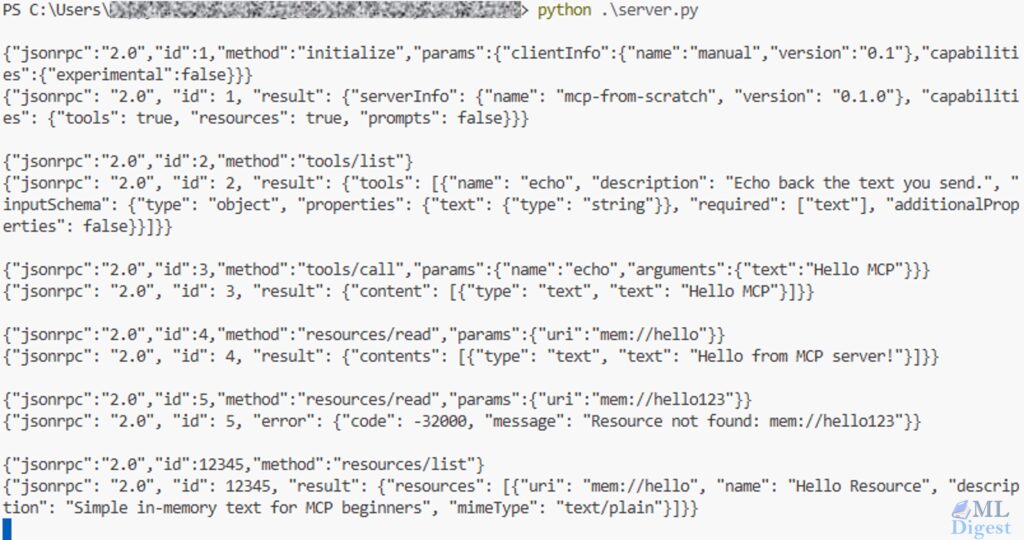
11. Building an MCP server with an SDK
In practice, most teams will want an SDK so that registration, framing, and schema plumbing are handled for them. The code becomes more declarative, which usually makes the server easier to maintain.
11.1 Illustrative Python sketch
# Pseudo-code. Exact imports and helper names vary by SDK version.

server = MCPServer(name="demo")


@server.tool(name="echo", description="Echo a string.")
def echo(text: str):
    return {
        "content": [{"type": "text", "text": text}]
    }


@server.resource(uri="mem://hello", name="Hello resource", mime_type="text/plain")
def read_hello():
    return {
        "contents": [
            {"uri": "mem://hello", "mimeType": "text/plain", "text": "Hello from MCP!"}
        ]
    }


server.run(transport="stdio")11.2 Illustrative TypeScript sketch
// Pseudo-code. Exact imports and helper names vary by SDK version.

const server = new MCPServer({ name: "demo" });

server.tool({
    name: "echo",
    description: "Echo a string.",
    inputSchema: {
        type: "object",
        properties: { text: { type: "string" } },
        required: ["text"]
    },
    handler: async ({ text }) => ({
        content: [{ type: "text", text }]
    })
});

server.resource({
    uri: "mem://hello",
    name: "Hello resource",
    mimeType: "text/plain",
    read: async () => ({
        contents: [
            { uri: "mem://hello", mimeType: "text/plain", text: "Hello from MCP!" }
        ]
    })
});

server.run({ transport: "stdio" });The main value of the SDK approach is not only fewer lines of code. It also nudges the server author toward clearer contracts and more standard behavior. The exact package names and decorators change over time, so it is best to treat the sketches above as API shape, not copy-paste-ready code.
12. Production design patterns
Once the hello-world server works, the next challenge is robustness.
- Keep tools focused: Small tools are easier for models to choose and easier for humans to audit.
- Design for cancellation: If a user changes direction mid-task, the client may cancel an in-flight request. Long-running tools should stop promptly and release resources.
- Favor stable output shapes: If the same tool sometimes returns plain text, sometimes nested JSON, and sometimes a URI, the client and the model will both have a harder time.
- Paginate or chunk large results: Context windows are limited. A tool that can return ten thousand records should offer pagination, filters, or summary-first behavior.
- Make errors actionable: “Permission denied for project billing-prod” is better than “request failed,” but even better is an error that tells the client what safe remediation is possible.
- Add tracing and metrics: Measure latency, error rate, request size, result size, and cancellation frequency. Those signals quickly reveal whether the server design works well for real agent loops.
13. How clients typically use MCP with models
Up to this point, the discussion has been architectural. Now let us connect the protocol back to model behavior.
An intuitive way to think about the model loop is to imagine the client maintaining a growing working notebook. Each turn adds new evidence: the user request, the available schemas, the proposed action, and the observed result. The model never acts directly on the world; it reasons over this notebook and proposes the next step.
That intuition can be formalized.
Let $U_t$ be the user request at time step $t$, and let $S = {s_1, \dots, s_n}$ be the set of discoverable tool schemas. For simplicity, this formalization focuses on tool use, even though MCP also supports resources, prompts, and negotiated client capabilities. Let $C_t$ denote the context available to the model at step $t$.
We can describe the model as a transition function that maps context to a response with an optional tool proposal $P_t$:
$$
P_t \leftarrow M(C_t)
$$
The operational loop then unfolds as follows:
- Context initialization: The model receives $C_t$, which contains user intent, prior conversation history, and the available schemas $S$.
- Action proposal: The model proposes a tool call $P_t$.
- Client validation: The client validates $P_t$ against some schema $s \in S$. Let that validation function be $V(P_t, s)$.
- Authorization: The client applies policy checks and, when appropriate, collects user approval.
- Execution: The client issues an execution request $\text{Exec}(P_t)$ over the MCP interface.
- Observation: The server returns a structured result $R_t$.
- State update: The client appends the proposal and result to the next context.
The update step can be written as:
$$
C_{t+1} = C_t \cup P_t \cup R_t
$$
And the end-to-end client-server feedback loop can be summarized as:
$$
C_{t+1} = C_t \cup P_t \cup f_{\text{server}}(V(M(C_t)))
$$
This framing makes the control boundary explicit. The model is advisory. Validation $V$ and execution $f_{\text{server}}$ live outside the model weights, which structurally limits the model’s ability to mutate external state without client supervision.
14. Comparing MCP with adjacent approaches
MCP becomes clearer when contrasted with neighboring ideas.
- Model-side function calling: Function calling describes how a model may express tool intent. MCP standardizes the provider side: discovery, invocation, resources, prompts, and a reusable protocol boundary. The two approaches can complement each other.
- Plugin systems: Many plugin systems are tied to a single application runtime. MCP aims for portability across clients.
- Agent frameworks: Frameworks such as LangChain or similar orchestration libraries help compose workflows inside one process or ecosystem. MCP adds an inter-process contract that makes capabilities more reusable across ecosystems.
- Direct SDK integration: Embedding every integration directly inside the client can be quick at first, but often leads to swollen clients, repeated business logic, and risky credential handling. MCP externalizes those concerns into separate servers.
15. Testing and debugging an MCP server
The simplest testing strategy is incremental.
- Start tiny: Begin with one read-only tool such as
echoand one trivial resource. Verify the handshake and one successful invocation. - Log every exchange: Request ID, method, arguments, duration, and result shape should all be visible during development.
- Replay known-good flows: A mock client or recorded transcript is useful for regression testing.
- Validate before execution: Perform schema validation before your business logic runs. This turns many runtime bugs into predictable client-facing errors.
- Test failure paths: Verify how your server behaves under timeouts, malformed arguments, unknown tools, permission failures, and canceled requests.
16. A compact end-to-end example
Let us walk through the smallest meaningful interaction.
- The client connects and sends
initialize. - The server responds with its negotiated protocol version and capabilities.
- The client sends
notifications/initialized. - The client sends
tools/listand discoversecho. - The model proposes calling
echowithtext = "MCP rocks". - The client validates the payload and sends
tools/call. - The server returns a structured tool result.
- The client inserts that output into the next model turn.
- The model uses the result to complete its answer.
This small loop already captures the core value of MCP: the model can use external capability without the client giving up control.
17. Practical applications you can build today
- Enterprise knowledge access: Expose internal documentation, source repositories, or ticket systems through narrow, read-only interfaces.
- Support and triage assistants: Combine ticket search tools, prompt templates, and update operations for issue classification and escalation.
- Data access gateways: Offer audited SQL read tools, curated dashboards as resources, and safe exports for downstream analysis.
- Coding assistants: Expose repository resources, test execution tools, CI status checks, and deployment metadata.
- Multi-agent systems: Use MCP servers as reusable capability modules shared across several specialized agents.
The unifying theme is reuse with control. You are not merely adding tools to one assistant. You are designing reusable capability surfaces.
18. Common mistakes to avoid
- Overloading one tool with too many behaviors: If a tool both searches, mutates, validates, and summarizes, it becomes harder for models to use correctly.
- Returning unbounded payloads: Large outputs waste tokens and reduce reliability.
- Exposing write actions too early: Start read-only, observe how the workflow behaves, and then add guarded mutation paths.
- Treating prompts as business logic: Prompts are useful scaffolding, but security, validation, and authorization must live in client and server code.
- Ignoring observability: If you cannot see which calls were made and why they failed, production debugging becomes unnecessarily painful.
19. Final takeaway
The easiest way to understand MCP is to think of it as infrastructure for disciplined tool use. It gives AI systems a standard port to the outside world.
The protocol is simple enough to explain in one sentence: clients discover capabilities, invoke them through structured requests, and feed the results back into the model loop.
The value, however, is larger than that sentence suggests. MCP improves portability, governance, reuse, and system clarity all at once.
If you are implementing your first server, start small:
- one tool
- one resource
- optionally one prompt
- strict schemas
- explicit errors
- full request logging
Once that loop feels reliable, you can scale to richer servers and combine them across assistants, IDEs, and agents.
That is why MCP is becoming such an important concept in modern AI tooling: it turns ad hoc integrations into a reusable system design pattern.

Silpa brings 5 years of experience in working on diverse ML projects, specializing in designing end-to-end ML systems tailored for real-time applications. Her background in statistics (Bachelor of Technology) provides a strong foundation for her work in the field. Silpa is also the driving force behind the development of the content you find on this site.

Happy is a seasoned ML professional with over 15 years of experience. His expertise spans various domains, including Computer Vision, Natural Language Processing (NLP), and Time Series analysis. He holds a PhD in Machine Learning from IIT Kharagpur and has furthered his research with postdoctoral experience at INRIA-Sophia Antipolis, France. Happy has a proven track record of delivering impactful ML solutions to clients.
Subscribe to our newsletter!