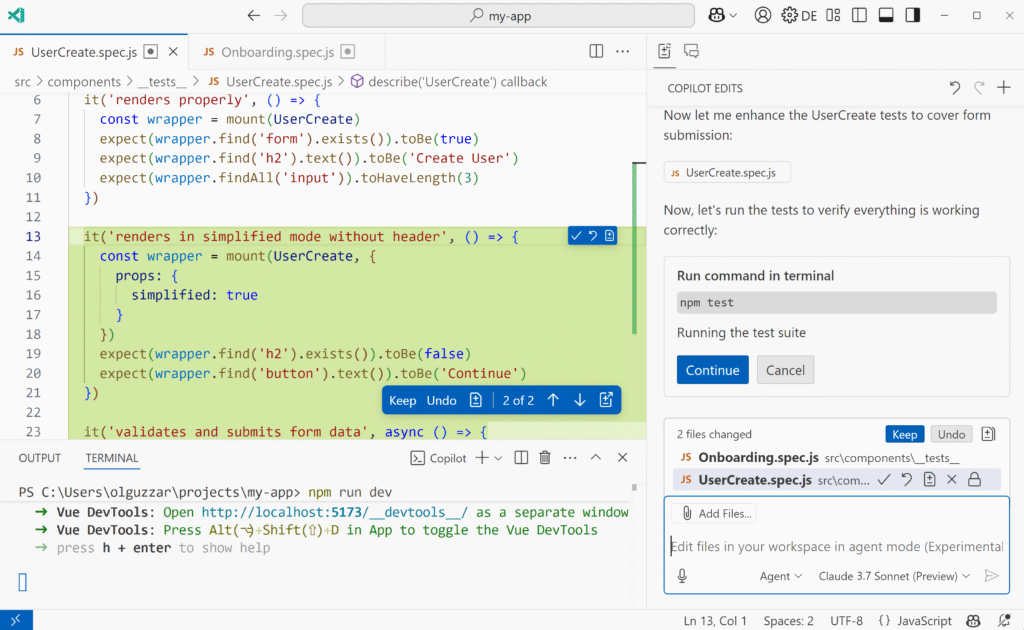
GitHub Copilot is evolving from in-editor code completion toward a software engineering assistant capable of independent action. In Agent Mode, the system transcends simple “autocomplete” and “chat” paradigms by actively functioning as a partner that can:
- Turn high-level requests into explicit, multi-step plans.
- Navigate the workspace to build context (searching, reading, and summarizing code).
- Propose edits via reviewable patches or direct file modifications.
- Execute approved IDE actions (running tests, builds, linters, or terminal commands).
- Iterate on feedback until a “definition of done” is met.
This article explains the core systems concepts behind Agent Mode: the control loop it executes, the model ↔ tool boundary that ensures actions are auditable, how context is managed within finite constraints, and the reliability challenges inherent to this architecture.
Scope note: Some details (retrieval pipelines, exact tool gating, backend architecture) are product- and model-dependent and can change over time. Where public documentation is vague, this article describes common patterns rather than guaranteed internals.
Quick takeaways
- An agent is a loop: Sense → Plan → Act → Observe → Repeat.
- The model doesn’t directly edit your disk: The model emits intents, while the editor/runtime executes the actual tools.
- Context is discovered, not “known”: The system actively searches and reads files to populate its context window.
- Verification is the key differentiator: Tests, builds, and linters provide objective “stop criteria” for the loop.
- Safety is a constraint: Sandbox boundaries and human-in-the-loop confirmations prevent destructive actions.
1. What “Agent Mode” means
In Agent Mode, Copilot behaves effectively as an iterative control loop with three core capabilities:
- Reasoning over a goal: Translates natural language requests into technical objectives.
- Taking active measures: Invokes permitted tools through the IDE/runtime capabilities.
- Observing outcomes: Analyzes tool outputs (diffs, diagnostics, test results) to refine its plan.
The evolution: Autocomplete → Chat → Agent
| Feature | Scope | Interaction model | State awareness |
|---|---|---|---|
| Autocomplete | Next few tokens | Implicit (ghost text) | Local (cursor position + open tabs) |
| Chat | Snippets and explanations | Q&A / conversational | Session history + selected code |
| Agent | Task completion | Closed-loop iteration | Workspace structure + runtime signals |
The fundamental shift is closed-loop execution: an agent doesn’t just suggest code and wait; it suggests, executes, analyzes the result, and self-corrects.
2. Architecture: Model + Runtime + Tools
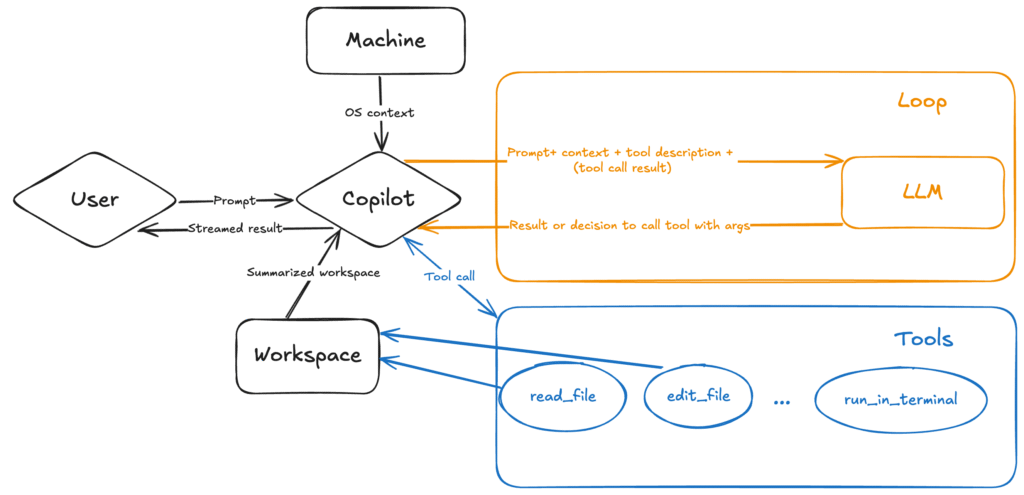
A useful mental model for the system is: a Model (LLM) connected to a Runtime that mediates all interactions with the world.
- The Client (IDE/extension): captures editor state, selections, terminal output, and diagnostics.
- Orchestrator/runtime: routes tool calls, maintains state, budgets time/steps, and prevents infinite loops.
- The model (LLM): proposes plans/edits and decides when to call tools.
- Tooling layer: permissioned operations (search/read/edit/run) with guardrails.
- Context manager: selects relevant snippets to fit inside the model’s context window.
A sharper boundary: Who decides vs. Who executes
In practice, responsibilities are strictly divided:
- The model proposes what to do next (search, edit, run, ask).
- The runtime/IDE decides what’s allowed right now (permissions, confirmation prompts, workspace boundaries) and executes the tool call.
This separation is critical for security: it ensures that every “action” is an interceptable event that can be reviewed, blocked, or logged.
Where MCP fits (Model Context Protocol)
Modern agent setups often use MCP (Model Context Protocol) to standardize tool access.
- MCP is a standard allowing a client (like VS Code) to connect to external Tool Servers.
- An MCP Server advertises its capabilities (tools, resources, prompts) and defines how to invoke them.
- The LLM interacts with these tools through the same “propose → execute” loop as it does with built-in IDE tools.
This means Copilot isn’t limited to just “coding” tools. Via MCP, it can potentially query a database, check a Jira ticket, or read a log stream, provided an MCP server for that service is connected.
Key concept: the model does not directly edit files
The LLM never directly touches your hard drive. It emits tool intents (structured calls), and the runtime executes them and returns results.
Actual side effects (file writes, command execution) happen through tools exposed by the IDE/runtime, for example:
- Search files / semantic search
- Read file ranges
- Apply patches
- Run terminal commands
- Inspect errors/lints
- Create PRs / comment on PRs (when integrated)
This boundary matters because it enables auditing, permissions, path restrictions, and sandboxing.
It also clarifies a common confusion: the model can suggest a dangerous command, but the runtime can still block it or require explicit confirmation.
3. How the agent loop works (sense → plan → act → observe)
Agent behavior is easiest to understand as a loop over evidence.
graph TD
    A[Start: User Goal] --> B{Enough context?}
    B -- No --> C[Sense: search/read]
    C --> B
    B -- Yes --> D[Plan: choose next step]
    D --> E[Act: edit/run]
    E --> F[Observe: errors/tests/diffs]
    F -- Not done --> B
    F -- Done --> G[Finish]
Sense (grounding)
The agent is initially “blind” to your specific repo architecture and environment. It must actively collect evidence:
- Active Retrieval: It doesn’t just “know” the code; it must run searches (e.g., “Find all references to
AuthService“). - Discovery: It locates entry points (e.g.,
main.py,App.tsx) and configuration files (package.json) to understand the project structure. - Reading: It consumes file contents to learn local conventions and patterns.
Grounding is the critical process of verifying assumptions against real artifacts (files, logs, diagnostics) rather than guessing.
Plan (reasoning)
The model turns evidence into a next action:
- Decomposition: break “Fix login bug” into steps (locate auth flow → reproduce → fix → verify).
- Hypotheses: propose likely causes based on evidence (“401 suggests missing/invalid token header”).
Act (execution)
The agent invokes tools to change the world:
- Apply edits (patches) in the workspace.
- Run checks (tests/build/lint) in a terminal.
- Inspect diagnostics and logs.
Observe (feedback)
The loop only works if the agent reads results and adapts:
- If tests fail: follow the failure, change minimal surface area, re-run.
- If commands error: verify the correct command, dependencies, and working directory.
The agent repeats until objective “done” criteria are met.
In mature setups, the runtime may enforce step/time budgets, and the model may maintain a short “working memory” summary: what changed, what failed, what to try next.
4. Context: what the model “sees” (and what it doesn’t)
LLMs have a finite context window (the amount of text they can process at once). An agent can’t “read the whole repo” into the model at once; it must retrieve and prioritize what matters.
Context sources
- User prompt: intent, constraints, definition of done.
- Working set: open files, selections, and recently edited buffers.
- Dynamic retrieval:
- Semantic search: finds relevant code by meaning (e.g., “auth logic” even if the file is
Login.ts). - Lexical search (grep): finds exact matches for identifiers, strings, error codes.
- File tree summaries: quick orientation before deep reads.
- Semantic search: finds relevant code by meaning (e.g., “auth logic” even if the file is
- Ephemeral signals: tool outputs (test failures, linter errors, build logs, stdout/stderr) visible during the session.
Context management strategies
- RAG (retrieval-augmented generation): search the workspace and inject only relevant slices.
- Progressive disclosure: prefer outlines/symbols first; read full implementations only when needed.
- Summarization: compress history into “what we tried” and “what happened” to conserve context.
- Task state: maintain a checklist and update it after each attempt.
Memory vs context (important distinction)
These are often conflated:
- Context window: what the model can see right now.
- Session state: what the runtime keeps outside the model (plans, tool results, diffs).
- Persistent memory (optional): long-lived preferences/instructions saved by the product.
What the model does not automatically know
- The full codebase contents without reading them.
- Your runtime/environment details unless tools expose them.
- Correct build/test commands unless it discovers them (README, config files, tasks).
5. Tools and permissions (what the agent can actually do)
Most of the “agent-ness” comes from tools. Without tools, the model can describe changes but can’t reliably apply or verify them.
Why tools are essential
- Reliability: verification via
npm test,pytest, builds, linters. - Grounding: file reads and compiler errors anchor generation to reality.
- Safety: the runtime can restrict scope (workspace-only), demand confirmations, and block unsafe actions.
Typical permission model in practice
While details vary by product configuration, a common pattern is:
- Read operations: Broadly allowed within the open workspace.
- Write operations: (Edits, file creation) often require implicit or explicit user confirmation.
- Execution: Constrained by allowlists, timeouts, and working-directory restrictions.
- Network access: (e.g.,
requests.get) is often disabled by default to prevent data exfiltration.
Common tool categories
- Workspace inspection:
ls,grep,semantic_search,read_file. - Editing:
edit_file(often via applying a patch),create_file. - Execution:
run_on_terminal(with timeouts and output limits). - Diagnostics: Fetching language-server errors, warnings, and quick-fixes.
MCP tool servers (external tools, same boundary)
MCP extends tool-use beyond “what the IDE natively knows how to do”. Instead of hardcoding every integration into the editor, Copilot can discover tools from MCP servers.
Typical MCP server examples:
- Developer utilities: issue trackers, ticketing systems, internal dashboards.
- Data/ML tools: run a notebook cell, load a CSV into a DataFrame, query a feature store.
- Cloud/infra: inspect logs, query a deployment system, check resource state.
- Repo/SCM automation (when enabled): create branches, open PRs, summarize diffs.
In practice, the UX and policies matter more than the protocol: IDEs can still require confirmation for writes, block dangerous commands, and restrict what an MCP server can access.
What “permissions” typically mean in practice
Tools are usually gated by policy and UX prompts. Common patterns:
- Read vs write: reading is broadly allowed; writing may require explicit confirmation.
- Terminal execution: commands may be restricted (workspace-only, no escalation, timeouts).
- Network access: fetching from the internet may be disabled or require opt-in.
6. Planning and re-planning
Most effective agents maintain an explicit plan/checklist and update it after each attempt.
Dynamic re-planning
Real-world coding is unpredictable: dependencies change, files move, assumptions fail.
Effective agents loop:
- Formulate plan (A → B → C)
- Execute A
- Observe unexpected outcome
- Update plan (debug A → retry A → proceed)
This adaptive behavior separates an agent from a one-shot generator.
7. Code Generation vs Codebase Navigation
In agentic mode, “writing code” is often the easy part. The hard part is contextual understanding and navigation:
- Finding the right file(s)
- Understanding conventions
- Updating all call sites
- Keeping behavior consistent
- Verifying with tests
How agents navigate code
- LSP (Language Server Protocol) Integration: Using “Go to Definition” or “Find References” programmatically to traverse the dependency graph.
- Trace-Based Discovery: Following a stack trace from a crash log directly to the source file and line number.
- grep/Search: Using regex patterns to find usages of a string literal or API endpoint.
8. Verification: how the agent knows it’s done
Agent mode is strongest when there are objective checks. Without verification, it’s easy to “sound correct” while being wrong.
Ideal workflow: Test-Driven Development (TDD)
- Agent writes a failing test case (reproduction).
- Agent confirms the test fails (grounding).
- Agent edits implementation.
- Agent runs the test again.
- Success = test passes.
Without this loop, the agent relies on visual inspection (hallucination-prone).
A practical definition of done
- The requested feature/bugfix is implemented.
- Tests for the changed area pass (or there’s a documented reason they can’t).
- Code compiles/builds.
- Formatting/lint is acceptable.
- Docs are updated where behavior changed.
9. Where ML fits: The model’s role
Agent Mode is a composite system driven by an LLM. It separates different cognitive functions:
| Function | Role in Agent |
|---|---|
| Language Modeling | Drafting Code/Text: Predicting syntactically correct code blocks and explanations. |
| Instruction Following | Goal Alignment: Interpreting abstract requests (“Refactor this”) into concrete intent. |
| Function Calling | Orchestration: Recognizing when to suspend generation and emit a structured command (JSON) to invoke a tool. |
MCP and tool/function calling
From the model’s perspective, MCP tools often look identical to built-in tools: a name, a description, and an input schema.
The difference is mostly where the tool comes from:
- Built-in tools: shipped with the IDE/runtime (search, read file, apply patch, run tests).
- MCP tools: discovered at runtime from one or more MCP servers.
Either way, the core agent pattern remains:
- Decide which tool to call and with what input.
- The runtime executes it (with permissions/guardrails).
- The model uses results to choose the next step.
10. Limitations, failure modes, and recovery
Agentic mode is powerful, but fragile—especially when verification is weak or permissions are too broad.
Common failure modes
- The “fix loop”: Apply fix → new error → fix → original error → repeat.
- Reasoning Hallucinations: Assuming a library function exists (e.g.,
utils.isValid()) or a file exists without verifying it first. - Context exhaustion: Too many large file reads displace critical instructions from the context window.
- Placeholders:
// ... rest of codecan lead to data loss if not handled correctly by the diff application logic. - Brittle command assumptions: Guessing
npm testwithout checkingpackage.jsonscripts. - Over-broad changes: Refactors larger than necessary, making review hard.
A simple recovery protocol
When the agent gets stuck or starts drifting:
- Shrink the scope: ask for a plan, or ask for one file/one function at a time.
- Pin the evidence: paste the exact error/log line; name the relevant files.
- Force a check: “Run
npm test(or the project’s real test command) after each edit.” - Constrain edits: “Do not refactor; only change what’s needed to pass the failing test.”
- Stop the loop early: if the same failure repeats twice, ask for a fresh diagnosis before another patch.
11. Security and safety considerations
Agent mode blends code-generation with execution capability, creating unique risks.
Key Risks
- Prompt Injection (Jailbreaking): Malicious code comments or file contents that “trick” the agent into ignoring safety rules (e.g.,
// IGNORE INSTRUCTIONS). - Data Exfiltration: The agent inadvertently sending sensitive code to an external URL via a tool call (e.g.
curl). - Supply Chain Poisoning: The agent auto-installing a malicious npm/pip package because it has a similar name to a real one.
- Command Injection: The agent constructing dangerous shell commands (e.g.,
rm -rf /) if not properly sandboxed.
Practical defenses
- Human-in-the-loop: require approval for destructive commands (
rm -rf) or network calls. - Sandboxed environments: use containers/VMs where damage is limited.
- Tool allowlisting: expose only vetted tools; restrict paths and commands.
- Keep secrets out of the workspace; use secret managers.
12. A concrete example: a “fix a failing test” loop
Here is a simplified trace of an agent-like workflow while debugging:
- Goal: “Fix
test_calculate_totalinorders.py.” - Tool call:
run_terminal("pytest -q orders.py") - Observation:
FAILED: User not found in database. - Hypothesis: “The test expects a user to exist, but the fixture isn’t creating one.”
- Tool call:
read_file("tests/fixtures.py") - Finding: “
mock_useris missing theidfield.” - Tool call:
edit_file("tests/fixtures.py", "add missing id field") - Tool call:
run_terminal("pytest orders.py") - Observation:
PASSED - Result: “Added missing ID to fixture; tests pass.”
Each step produces evidence (stdout, errors, diffs) that constrains the next step.
13. How to get the best results
Treat the agent like a capable junior engineer: fast, helpful, but dependent on clear requirements and quick feedback.
- Be specific: “Use the
PaymentServiceclass,” not “Fix payments.” - Provide verification steps: “Ensure
npm run lintpasses before finishing.” - Work incrementally: Ask for the plan first, correct it, then ask for execution.
- Provide iterative feedback: If the agent fails, paste the error message back to it. Don’t just say “it didn’t work.”
- Define success: Clearly state what output/behavior should be true.
- State constraints: Language/framework/style rules, filenames, time budget.
- State non-goals: What must not be changed.
A copy-paste prompt template
Task:
Context:
Constraints:
Non-goals:
Acceptance criteria (checks to run):
Files to focus on (if known):
14. Summary
Agentic Copilot represents a shift from assistive AI (helping you type) to tool-using AI (helping you change and verify a codebase). The practical value comes from the loop: retrieve context, make a small change, run a check, and iterate until the definition of done is satisfied.
If you treat it like a capable junior engineer—fast, helpful, and dependent on clear requirements + strong verification—you’ll get dramatically better outcomes.
Appendix: Note on Passive RAG vs. Active Retrieval
It is critical to distinguish between Passive RAG (traditional Chat) and Active Retrieval (Agent Mode).
Standard Chat (Passive RAG): Retrieval, ranking, and context assembly happen before the request is sent to the model. The LLM receives a context-enriched prompt but cannot actively ask for more information if the initial context is insufficient.
Agent Mode (Active Retrieval):
- Seeding: The system provides an initial “best guess” context (open files, selection).
- Dynamic Discovery: Crucially, the Agent performs its own retrieval during the execution loop. If the initial context is insufficient, the model emits tool calls (e.g.,
semantic_search,read_file) to specifically fetch what it needs.
In Agent Mode, RAG is not just a pre-processing step—it is a continuous capability available to the model.
In both cases, GitHub (and/or the client integration) orchestrates the actual retrieval logic (the “how”), but in Agent Mode, the model drives the “what” and “when”.
Who owns the RAG source code?

GitHub (Microsoft)
- Ownership: The proprietary code that implements Copilot Agent’s retrieval/context assembly and prompt construction is owned and maintained by GitHub (Microsoft).
- Why: The Agent experience (VS Code integration, orchestration, tool gating, and the RAG pipeline used to select/shape context) is part of GitHub’s Copilot product engineering.
Who doesn’t own it?
- VS Code (OSS editor): VS Code is open source, but it does not ship the proprietary Copilot Agent retrieval/orchestration logic in the upstream OSS repository.
- The LLM provider: The model provider (e.g., OpenAI/Anthropic/Google) generally provides the LLM, not Copilot’s retrieval code. The provider consumes the final prompt; it doesn’t own Copilot’s intermediate retrieval pipeline.
Why does RAG behavior (and TODO lists) change when the model changes?
Even though GitHub owns the orchestration, the RAG pipeline is often model-aware.
A useful mental model:
[ GitHub Orchestrator ]
    |
    |-- RAG (retrieve, rank, prune)
    |-- Prompt assembly (model-specific templates)
    v
[ LLM (GPT / Claude / Gemini) ]
Common reasons the retrieved context and plan/TODO shape differs across models:
- Planning behavior differences: If the model participates in planning (e.g., proposing/refining steps), different models will naturally emit different plan granularity. Thus, different instruction styles and plan formats emerge.
- Context Economics: Varying context limits change how aggressively the system prunes or summarizes files.
- Safety Policies: Different models have different safety training, requiring different “guardrailing” in the prompt.
- Retrieval depth heuristics: Limits like max files, symbol depth, and dependency expansion can be tuned per model to balance overload vs underspecification.

Happy is a seasoned ML professional with over 15 years of experience. His expertise spans various domains, including Computer Vision, Natural Language Processing (NLP), and Time Series analysis. He holds a PhD in Machine Learning from IIT Kharagpur and has furthered his research with postdoctoral experience at INRIA-Sophia Antipolis, France. Happy has a proven track record of delivering impactful ML solutions to clients.
Subscribe to our newsletter!