Imagine you are in a kitchen trying to cook a new, complex dish. You do not just grab random ingredients and throw them in a pot. Instead, you work in a loop: you think (“I need to chop the onions first”), you act (chop the onions), and then you observe (“The onions are diced, now what?”). This cycle of thought, action, and observation is how humans solve problems.
ReAct (Short for Reasoning and Acting) applies this same intuitive loop to AI agents. It is a framework that allows LLMs to solve complex tasks by interleaving two key capabilities:
- Reasoning: Producing intermediate “thoughts” to plan, track progress, and update beliefs.
- Acting: Executing external tools (like search engines, calculators, or APIs) to gather concrete evidence from the world.
Without ReAct, LLMs can be like an impulsive cook who guesses the recipe. They might hallucinate facts or fail to notice when a step goes wrong. ReAct forces the model to slow down, think about what it needs, get factual data, and then decide the next step.
You can think of ReAct as an agent that repeatedly runs this loop:
- Think about what to do next.
- Act to get new information or make progress.
- Observe the result.
- Repeat until done.
flowchart LR
    A([Input Prompt]) --> B

    subgraph B[ReAct Agent]
        direction LR

        R((Reason))
        O((Observe))
        C((Act))

        R e1@--> C
        C e2@--> O
        O e3@--> R
    end

    B --> D([Final Answer])
    e1@{ animate: true }
    e2@{ animate: true }
    e3@{ animate: true }
This coupling matters because reasoning without interaction can hallucinate, while acting without reasoning can become a noisy tool caller. ReAct aims to keep an agent grounded (through observations) and goal-directed (through explicit planning).
The Core Idea Vizualization
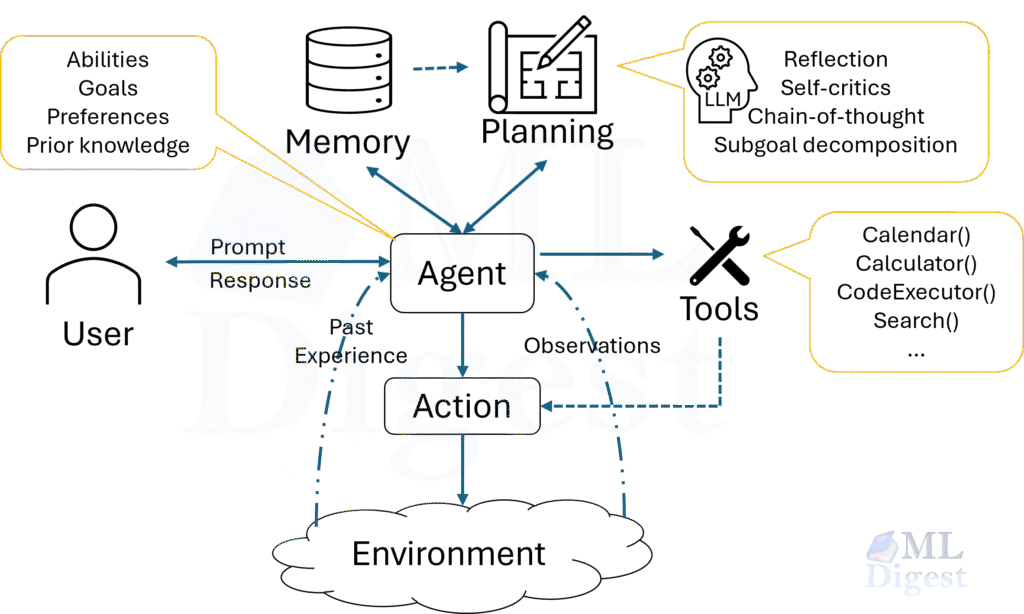
Imagine a small “control room” with three panels:
- A whiteboard (reasoning): the agent writes a short plan and notes.
- A tool console (actions): the agent can press buttons to query the world.
- A monitor (observations): results appear after each action.
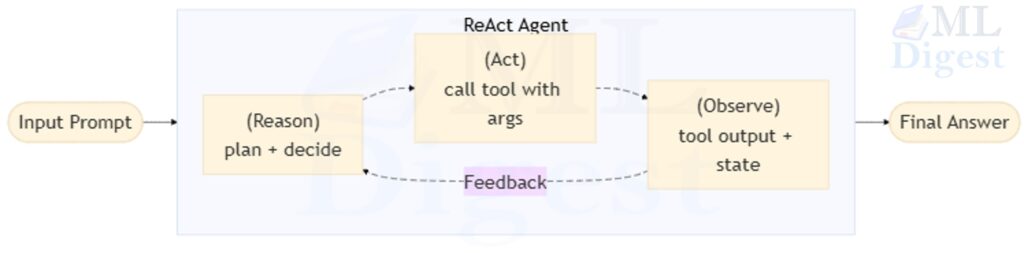
The feedback loop is crucial: the next reasoning step is always informed by the observation from the previous action.
Why ReAct Matters
In static generation, an LLM predicts the next likely token and can produce a convincing-looking answer without ever checking reality. In agentic settings, that failure mode is expensive: the system can confidently assert facts that are wrong, call the wrong tools, or drift away from the user goal.
ReAct addresses three common failure modes.
1. Grounding and factuality: Many tasks depend on information that is not in model weights (fresh news, private docs, internal dashboards). A ReAct agent can explicitly decide: “I do not know this; I should retrieve it,” then use the tool output as evidence. While this does not guarantee correctness, it shifts the agent from guessing to checking.
2. Long-horizon coherence: Multi-step tasks require memory of what was tried, what succeeded, and what remains. ReAct’s loop behaves like a simple control system: (plan) $\rightarrow$ (action) $\rightarrow$ (measurement) $\rightarrow$ (plan update). When a tool call fails, the next reasoning step can branch: retry with different arguments, switch tools, or stop and report the limitation.
3. Debuggability: ReAct yields an explicit trace: Reason $\rightarrow$ Act $\rightarrow$ Observe. In production, this trace is often more valuable than the final answer because it supports debugging, evaluation, and governance (for example, “Which tool outputs led to this decision?”).
It also provides a clean interface for heterogeneous tools (RAG retrieval, DB queries, code execution, web search, ticketing systems): the loop becomes the control structure, and tools become pluggable modules.
ReAct vs Other Architectures
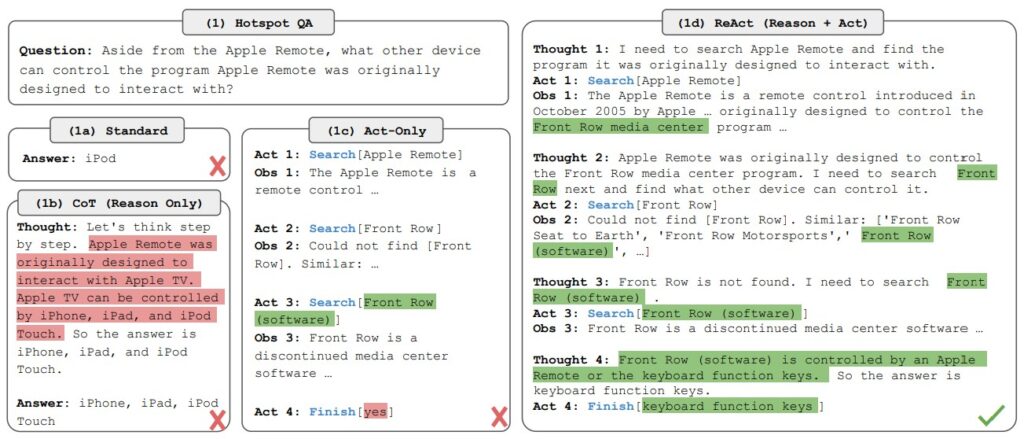
ReAct vs Chain-of-Thought:
- Chain-of-thought emphasizes reasoning steps.
- ReAct emphasizes reasoning steps that trigger actions and incorporate observations as feedback into further reasoning in a loop.
ReAct vs Tool-Use Only Agents:
- Tool-use only agents often do: tool → tool → tool, with weak planning.
- ReAct enforces: decide → act → observe, repeatedly, maintaining coherence.
ReAct vs Plan-and-Execute:
- Plan-and-execute: generate a plan once, then run steps.
- ReAct: re-plan continuously as new observations arrive.
- In practice, hybrid approaches work well: a high-level plan plus ReAct micro-loops inside each step.
The Prompting Strategy
ReAct is often implemented through structured prompting and a runtime loop, where the model is guided to emit:
- a reasoning step (possibly hidden)
- an action in a controlled format
- a final answer when ready
An example schema:
Goal: ...

State: ... (what is known)

Thought: ... (why this step)
Action: tool_name({ ...json args... })
Observation: ... (tool output)

Thought: ...
Action: ...
Observation: ...

Final: ...
In modern “function calling” APIs, the Action step maps naturally to structured tool calls.
Two practical notes:
- Many production systems hide the full reasoning text (or compress it) and keep only structured state transitions plus short rationales. This reduces prompt-injection risk and makes traces easier to analyze.
- The loop should distinguish between “tool observations” (external evidence) and “internal notes” (agent memory). Blurring them leads to brittle behavior.
Mathematical Formalization
To define ReAct rigorously, we can view it as a sequential decision-making process within a trajectory.
Let $\mathcal{D}$ define a task. The agent interacts with an environment $\mathcal{E}$ (retriever, database, sandbox, API) to solve the task.
At time step $t$, the agent receives an observation $o_t \in \mathcal{O}$ and produces an internal reasoning record $r_t \in \mathcal{R}$ and an action $a_t \in \mathcal{A}$.
Practically, $r_t$ is a compressed working-memory record: a plan sketch, extracted facts, and a justification for the next action. It is useful to model $r_t$ explicitly because it is the mechanism that turns observations into decisions.
- Policy (reasoning and acting): the agent chooses $(r_t, a_t)$ conditioned on interaction history.
$$ (r_t, a_t) \sim \pi_\theta(r_t, a_t \mid c_t) $$
where $c_t = (o_1, r_1, a_1, \dots, o_{t-1}, r_{t-1}, a_{t-1}, o_t)$ is the context or history up to time $t$. - Environment (observation): the environment provides feedback based on the action.
$$ o_{t+1} = \mathcal{E}(a_t) $$ - State update: the context is updated by appending $(r_t, a_t, o_{t+1})$.
This perspective is close to a partially observable Markov decision process (POMDP): the agent does not directly observe the true world state, only tool outputs and messages. The “design work” in ReAct is therefore mostly about (a) defining reliable actions (tools) and (b) shaping observations so that the belief state remains stable.
You can attach a reward (or utility) to states or transitions, such as: task success, correctness of final answer, number of tool calls (cost), latency, or user satisfaction.
The goal is to maximize the utility or reward over the trajectory $\tau$ of length $T$:
$$ \max_\theta \mathbb{E}_{\tau \sim \pi_\theta} [R(\tau)] = \max_\theta \mathbb{E}_{\tau \sim \pi_\theta} \left[\sum_{t=0}^{T-1} \gamma^t R(r_t, a_t, o_{t+1})\right] $$
In a simple ReAct agent, we do not typically perform gradient descent on $\theta$ during the interaction (unless using Reinforcement Learning). Instead, we rely on the in-context learning capabilities of large pre-trained models to approximate the optimal policy $\pi_\theta$.
Connection to Reinforcement Learning
While standard ReAct uses a fixed LLM at inference time, the framework maps neatly onto reinforcement learning. The internal record $r_t$ conditions the action $a_t$, and the trace provides structured supervision signals.
One practical distinction: PPO is an on-policy reinforcement learning algorithm that optimizes expected reward under a rollout distribution, while DPO is a preference-optimization objective that can improve behavior without explicit reward modeling. Both can be used to improve tool-use policies, but they have different assumptions and failure modes.
Building Your ReAct Agent: A Blueprint
Creating a robust ReAct agent requires more than just a prompt. You need to design the system components carefully.
1. The Tool Interface
Your tools are the hands of the agent. They must be crisp and predictable. Each tool definition should include:
- Name: A unique identifier (for example,
search_knowledge_base). - Description: A clear instruction on when and how to use the tool. The LLM reads this significantly, so treat it as documentation for a junior colleague.
- Schema: Strict input types (preferably JSON Schema) to define arguments.
Tip: Keep tools narrow. A search_knowledge_base tool and a calculate_mortgage tool are better than a single do_everything tool.
2. The Agent State
The state is the agent’s working memory. At every step, the model needs to see:
- Conversation History: The original user request and any specific instructions.
- Trajectory: The full history of
[Thought, Action, Observation]triplets from the current session. - Scratchpad: An optional free-text area where the agent can store extracted facts to avoid re-reading long observation logs.
3. The Control Loop
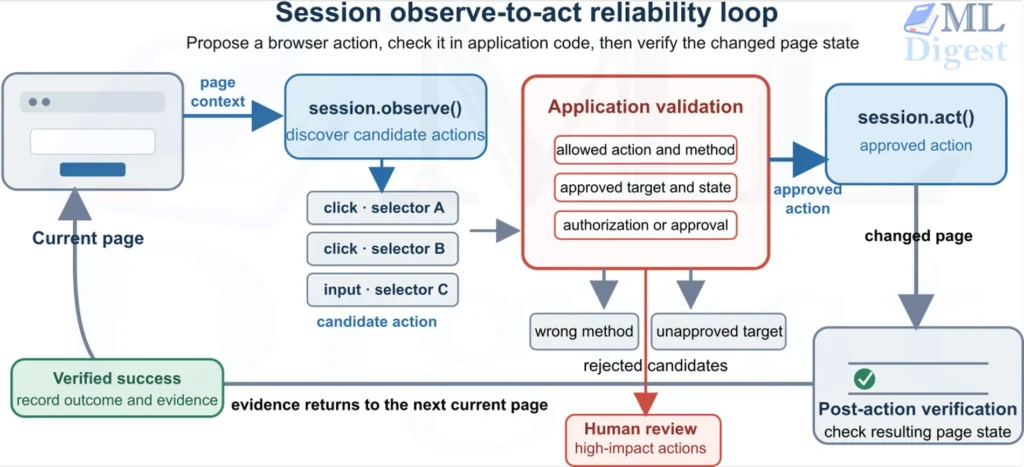
The runtime loop is the engine that drives the agent. It operates sequentially:
- Select: The model observes the state and selects an Action (or decides to finish).
- Execute: The system runs the selected tool. This happens outside the LLM.
- Update: The system appends the Tool Output (Observation) to the state.
- Repeat: The modified state is fed back into the model for the next cycle.
4. Guardrails and Safety
You cannot trust the model to always behave perfectly.
- Tool Allowlisting: Ensure the model can only call registered, safe tools.
- Argument Validation: Always validate the JSON arguments against your schema before execution.
- Step Limits: Enforce a maximum number of steps (e.g., 10) to prevent infinite loops where the agent obsesses over a detail.
5. Evaluation Strategy
How do you know if it is working? Do not only grade the final answer. Inspect the traces and measure behavior.
- Task success: End-to-end completion rate under realistic user prompts.
- Tool correctness: Did the agent call the right tool, with valid arguments, for the right reason?
- Evidence alignment: Do claims in the final answer match retrieved or computed observations?
- Efficiency: Step count, unique tool calls, and repeated queries.
- Latency and cost: time per step, time-to-first-action, total tokens, and tool-call cost.
- Robustness: behavior under tool errors, empty retrievals, and ambiguous user requests.
In practice, “evidence alignment” is the most informative metric: many failures are not reasoning failures, but evidence-handling failures (wrong snippet selection, stale caches, or over-trusting a single tool result).
Pseudocode: A ReAct Agent Loop
from dataclasses import dataclass, field
from typing import Any, Callable, Dict, List, Optional, Tuple


@dataclass
class Tool:
    name: str
    description: str
    fn: Callable[[Dict[str, Any]], Any]


@dataclass
class StepRecord:
    action_name: str
    action_args: Dict[str, Any]
    observation: Any


@dataclass
class AgentState:
    user_task: str
    notes: str = ""
    history: List[StepRecord] = field(default_factory=list)


def react_loop(llm_next: Callable[[AgentState, List[Tool]], Dict[str, Any]],
              tools: List[Tool],
              state: AgentState,
              max_steps: int = 8) -> str:
    tool_map = {t.name: t for t in tools}

    for _ in range(max_steps):
        decision = llm_next(state, tools)
        # decision example:
        # {"type": "tool", "name": "search", "args": {...}}
        # or {"type": "final", "answer": "..."}

        if decision.get("type") == "final":
            return decision["answer"]

        tool_name = decision["name"]
        tool_args = decision.get("args", {})
        if tool_name not in tool_map:
            raise ValueError(f"Unknown tool: {tool_name}")

        obs = tool_map[tool_name].fn(tool_args)
        state.history.append(StepRecord(tool_name, tool_args, obs))

        # Update notes in a simple way (your implementation can be richer)
        state.notes = state.notes + f"\n[{tool_name}] {str(obs)[:400]}"

return "Stopped: reached max steps without a final answer."The function llm_next(...) is where you integrate your model provider. In practice, you use structured outputs (function calling) so the agent returns either: final(answer=...), or tool(name=..., args=...).
A Small, Runnable Python Example (Toy Tools)
This toy example demonstrates the mechanics (not a full LLM integration). The goal is to show the ReAct loop interactions clearly.
import math
from dataclasses import dataclass, field
from typing import Any, Dict, List


@dataclass
class Step:
    thought: str
    action: str
    args: Dict[str, Any]
    observation: Any


@dataclass
class ToyState:
    question: str
    steps: List[Step] = field(default_factory=list)


def tool_calculator(args: Dict[str, Any]) -> Any:
    expr = args["expression"]
    # Warning: eval is unsafe in real systems.
    # This toy tool is intentionally minimal; avoid copying this pattern.
    # Even with __builtins__ removed, eval-based evaluators are often escapable.
    return eval(expr, {"__builtins__": {}}, {"math": math})


def toy_policy(state: ToyState) -> Dict[str, Any]:
    # A tiny hand-written “policy” to emulate an LLM decision.
    if not state.steps:
        return {
            "thought": "I should compute this precisely.",
            "action": "calculator",
            "args": {"expression": "(17**2 + 19**2)"},
        }
    if len(state.steps) == 1:
        return {
            "thought": "Now I can respond with the computed result.",
            "action": "final",
            "args": {"answer": f"The value is {state.steps[-1].observation}."},
        }


def run_toy_react(question: str) -> str:
    state = ToyState(question=question)
    for _ in range(4):
        decision = toy_policy(state)
        print("Iteration", _, decision)
        thought = decision["thought"]
        action = decision["action"]
        args = decision["args"]

        if action == "final":
            return args["answer"]
        if action == "calculator":
            obs = tool_calculator(args)
        else:
            raise ValueError("unknown action")

        state.steps.append(Step(thought=thought, action=action, args=args, observation=obs))

    return "Stopped"


if __name__ == "__main__":
    print(run_toy_react("Compute 17^2 + 19^2"))
# Expected output:
# Iteration 0 {'thought': 'I should compute this precisely.', 'action': 'calculator', 'args': {'expression': '(17**2 + 19**2)'}}
# Iteration 1 {'thought': 'Now I can respond with the computed result.', 'action': 'final', 'args': {'answer': 'The value is 650.'}}
# The value is 650.Key lesson: even in a toy setting, the “reasoning step” chooses an action, the tool returns an observation, and the next step uses it.
Production Patterns and Pitfalls
Taking ReAct from a demo to production requires handling the messiness of the real world. Here is arguably the most important advice for building stable agents.
1. The Observation Bottleneck
Problem: A tool returns a massive JSON blob or a full webpage. This floods the agent’s context window, confusing the model or truncating important data.
Solution: Summarize inputs before they hit the context. Tool wrappers should strip HTML, select key fields, and preserve provenance (URL, document ID, timestamp). For long tool outputs, prefer a two-stage pattern: retrieve $\rightarrow$ compress $\rightarrow$ reason.
2. The Loop of Death
Problem: The agent searches for “Apple”, gets ambiguous results, decides to search for “Apple” again, and repeats until the step limit is hit.
Solution: Implement deduplication or caching in the tool handler. If an agent repeats the same action with identical arguments, return a structured observation indicating “cached result” or “duplicate call” and require a changed query or a different tool. This forces strategy change and lowers cost.
3. Deliberation Budgets
Problem: The agent burns through tokens and time on trivial sub-tasks.
Solution: Set strict resource limits.
- Step Limit: Hard stop after $N$ steps or $M$ tokens or $T$ seconds.
- Reflection: After $N/2$ steps, force a “Reasoning” step where the prompt asks: “Are you closer to the answer? If not, switch strategies.”
4. Handling Tool Errors
Problem: The API is down or the arguments are invalid.
Solution: Do not crash. Feed errors back as observations in a consistent schema (error type, retryable flag, message). A well-behaved agent can then decide whether to retry, switch tools, ask a clarifying question, or stop with a transparent limitation.
5. Overusing Tools
Problem: Many tool calls with little progress.
Solution: Add a call budget (max steps, max tool calls, or time limit) and a periodic reflection step that asks whether progress is being made. A brief justification of each tool call can also help. Cache tool results where safe, and store “already tried” markers in agent state to prevent unproductive repetition.
6. Underusing Tools
Problem: The agent answers confidently with no evidence.
Solution: If the agent is skipping tools, it may be because the prompt does not sufficiently incentivize tool use. You can add explicit instructions: “If you do not know the answer, you must call a tool to find it.” You can also add a penalty for final answers that are not supported by any tool calls, or a reward for using tools effectively.
Enforce “verify before final” on factual tasks. You can add a policy instruction like: “Always use tools to verify facts before giving a final answer.” You can also require the agent to cite sources (for example, document IDs or URLs) in the final answer, which encourages tool use for grounding.
When to Use ReAct
ReAct is powerful, but it introduces latency and cost. The question is not “Is ReAct good?”, but “Is a closed-loop, evidence-seeking agent necessary for this task?”.
Use it when:
- Truth is External: The answer depends on real-time data or private databases not in the model’s training set.
- Tasks are Multi-Step: Solving the problem requires sequential logic (A $\rightarrow$ B $\rightarrow$ C).
- Explainability is Key: You need to show users (or auditors) how the system arrived at an answer.
Avoid it when:
- Speed is Critical: The reasoning loop adds significant latency.
- Tasks are Simple: For simple classification or creative writing, ReAct is overkill. A standard prompt is faster and cheaper.
If you are unsure, start with a single tool call (retrieve once) plus a short rationale. Add the full ReAct loop only when you see repeated failures from hallucinations, drift, or tool misuse.

Happy is a seasoned ML professional with over 15 years of experience. His expertise spans various domains, including Computer Vision, Natural Language Processing (NLP), and Time Series analysis. He holds a PhD in Machine Learning from IIT Kharagpur and has furthered his research with postdoctoral experience at INRIA-Sophia Antipolis, France. Happy has a proven track record of delivering impactful ML solutions to clients. Check more about him here: https://sites.google.com/site/slhappyin/
Subscribe to our newsletter!